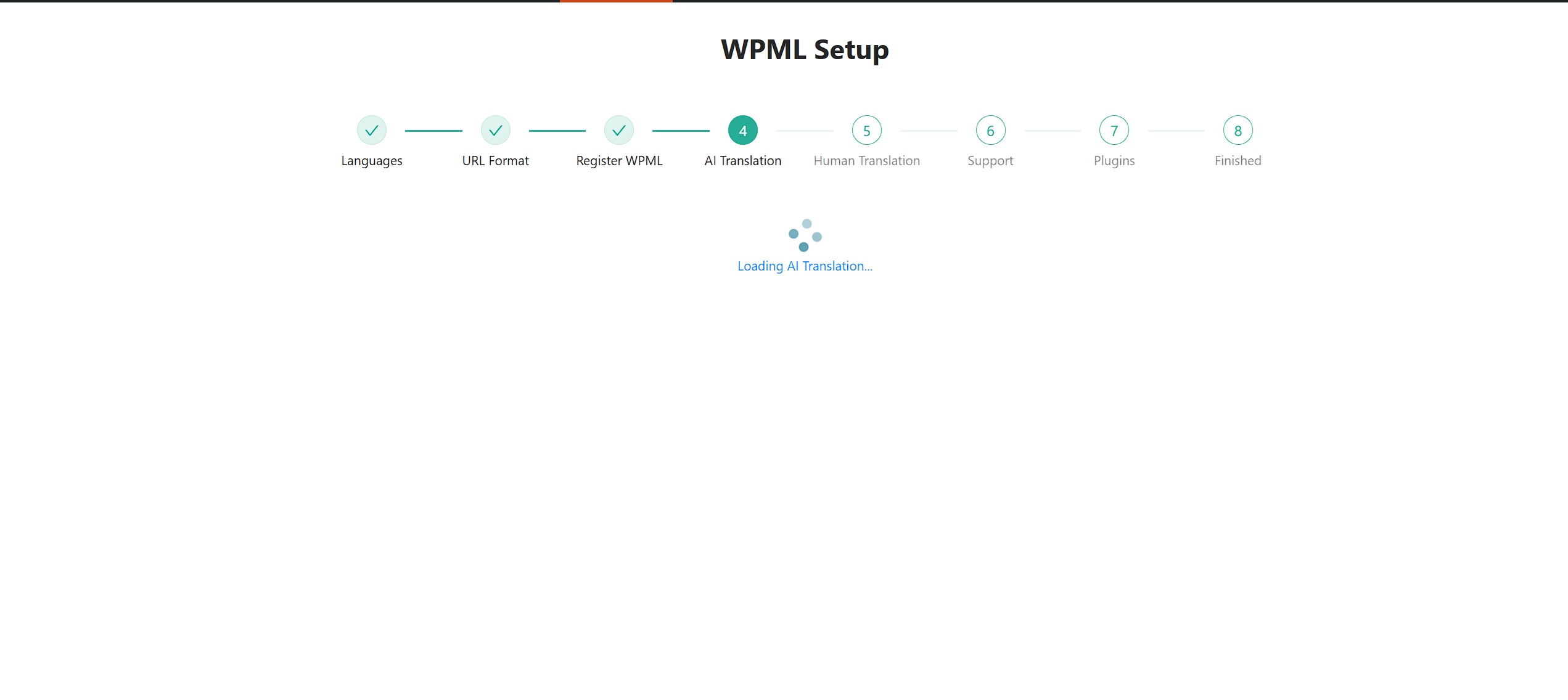
[Resolved] WPML set up stuck on step 4 AI Translation loading
This thread is resolved. Here is a description of the problem and solution.
Problem: If you're experiencing issues with the WPML plugin getting stuck on the 4th step of the setup, which involves the AI translator, and you are unable to proceed. Solution: We recommend you try the following steps: 1. Temporarily disable all plugins except WPML. 2. Activate a default theme. 3. Check the AI Translation step to see if it works correctly. 4. Reactivate everything back.
This approach helps to identify if there is a conflict with other plugins or the theme that might be causing the setup to stall.
If this solution does not resolve your issue, or if it seems outdated or not applicable to your case, we highly recommend checking related known issues at https://wpml.org/known-issues/, verifying the version of the permanent fix, and confirming that you have installed the latest versions of themes and plugins. If further assistance is needed, please open a new support ticket at WPML support forum.
0% of people find this useful.
This is the technical support forum for WPML - the multilingual WordPress plugin.
Everyone can read, but only WPML clients can post here. WPML team is replying on the forum 6 days per week, 22 hours per day.
Do you see any errors in the browser's console? Please activate the debug.log to check if anything is present at the moment you attempt to complete the step.
You can add a few lines to the site’s wp-config.php file. With the error log enabled, you will see the actual problem.
To enable it, open your wp-config.php file and look for define('WP_DEBUG', false);. Change it to:
define('WP_DEBUG', true);
To enable the error logging to a file on the server, you need to add yet one more similar line:
define( 'WP_DEBUG_LOG', true );
Add:
define('WP_DEBUG_DISPLAY', false);
The errors will be saved to a debug.log file located inside the /wp-content/ directory.
JOIN wp_posts p
ON wpml_translations.element_id = p.ID
AND wpml_translations.element_type = CONCAT('post_', p.post_type)
JOIN wp_icl_translations tridt
ON tridt.element_type = wpml_translations.element_type
AND tridt.trid = wpml_translations.trid
WHERE tridt.element_id IN(6) made by require_once('wp-load.php'), require_once('wp-config.php'), require_once('wp-settings.php'), do_action('init'), WP_Hook->do_action, WP_Hook->apply_filters, Automattic\WooCommerce\Blocks\BlockPatterns->register_block_patterns, Automattic\WooCommerce\Blocks\BlockPatterns->load_pattern_content, include('/plugins/woocommerce/patterns/banner.php'), get_permalink, get_page_link, apply_filters('page_link'), WP_Hook->apply_filters, WPML_URL_Filters->page_link_filter, WPML_URL_Filters->permalink_filter, WPML_URL_Filters->get_translated_permalink, WPML_URL_Filters->get_permalink_filter_lang, WPML_Element_Translation->get_element_lang_code, WPML_Element_Translation->maybe_populate_cache
[24-Sep-2025 13:46:35 UTC] WordPress database error Table 'u590708096_lOVDl.wp_icl_translations' doesn't exist for query
SELECT trid, language_code, source_language_code
FROM wp_icl_translations
WHERE element_id=6 AND element_type='post_page'
made by require_once('wp-load.php'), require_once('wp-config.php'), require_once('wp-settings.php'), do_action('init'), WP_Hook->do_action, WP_Hook->apply_filters, Automattic\WooCommerce\Blocks\BlockPatterns->register_block_patterns, Automattic\WooCommerce\Blocks\BlockPatterns->load_pattern_content, include('/plugins/woocommerce/patterns/banner.php'), get_permalink, get_page_link, apply_filters('page_link'), WP_Hook->apply_filters, WPML_URL_Filters->page_link_filter, WPML_URL_Filters->permalink_filter, WPML_URL_Filters->get_translated_permalink, WPML_URL_Filters->should_use_permalink_of_post_translation, WPML_Translation_Element->get_language_code, WPML_Translation_Element->get_language_details, WPML_Translation_Element->init_language_details, SitePress->get_element_language_details
[24-Sep-2025 13:46:35 UTC] WordPress database error Table 'u590708096_lOVDl.wp_icl_languages' doesn't exist for query
SELECT
l.code,
l.id,
english_name,
nt.name AS native_name,
major,
active,
default_locale,
encode_url,
tag,
lt.name AS display_name
FROM wp_icl_languages l
JOIN wp_icl_languages_translations nt
ON ( nt.language_code = l.code AND nt.display_language_code = l.code )
LEFT OUTER JOIN wp_icl_languages_translations lt ON l.code=lt.language_code
WHERE l.active = 1 AND
( lt.display_language_code = ''
OR (lt.display_language_code = 'en'
AND NOT EXISTS ( SELECT *
FROM wp_icl_languages_translations ls
WHERE ls.language_code = l.code
AND ls.display_language_code = '' ) ) )
GROUP BY l.code
ORDER BY english_name ASC made by require_once('wp-load.php'), require_once('wp-config.php'), require_once('wp-settings.php'), do_action('init'), WP_Hook->do_action, WP_Hook->apply_filters, TInvWL_Public_TInvWL::add_rewrite_rules, apply_filters('wpml_active_languages'), WP_Hook->apply_filters, wpml_get_active_languages_filter, SitePress->get_ls_languages, SitePress->get_active_languages, SitePress->get_languages, WPML_Installation->refresh_active_lang_cache
[24-Sep-2025 13:46:35 UTC] WordPress database error Table 'u590708096_lOVDl.wp_icl_languages' doesn't exist for query
SELECT
l.code,
l.id,
english_name,
nt.name AS native_name,
major,
active,
default_locale,
encode_url,
tag,
lt.name AS display_name
FROM wp_icl_languages l
JOIN wp_icl_languages_translations nt
ON ( nt.language_code = l.code AND nt.display_language_code = l.code )
LEFT OUTER JOIN wp_icl_languages_translations lt ON l.code=lt.language_code
WHERE l.active = 1 AND
( lt.display_language_code = ''
OR (lt.display_language_code = 'en'
AND NOT EXISTS ( SELECT *
FROM wp_icl_languages_translations ls
WHERE ls.language_code = l.code
AND ls.display_language_code = '' ) ) )
GROUP BY l.code
Since you're currently configuring WPML, please follow these steps.
1. Navigate to WPML → Support and click the Troubleshooting link.
2. On the Troubleshooting page, locate the Reset section and select the checkbox labeled "I am about to reset all translation and language data." Then, click the "Reset and deactivate WPML" button.
3. Reactivate WPML and begin the configuration process again.
[24-Sep-2025 14:07:25 UTC] [WPMCP JWT Auth] JWT_AUTH_SUCCESS: User morfyz@gmail.com authenticated via JWT (IP: 34.89.86.34, URI: /wp-json/wp/v2/wpmcp/streamable)
[24-Sep-2025 14:07:27 UTC] [WPMCP JWT Auth] JWT_AUTH_SUCCESS: User morfyz@gmail.com authenticated via JWT (IP: 34.89.86.34, URI: /wp-json/wp/v2/wpmcp/streamable)
[24-Sep-2025 14:07:29 UTC] [WPMCP JWT Auth] JWT_AUTH_SUCCESS: User morfyz@gmail.com authenticated via JWT (IP: 34.89.86.34, URI: /wp-json/wp/v2/wpmcp/streamable)
[24-Sep-2025 14:07:58 UTC] PHP Warning: Attempt to read property "title" on null in /home/u590708096/domains/stage-akirex.julo.digital/public_html/wp-includes/class-wp-customize-widgets.php on line 926
[24-Sep-2025 17:23:20 Europe/Vilnius] PHP Warning: Attempt to read property "refresh_token" on null in /home/u590708096/domains/stage-akirex.julo.digital/public_html/wp-content/plugins/woo-lithuaniapost-main/admin/api/class-woo-lithuaniapost-admin-oauth-api.php on line 140
[24-Sep-2025 14:26:02 UTC] [WPMCP JWT Auth] JWT_AUTH_SUCCESS: User morfyz@gmail.com authenticated via JWT (IP: 35.242.131.17, URI: /wp-json/wp/v2/wpmcp/streamable)
[24-Sep-2025 14:26:04 UTC] [WPMCP JWT Auth] JWT_AUTH_SUCCESS: User morfyz@gmail.com authenticated via JWT (IP: 35.242.131.17, URI: /wp-json/wp/v2/wpmcp/streamable)
[24-Sep-2025 14:26:06 UTC] [WPMCP JWT Auth] JWT_AUTH_SUCCESS: User morfyz@gmail.com authenticated via JWT (IP: 35.242.131.17, URI: /wp-json/wp/v2/wpmcp/streamable)
[24-Sep-2025 14:30:22 UTC] PHP Deprecated: Return type of WPML\Collect\Support\Collection::offsetExists($key) should either be compatible with ArrayAccess::offsetExists(mixed $offset): bool, or the #[\ReturnTypeWillChange] attribute should be used to temporarily suppress the notice in /home/u590708096/domains/stage-akirex.julo.digital/public_html/wp-content/plugins/otgs-installer-plugin/vendor/wpml/collect/src/Illuminate/Support/Collection.php on line 1293
[24-Sep-2025 14:30:22 UTC] PHP Deprecated: Return type of WPML\Collect\Support\Collection::offsetGet($key) should either be compatible with ArrayAccess::offsetGet(mixed $offset): mixed, or the #[\ReturnTypeWillChange] attribute should be used to temporarily suppress the notice in /home/u590708096/domains/stage-akirex.julo.digital/public_html/wp-content/plugins/otgs-installer-plugin/vendor/wpml/collect/src/Illuminate/Support/Collection.php on line 1304
[24-Sep-2025 14:30:22 UTC] PHP Deprecated: Return type of WPML\Collect\Support\Collection::offsetSet($key, $value) should either be compatible with ArrayAccess::offsetSet(mixed $offset, mixed $value): void, or the #[\ReturnTypeWillChange] attribute should be used to temporarily suppress the notice in /home/u590708096/domains/stage-akirex.julo.digital/public_html/wp-content/plugins/otgs-installer-plugin/vendor/wpml/collect/src/Illuminate/Support/Collection.php on line 1316
[24-Sep-2025 14:30:22 UTC] PHP Deprecated: Return type of WPML\Collect\Support\Collection::offsetUnset($key) should either be compatible with ArrayAccess::offsetUnset(mixed $offset): void, or the #[\ReturnTypeWillChange] attribute should be used to temporarily suppress the notice in /home/u590708096/domains/stage-akirex.julo.digital/public_html/wp-content/plugins/otgs-installer-plugin/vendor/wpml/collect/src/Illuminate/Support/Collection.php on line 1331
[24-Sep-2025 14:30:22 UTC] PHP Deprecated: Return type of WPML\Collect\Support\Collection::count() should either be compatible with Countable::count(): int, or the #[\ReturnTypeWillChange] attribute should be used to temporarily suppress the notice in /home/u590708096/domains/stage-akirex.julo.digital/public_html/wp-content/plugins/otgs-installer-plugin/vendor/wpml/collect/src/Illuminate/Support/Collection.php on line 1272
[24-Sep-2025 14:30:22 UTC] PHP Deprecated: Return type of WPML\Collect\Support\Collection::getIterator() should either be compatible with IteratorAggregate::getIterator(): Traversable, or the #[\ReturnTypeWillChange] attribute should be used to temporarily suppress the notice in /home/u590708096/domains/stage-akirex.julo.digital/public_html/wp-content/plugins/otgs-installer-plugin/vendor/wpml/collect/src/Illuminate/Support/Collection.php on line 1251
[24-Sep-2025 14:30:22 UTC] PHP Deprecated: Return type of WPML\Collect\Support\Collection::jsonSerialize() should either be compatible with JsonSerializable::jsonSerialize(): mixed, or the #[\ReturnTypeWillChange] attribute should be used to temporarily suppress the notice in /home/u590708096/domains/stage-akirex.julo.digital/public_html/wp-content/plugins/otgs-installer-plugin/vendor/wpml/collect/src/Illuminate/Support/Collection.php on line 1220
[24-Sep-2025 14:31:36 UTC] PHP Warning: themes_api(): Įvyko nenumatyta klaida. Kažkas gali būti blogai su WordPress.org serveriu ar Jūsų serverio nustatymais. Jei problema nepranyksta, kreipkitės į pagalbos forumus. (WordPress nepavyko sukurti saugaus ryšio su WordPress.org. Susisiekite su serverio administratoriumi.) in /home/u590708096/domains/stage-akirex.julo.digital/public_html/wp-includes/functions.php on line 6121
I need to request temporary access (wp-admin and FTP) to your site—preferably to a test site where the problem has been replicated if possible—in order to be of better help. When you log in to leave your next reply, you will find the needed fields below the comment area. The information you will enter is private, meaning only you and I can see and access it.
app.js?ver=481990:1 Error in AITranslation component: Error: Failed to get parameters to initialize ATE dashboard: Empty or invalid response
at app.js?ver=481990:1:7268
at u (app.js?ver=481990:662:5830)
at Generator._invoke (app.js?ver=481990:662:5583)
at Generator.next (app.js?ver=481990:662:6189)
at n (app.js?ver=481990:15:13709)
at s (app.js?ver=481990:15:13920)
got this now. Also how can I provide you access? See no fields to securely leave login data.
I’ve reviewed your website, but couldn’t find an apparent reason for the issue.
Would it be possible for me to create a copy of your site and install it on a local server for further testing? I suspect that your hosting might be blocking the cURL requests.