This thread is resolved. Here is a description of the problem and solution.
Problem:
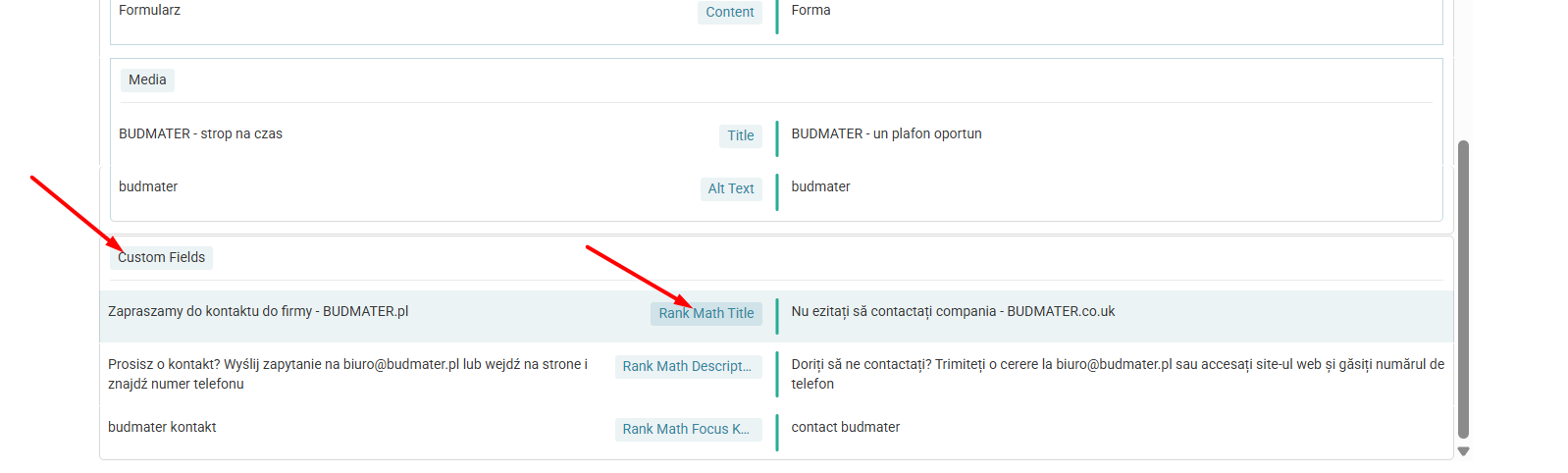
After switching from Rank Math to AIO SEO, the client noticed that WPML was still displaying Rank Math SEO strings (title and meta description) on the 'edit translations' page, resulting in untranslated titles and descriptions for translated pages.
Solution:
1. Ensure that the AIO SEO fields for title and meta description are filled out in the default language on the page or post you want to translate.
2. Navigate to WPML → Translation Management or WPML → Translation Dashboard.
3. Select the page or post you want to translate.
4. If the AIO SEO fields do not appear, update the original page and resend for translation.
5. Clear both site and browser caches.
6. Check for global SEO strings in WPML String Translation and update if necessary.
7. If the old custom fields from Rank Math are still showing, this might be because they were not deleted from the database when the plugin was disabled. You can check this in the database or contact Rank Math support for assistance on how to delete these fields.
8. To set the custom fields added by AIO SEO as translatable, follow this guide: Translating Custom Fields. After setting them as translatable, resend the content for translation.
If these steps do not resolve your issue or if the solution seems outdated, we recommend opening a new support ticket. We also advise checking related known issues at https://wpml.org/known-issues/, verifying the version of the permanent fix, and confirming that you have installed the latest versions of themes and plugins. For further assistance, please visit our support forum at WPML Support Forum.
This is the technical support forum for WPML - the multilingual WordPress plugin.
Everyone can read, but only WPML clients can post here. WPML team is replying on the forum 6 days per week, 22 hours per day.
This topic contains 1 replies, has 0 voices.
Last updated by 6 months, 3 weeks ago.
Assisted by: Carlos Rojas.