[Resolved] Translate fields in a repeater in a repeater
This thread is resolved. Here is a description of the problem and solution.
Problem: You are using WPML and ACF on a WordPress site to manage translation settings for nested repeater fields in the Global Options. You have encountered an issue where translations for one of the text fields inside a nested ACF repeater are overwritten by the original language every time you update the Global Options, despite setting it to 'Translate'. Solution: Initially, we recommended setting the parent and nested repeater fields to Copy Once. This approach would copy the structure to English the first time you translate the options page, but any subsequent additions or changes would require manual adjustments in both languages. However, this issue has been resolved in ACFML version 2.2.0. We strongly recommend updating all our plugins to their latest versions by visiting https://wpml.org/account/downloads/. Please ensure to make a full site backup before updating.
If this solution does not apply to your case, or if it seems outdated, we highly recommend checking related known issues at https://wpml.org/known-issues/, verifying the version of the permanent fix, and confirming that you have installed the latest versions of themes and plugins. If issues persist, please open a new support ticket at WPML support forum.
This is the technical support forum for WPML - the multilingual WordPress plugin.
Everyone can read, but only WPML clients can post here. WPML team is replying on the forum 6 days per week, 22 hours per day.
Background of the issue:
I am working with WPML and ACF on a WordPress site to manage translation settings for nested repeater fields in the Global Options. I have two text fields inside an ACF repeater, which itself is nested within another repeater. hidden link
Symptoms:
Every time I update the Global Options, my translations for one of the text fields are overwritten by the original language, despite setting it to 'Translate'.
Questions:
How can I prevent the translations from being overwritten upon updating the Global Options?
Is there a specific configuration or setting in WPML or ACF that I need to adjust to maintain translations in nested repeater fields?
I tried to see if there is a problem from our side with the same setup as you have on your site. For this, I created a test site with WPML and ACF. I created a parent options page and a child options page. Then, I created a field group for this options page. I included a repeater field with two text fields in the field group. The first is set to Copy, and the second is set to Translate. When I update the translated options pages, the values of the fields are kept and are not overwritten by the default language values. Please watch the video I created to show you this.
hidden link
I see no options pages on your site in ACF -> Options Pages. This may be because you imported the settings to create the options page differently. The problem might be there.
Can you please elaborate on how you created the options pages?
I hope this will help us get advanced with helping you with this issue.
Please note that my weekend is Friday-Saturday, and I'll be able to continue to check this issue and help you on Sunday.
Sorry for my late response but i missed the mails.
I've added the options by in my functions.php file.
But i think the problem is more that i have a repeater in a repeater
so the 'statistics_group' is a repeater
and in that i have another repeater 'numbers'
i want to copy them both so i have the same amout of repaeter rows
in the last repeater (numbers) i have two text fields. One of them i like to copy and the other should be translated.
The example video you send is also working for me but you are missing the second repeater.
With that it's not working.
About the notifications
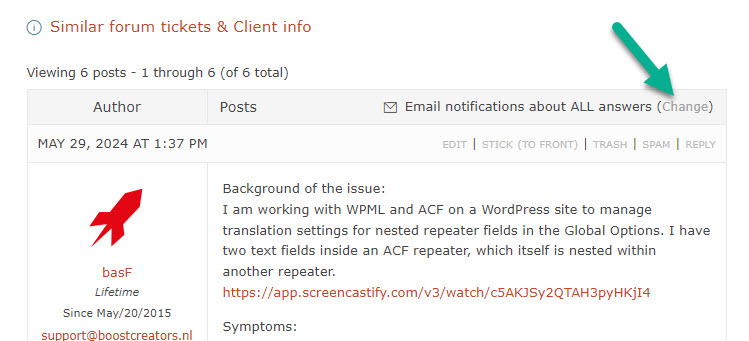
You haven't set yourself up to get notifications for this ticket. You can change it in the section for notifications. Please see the attached screenshot get-notifications.jpg.
The ACF repeater field problem
The test site I created for this problem has been deleted (our system automatically deletes them if they are not being used.) I've created a new test site with Dutch as the default language and English as the second language. I also installed ACF Pro on this new test site.
Please replicate the problem you mentioned on the new test site. Then, I'll be able to escalate it to our second-tier supporters.
You can access it through this link:
hidden link
With this link, you'll be directly logged in.
Do not import your site into the test site. Only replicate the issue from scratch.
I changed the notification settings so now i will receive the mails about the updates.
I also replicate the repeater rows and i have the same issues on your testing server.
So when i like to change the english text for example 'Totaal gefinancierd' to 'Total funded' it is not working and get the dutch text after updating.
Thanks a lot for replicating this issue on the test site!
The issue has now been escalated to our developers and will be fixed in future versions of ACFML. We will update you here once the new version is released.
As a workaround, you can do the following.
A. Set the parent and nested repeater fields to Copy Once.
B. The whole structure will be copied to English the first time you translate the options page. However, after one save in 2nd language, if you need to make any additions or changes to the fields, you must adjust the new rows in both languages.
I realize this might not be the most convenient solution, but this is the only workaround for this issue until the problem is fixed in ACFML in a future version.
I'm sorry, I don't have an ATE for when the fix will be released. It is up to our developers to decide on this. To be honest, I don't think it will be very soon. I'll send a note about it to our developers.
Update
The problem in this ticket has been solved with AFML version 2.2.0, which has been released. https://wpml.org/account/downloads/. Please update all our plugins to their latest versions on your site.
**** Important! Please make a full site backup (files and DB) before you proceed with those steps****
I'm closing this ticket.
Please don't hesitate to contact us again with any WPML-related issues or questions.