
This is the technical support forum for WPML - the multilingual WordPress plugin.
Everyone can read, but only WPML clients can post here. WPML team is replying on the forum 6 days per week, 22 hours per day.
This topic is split from https://wpml.org/forums/topic/missing-translations-after-attempting-to-retranslate-entire-site/
| Sun | Mon | Tue | Wed | Thu | Fri | Sat |
|---|---|---|---|---|---|---|
| - | 9:00 – 13:00 | 9:00 – 13:00 | 9:00 – 13:00 | 9:00 – 13:00 | 9:00 – 13:00 | - |
| - | 14:00 – 18:00 | 14:00 – 18:00 | 14:00 – 18:00 | 14:00 – 18:00 | 14:00 – 18:00 | - |
Supporter timezone: America/Argentina/Buenos_Aires (GMT-03:00)
Tagged: Documentation request
This topic contains 8 replies, has 0 voices.
Last updated by Otto 1 day, 15 hours ago.
Assisted by: Otto.
| Author | Posts |
|---|---|
| January 22, 2026 at 7:20 pm #17755254 | |
 matthewG-25 |
One other question regarding the Advanced Custom Fields translation settings. As you can see in the test site, the custom fields are *very* complex. Too complex and bloated really, but I guess that's the nature of this very large multisite that has grown over the years. I have the main "Page Content" field, which is a flexible field, set to "Copy." Some time ago I had it set to "Copy Once" but I suspect that might be what caused our translations to eventually grow out of sync with our English updates over the years. So I have the main flexible field set to "Copy," but most fields within that field are set to "Translate." Except for any other repeatable/flexible fields, which I also have set to "Copy." For a specific example: Do I have that set right? I've read conflicting support/documentation on Copy vs Copy Once, and I'm not entirely clear how to handle nested repeatable fields. |
| January 22, 2026 at 7:35 pm #17755276 | |
|
matthewG-25 |
Since this is split into a new topic, I'll add some more context. That "Download list" custom field can be seen in use here: hidden link But if we look at the Spanish translation, although the words on this page are properly translated, the links still point to English resources: hidden link And the Chinese translation seems to have not translated properly but it *did* get the link destinations correct. It seems to have replaced "Read Online" with the Chinese title of whatever the link leads to: hidden link |
| January 22, 2026 at 7:37 pm #17755277 | |
 Otto WPML Supporter since 09/2015 Languages: English (English ) Spanish (Español ) Timezone: America/Argentina/Buenos_Aires (GMT-03:00) |
Hello Matt, I think you are right about “Copy Once” causing content to drift out of sync over time. Using Copy for the “structural” container fields is generally the right setup when you want the same layout/rows across languages, and you translate only the text parts via WPML’s Translation Editor. Guidance may seem conflicting about this because a lot of the “use Copy Once” advice is specifically about workflows where people edit translations in the WordPress native editor and want freedom to change layout/rows per language. As you’re using WPML’s Translation Editor/ATE and want translations to stay aligned with English, Copy is typically the safer long-term choice: Copy vs Copy Once explanation * Copy = keeps the value synchronized across languages (when you update the original, the translation is overwritten with the same change). Our recommendation for Repeater and Flexible Content is: Your structure is right if your goal is: For Repeater/Flexible, you can set the main field to Copy/Copy Once and still set translation preferences for sub-fields Let me know if it's clear, please. Best Regards, |
| January 27, 2026 at 9:26 pm #17768990 | |
|
matthewG-25 |
That's clear, but can you explain this section on the WPML > Settings page? It does not reflect the settings I have in the ACF page. See attached images. 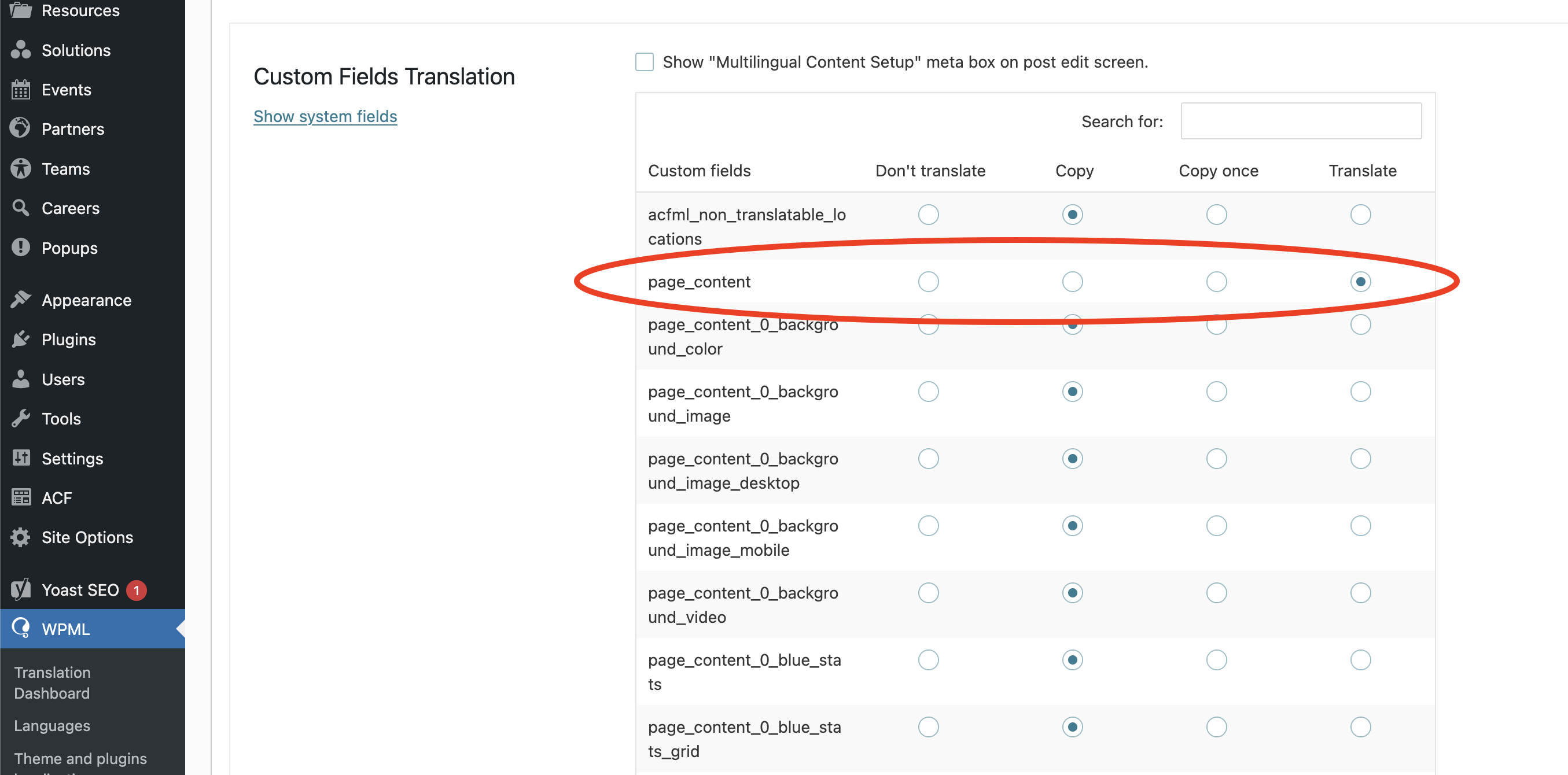  |
| January 28, 2026 at 1:02 pm #17770491 | |
|
Otto WPML Supporter since 09/2015 Languages: English (English ) Spanish (Español ) Timezone: America/Argentina/Buenos_Aires (GMT-03:00) |
Hello, In the sandbox site we've used in the other ticket: It's working as expected. Both places are in sync. Can you please change the setting in the ACF settings, save, then change it back and save. Then visit the WPML settings page and check if it's OK now. Please enable the WP debug information so we can see if there is any error: Best Regards, |
| January 29, 2026 at 3:06 pm #17774413 | |
|
matthewG-25 |
I have managed to isolate the issue (or one of the issues) in a reproducible way! I think the problems are related to the fact that this is a multisite using ACF fields synced with JSON. "Can you please change the setting in the ACF settings, save, then change it back and save. Then visit the WPML settings page and check if it's OK now." This worked to fix the WPML settings page. However, by re-saving the ACF fields on one site, the other sites in the multisite network show "Sync available" on the ACF page since the JSONs' modified time is now newer. If I run the sync on one of those sites, then go check the WPML settings page on that site, the page_content field is set to translate for some reason. So I have to go to the ACF page, change-save-unchange-save again, and that fixes the WPML settings page but of course triggers all other sites to show "Sync available" again. So it's an endless circle. And the issue where pages seemed to "fail" translating seems to occur when I try automatic translations not realizing the page_content field had been set to translate instead of copy, due to the syncing issues. With this in mind, would it still be helpful for me to enable debug? I wonder if this is a quirk with how this multisite/ACF is set up. Even though it uses JSON syncing, it does not utilize the default acf-json folder to do so, but a custom mu-plugin folder instead, which I suspect is the reason why the attached image doesn't seem to do anything when I try it.  |
| January 29, 2026 at 8:39 pm #17775198 | |
|
Otto WPML Supporter since 09/2015 Languages: English (English ) Spanish (Español ) Timezone: America/Argentina/Buenos_Aires (GMT-03:00) |
Hello, Thanks for the investigation and detailed report. Yes, I think that the mu-plugin folder can be the root cause. WPML/ACFML doesn’t “scan your server for JSON files anywhere”; it relies on what ACF reports as its Local JSON load points (the folders returned by ACF’s acf/settings/load_json logic). If your multisite uses a custom mu-plugin folder for JSON and that folder is not registered consistently and early (or differs per subsite / load order), then ACFML can end up: Is it possible for you to check this hypothesis (I don't know the specifics of your setup)? I can provide a fresh multisite install if needed to test it from scratch. Best Regards, |
| January 29, 2026 at 10:16 pm #17775299 | |
|
matthewG-25 |
Can you provide a fresh multisite where I can test? I don't want to disable this on our live site in case it breaks something. Here is how it's registered: In functions.php // auto save json for ACF function custom_acf_json_save_point($path) { |
| January 30, 2026 at 6:50 pm #17779297 | |
|
Otto WPML Supporter since 09/2015 Languages: English (English ) Spanish (Español ) Timezone: America/Argentina/Buenos_Aires (GMT-03:00) |
Hello, Thanks. I think a WPML XML config file can help a lot here, specifically as a “lock” so the page_content field can’t keep flipping between Copy and Translate when ACF JSON sync / ACFML scanning runs: Right now, your problem is not “how do I translate this field?”, it’s “the translation preference keeps getting overwritten by the Local JSON / multisite sync behavior”. A wpml-config.xml can make WPML treat specific custom fields with a fixed rule, regardless of what ends up shown (or temporarily mis-shown) in WPML → Settings → Custom Fields Translation. https://wpml.org/documentation/support/language-configuration-files/ Can you please try this: That tells WPML: for the meta key page_content, always copy. Let me know if this helps. Best Regards, |




