
This is the technical support forum for WPML - the multilingual WordPress plugin.
Everyone can read, but only WPML clients can post here. WPML team is replying on the forum 6 days per week, 22 hours per day.
Tagged: ATE, Not WPML issue
This topic contains 6 replies, has 1 voice.
Last updated by Alejandro 1 month ago.
Assisted by: Alejandro.
| Author | Posts |
|---|---|
| March 2, 2026 at 8:16 am #17863516 | |
 Eirik |
Hello. We have migrated content from another site, importing XLIFFs. The translations are all showing on the frontend, and are connected properly – but when going to edit them in the ATE, they are (almost) all blank/missing. We do not wish to use the Automatic Translation option, since we already have the confirmed translated content in place. Or would the automatic translation check for existing translations first, and use those instead? If not – how can we populate the strings in the ATE without copy/pasting manually (too much content). The site is using WP/Gutenberg Blocks, and the block markup is identical per language. We only want string translation, not visual changes. 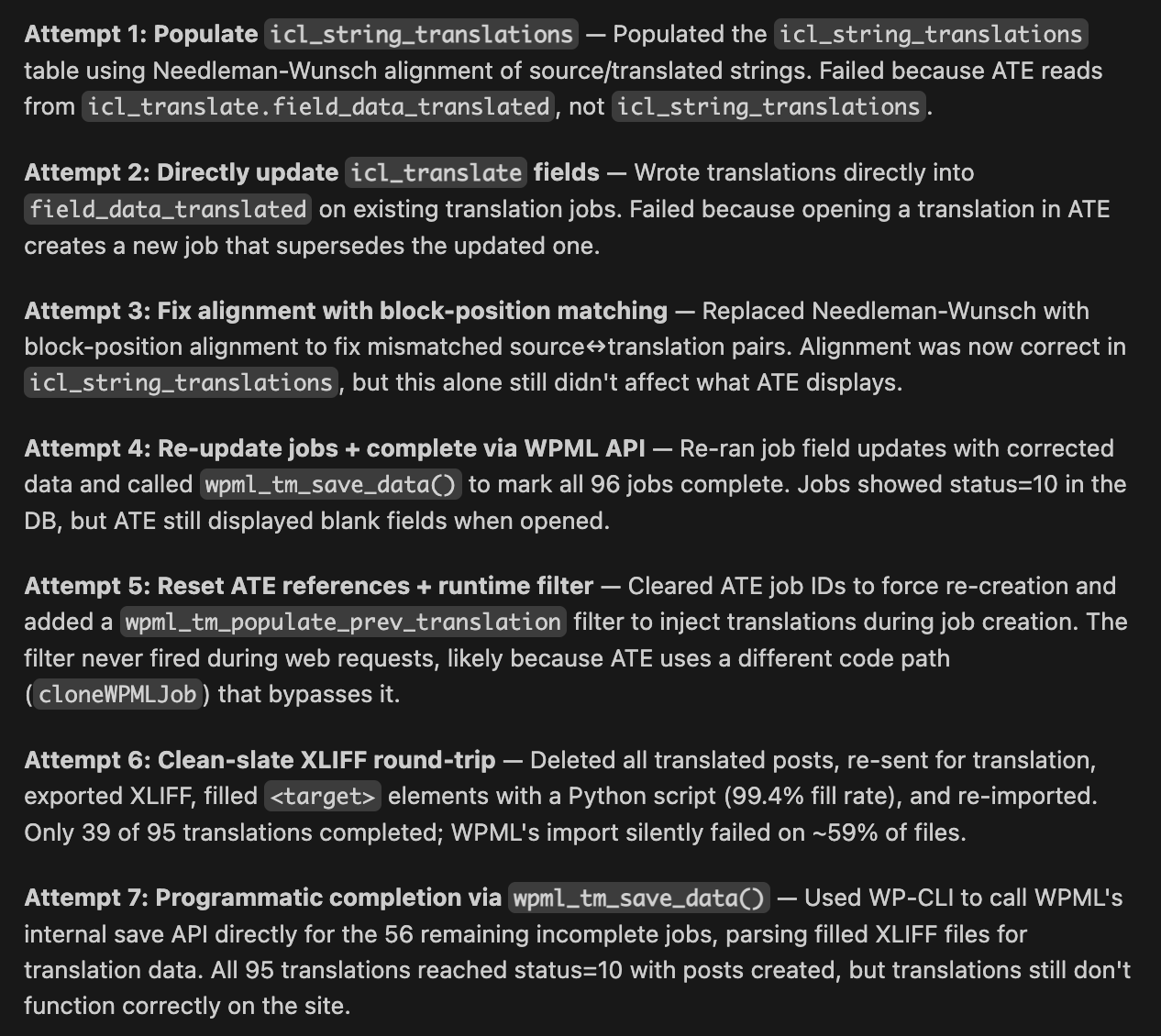  |
| March 2, 2026 at 8:33 am #17863621 | |
|
Eirik |
In the Classic Editor, the fields are populated with the original language (Norwegian) text, even though they display translated (e.g. English) on the front-end. See screenshot. 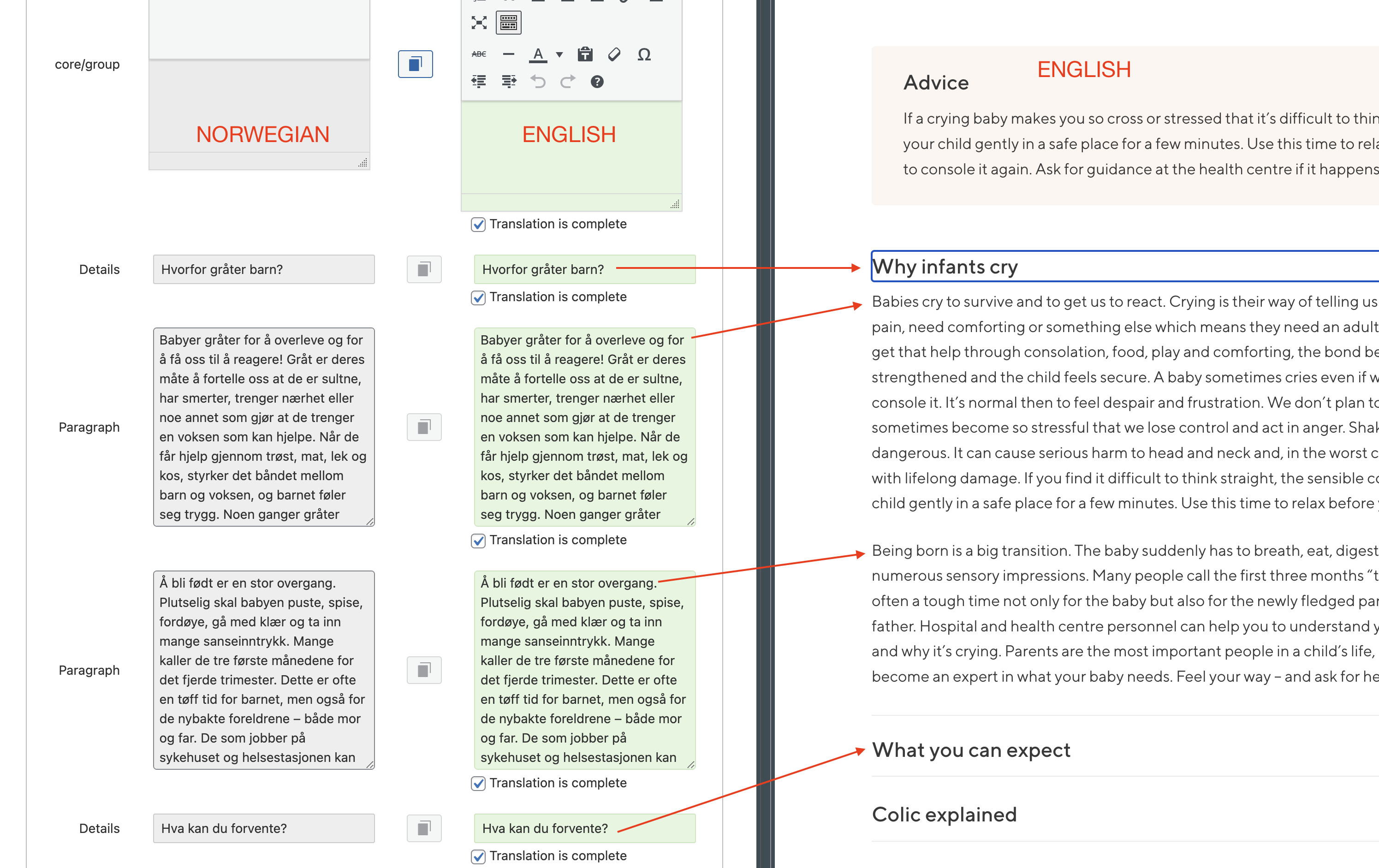 |
| March 2, 2026 at 12:33 pm #17864468 | |
 Otto |
Hello, Thanks for the detailed explanation — based on what you described, it’s expected that the Advanced Translation Editor (ATE) shows the content as blank after a migration/import of existing translations (XLIFFs created/handled outside of WPML’s ATE jobs). ATE can only display content that exists inside its own translation jobs/memory, so it won’t automatically “pick up” already-imported translations that are already stored in the site’s database. ✅ For this kind of workflow (imported XLIFF translations), the correct editor is the Classic Translation Editor (CTE). Why does CTE show the original language text then? If CTE opens and the fields are filled with the **original Norwegian content**, while the front-end shows English, it usually means WPML isn’t loading the *stored translation package* for that item (or the translation is stored in a way that WPML isn’t treating as “CTE-managed”). ### Please try this to fix CTE loading the translation **Option A — Force WPML to rebuild the translation package (recommended first)** * Edit the **original (Norwegian)** page/post. **Option B — “Refresh” WPML’s translation status** * Go to **WPML → Support → Troubleshooting**. * **Clear the cache in WPML** **Option C — Re-send the page as a translation job and then open it in CTE** * Go to **WPML → Translation Management / Translation Dashboard** **Option D — Confirm CTE is the active editor (so WPML doesn’t keep pushing ATE)** * Go to **WPML → Settings → Translation Editor** If, after Option A + B, the Classic Translation Editor still shows the original text, please tell me **how the translations were imported** (from WPML-exported XLIFFs or from another platform/tool). Best Regards, |
| March 11, 2026 at 1:05 pm #17888758 | |
|
Eirik |
Hello Otto, and thanks good instructions. The translations show up fine in the Classic Editor, as you said. But how can we migrate them to use ATE? We would like to activate Automatic Translation Services / PTC. I have looked at previous tickets, like this one: https://wpml.org/forums/topic/translations-lost-when-switched-to-advanced-editor/ Question: If we use the automatic translation tool – will WPML then use the existing (Classic) translations before it uses credits and creates new translations? If not, it would mean existing translations would be overwritten? Replacing proof read content across 5 languages, and simply trusting that AI makes it just as good, is not an option for us! Hope there is some way to do this. I am comfortable using API or scripting to help achieve this. Best regards, |
| March 12, 2026 at 10:49 am #17891828 | |
 Alejandro WPML Supporter since 01/2018 Languages: English (English ) Spanish (Español ) Italian (Italiano ) Timezone: Europe/Rome (GMT+02:00) |
Hello, It may use it for some segments but I general it won't use it for big sentences because of the segmentation that the advanced editor uses. We can help you get started by gifting you some credits if that helps but in general we suggest that if you're going to do this, do it only when you need to make changes to the page, so the work becomes gradual and less time consuming. But yes, if you already proofread it, then it's better to copy paste it when you need to make changes to the page, that way the work is way less. |
| March 17, 2026 at 10:07 am #17903375 | |
|
Eirik |
Hi Alejandro. As mentioned, it is too much work to copy-paste everything manually. The content is spread across many blocks and patterns, in 100+ posts. This is not something I want to do manually – but now I have spent days now trying to solve this in a different way. What I am currently doing is using a custom script that intercepts the translation-job and replaces the Automatic Translations made by PTC before save. This works, and my existing proof-read translations are showing up as they should in the Advanced Editor. However – this is bleeding Credits, since I am paying to automatically translate the entire project only to disregard those translations before they are even saved. I am surprised and disappointed that you do not have a good way to migrate existing translations into the ATE. |
| March 18, 2026 at 4:29 pm #17908867 | |
|
Alejandro WPML Supporter since 01/2018 Languages: English (English ) Spanish (Español ) Italian (Italiano ) Timezone: Europe/Rome (GMT+02:00) |
Unfortunately we do not have any other way to handle this. however may I know why are you using credits for this? I mean why do you need to use the automatic translation here in order to replace it afterwards? I refunded those credits but we can't do that for your entire site, only what has already been used. When the page has first been translated, you can click the "undo" button or click the gear icon on the uppermost right side of the editor and disable the automatic translation altogether. would that work? Unfortunately due to the dynamic nature of the segmenting feature, we can't reliably port the translations from the classic editor to the advanced one natively. Regards, |









