Skip to content Skip to sidebar

This thread is resolved. Here is a description of the problem and solution.

Problem:
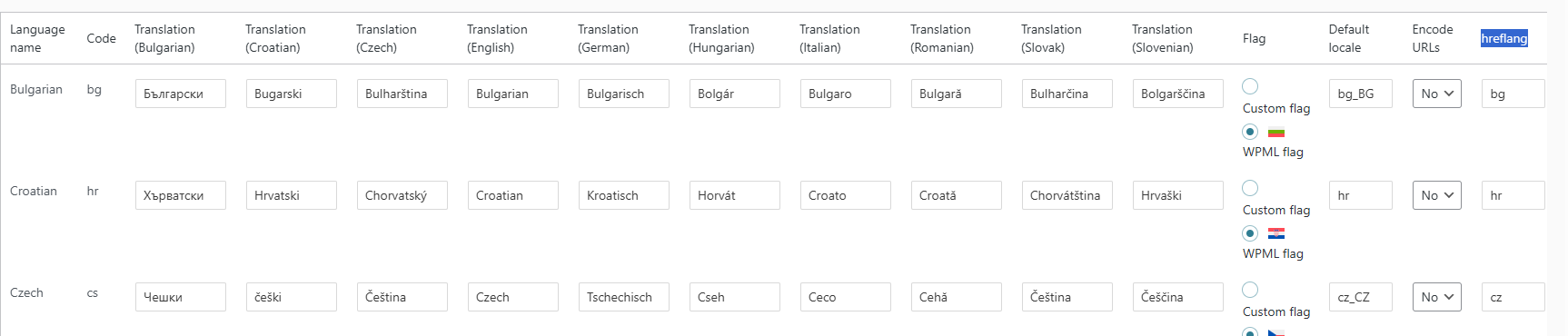
The client is experiencing an issue where the hreflang and URL code for the Czech language are set to 'cz', but the website outputs '/cs/' in the URL, despite changes in the language settings.
Solution:
1. Navigate to WPML > Languages > Edit Languages, and add the custom Czech language with the desired hreflang and code.
2. Go to WPML > Translation Dashboard, and duplicate the content from the previous Czech language to the new custom one. For detailed instructions on how to do this, visit https://wpml.org/documentation/translating-your-contents/displaying-untranslated-content-on-pages-in-secondary-languages/.

If this solution does not resolve your issue, or if it seems outdated or irrelevant to your case, we highly recommend checking related known issues at https://wpml.org/known-issues/, verifying the version of the permanent fix, and confirming that you have installed the latest versions of themes and plugins. If further assistance is needed, please open a new support ticket at WPML support forum.

This is the technical support forum for WPML - the multilingual WordPress plugin.

Everyone can read, but only WPML clients can post here. WPML team is replying on the forum 6 days per week, 22 hours per day.

This topic contains 1 replies, has 0 voices.

Last updated by Lucas Vidal de Andrade 1 week, 5 days ago.

Assisted by: Lucas Vidal de Andrade.

Author Posts
February 5, 2026 at 10:16 am

wpm-si

Hello,

I’m having an issue with WPML hreflang and language URL settings. For the Czech language, the hreflang and URL code are set to cz, but the website always outputs /cs/ in the URL, no matter what I change in the language settings.

I have:

set the language code to cz
checked hreflang configuration
verified that “Encode URLs” is disabled

Despite this, the frontend URLs remain /cs/ and do not reflect /cz/ as configured. Could you please advise why WPML is forcing /cs/ and how this can be changed properly?

Thank you.
Best regards

February 5, 2026 at 11:04 am #17795650

Lucas Vidal de Andrade
WPML Supporter since 11/2023

Languages: English (English ) Spanish (Español ) German (Deutsch ) Portuguese (Brazil) (Português )

Timezone: Europe/Vienna (GMT+01:00)

Hello,

Please confirm if the solution worked out for you. Again, here's a summary of what needs to be done:

1. In WPML > Languages > Edit Languages, add the custom Czech language, with the desired hreflang and code;
2. In WPML > Translation Dashboard, duplicate the content from the previous Czech language, to the new custom one. The details on how to do that can be found here:
https://wpml.org/documentation/translating-your-contents/displaying-untranslated-content-on-pages-in-secondary-languages/

Please let me know how it goes, and if you need any assistance along the way.