I have posted a video for you to watch capturing the process I describe below: hidden link
---I think the issue has to do with Step 11 below but need help figuring-out how to fix it---
1. I have a page in English that I want to translate to French
2. I goto Admin > WPML > Translation Management
3. I check the checkbox for the page I want to translate to French
4. I scroll down to "Select translation options" and only choose "Translate" for the French row
5. In "How do you want to translate?" I choose "Translate automatically" and click the "Start translating" button.
6. I goto Admin > WPML > Translations
7. I find my page in the list and click the "Review" button for it on the right
8. I choose the option to publish the page and when the page refreshes it's completely broken (see "8-broken-upon-publish.jpg") -- This is "Tab 1" which I leave open
9. In a new tab, I go back to Admin > Pages
10. I click the "French" link at the top to show the French pages
11. I click to edit this page
NOTE: Upon loading the top of the page has a note "You need to translate this post manually because the field groups attached to it use different translation options." with a link to https://wpml.org/documentation/translating-your-contents/using-different-translation-editors-for-different-pages/ (see "11-edit-message.jpg")
12. Without doing anything on the page, I just click the "Update" button
13. I choose to view the page now, everything is fine. (see "13-reload.jpg")
This workflow is obviously not ideal in that we'd have to have our translator approve/publish the page, and then go in and "Update" the page before it appeared correctly.
==Step 11 Issue==
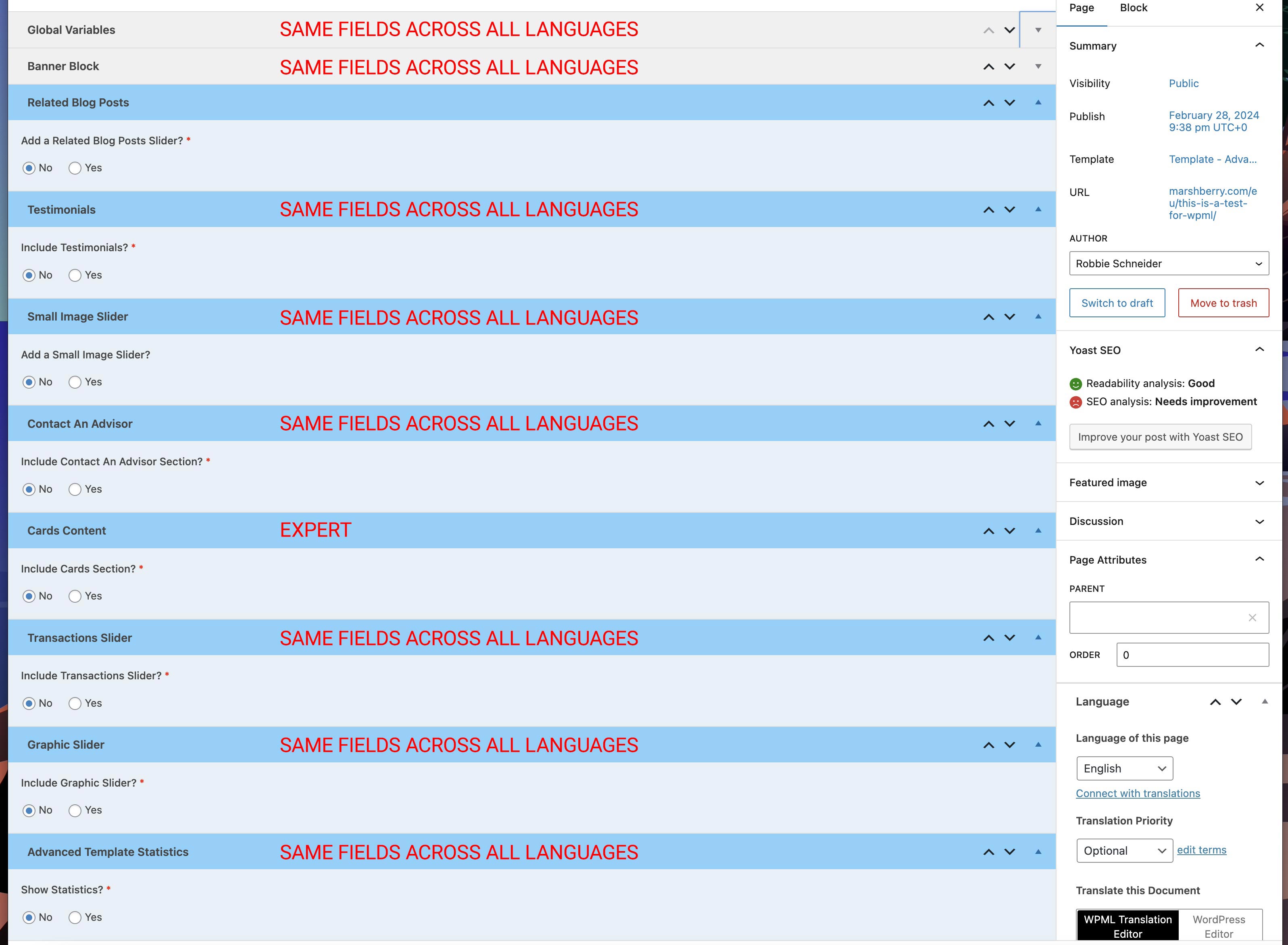
Above in Step 11, I note at the top of the edit page, there's a message "You need to translate this post manually because the field groups attached to it use different translation options." I created a screenshot of the field groups associated with this page template along with the translation options (see "11-field-group-details.jpg"). There is one that is using "Expert" instead of "Same Fields Across All Languages" because there is a Link field I set to "Copy Once".
NOTE: The fields that could be causing an issue are conditional fields that aren't even in question in my example because the parent field is set to No.
Languages: English (English )Vietnamese (Vietnamese )
Timezone: Asia/Ho_Chi_Minh (GMT+07:00)
Hi John,
Thank you for contacting WPML support, I’m happy to help you with this issue.
According to your screenshot, I see the page works after you update the page manually. I think it could be a temporary issue when reviewing and updating it with parameters in the URL.
You can try again with a new page and go to admin area > Switch to French > View the page without updating and see how it goes.
Regarding the link field that is set to "Copy Once", as far as I know, it isn't related to this issue. Copy Once means the value is copied at once. If you change the field value and re-translate the page, it won't be copied again. You need to use the WordPress editor to update the field on the translation page manually.
Refer documentation https://wpml.org/documentation/getting-started-guide/translating-custom-fields/
I'm still seeing the same issue when I choose to view the French version from the Pages listing, directly upon publishing. A quick edit doesn't do anything, but again updating the page does.
Languages: English (English )Vietnamese (Vietnamese )
Timezone: Asia/Ho_Chi_Minh (GMT+07:00)
Hi,
Please try to enable a minimal environment as below and see if it helps:
- Deactivate all plugins except WPML plugins and ACF.
- Switch to a standard theme of WordPress.
If not, I would like to request temporary access (wp-admin and FTP) to your site to take a better look at the issue. It would be better to have a testing site where the issue is replicated. Your next reply is set to private to share the info.
❌ IMPORTANT: Please backup your database and website before proceeding ❌
You can use this plugin to create the backup: https://wordpress.org/plugins/duplicator/
✙ I would need your permission to de-activate and re-activate Plugins and the Theme to change configurations on the site if needed. This is also a reason the backup is critical.
Looking forward to your reply.
Thanks
The topic ‘[Closed] Pages Are Broken Upon Translation’ is closed to new replies.