Home›Support›English Support›[Resolved] CRITICAL BUG FOUND: REST API endpoints broken in translated language directories
[Resolved] CRITICAL BUG FOUND: REST API endpoints broken in translated language directories
This thread is resolved. Here is a description of the problem and solution.
Problem:
A bug triggered by specific plugins, producing a 500 error intermittently. Solution:
We have found out that it is an internal server error triggered by the fact that the .htaccess is altered and /en/ is the rewrite base:
This occurs primarily on a specific page and happens on every heartbeat. This happens when third-party plugins call the flush_rewrite_rules(true) function too often. This can change the rewrite rules in your .htaccess file and cause issues on your WordPress site. The full explanation can be found here: https://wpml.org/faq/why-is-htaccess-getting-overwritten-with-the-language-folder-on-my-wpml-website/.
We suggest implementing the workaround on your staging site by adding the following function to the theme's functions.php file.
CRITICAL BUG FOUND:
WPML's REST API endpoints are completely broken in translated language directories.
Failing endpoint: hidden link
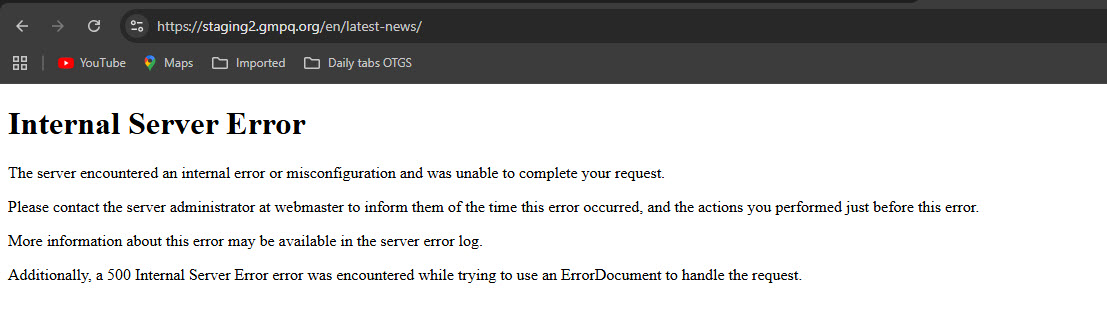
Returns: 500 Internal Server Error
Working endpoint (default language): hidden link
Returns: Valid JSON response
Impact:
This breaks the language switcher for logged-in users because WPML cannot communicate via REST API when in a translated language context (/en/). This causes redirect loops when switching from English back to French.
The WPML → Support page in WordPress admin confirms this issue: "The REST API test endpoint hidden link is not responding correctly."
This is a critical WPML bug that prevents basic language switching functionality.
If the problem does not occur when WPML is deactivated, and since we have no other specific PHP errors, please proceed with the following.
We suspect a collision with the theme or another plugin might cause this problem. If possible, get your site into a minimum environment, switching to a default WordPress theme like TwentyTwenty-Four and activating only WPML.
First, check whether the problem persists when only the theme is switched to TwentyTwenty-Four (for example). If it persists, deactivate all plugins except WPML and Strings Translation. Then, please check if the problem persists. If it does not persist, start by activating the plugins individually and checking when the issue comes back, then report to me which plugin was the culprit.
**** Important! Please make a full site backup (files and DB) before you proceed with those steps****
*** If your site is live, you might want to try those procedures in a staging environment or a snapshot of your site on your local server or another server. ***
The REST API issue is resolved - that was caused by .htaccess Directory Hardening blocking it.
The critical error on /member-home/ persists even with WPML deactivated, which proves the English page content itself is corrupted. This appears to be a problem with how the English pages were translated/created, not with WPML's core functionality.
Should I delete and recreate the English translations from scratch?
Also... Important detail - the errors only happen when users are logged in. In incognito mode (logged out), all pages work fine. Does WPML handle authenticated users differently?
I'm using MemberPress for the member-restricted pages. The errors occur:
- On MemberPress-restricted pages when logged in as a member
- When using the language switcher on Events Calendar pages
- But NOT when directly accessing non-restricted French pages
This suggests a conflict between WPML + MemberPress + Events Calendar. Are there known compatibility issues or specific configuration requirements for this combination?
I meant that you check if the problem persists on the French original pages, like: hidden link.
You wrote: "The critical error on /member-home/ persists even with WPML deactivated, which proves the English page content itself is corrupted. This appears to be a problem with how the English pages were translated/created, not with WPML's core functionality."
If this problem occurred because of the Deston theme or a third-party plugin, my suggestion to try in a minimal environment remains valid. In this case, please try to translate a page from French to English in a minimal environment, as I explained, and check if you still get the problem. If not, then it might be the Deston theme or a third-party plugin.
You asked: "Should I delete and recreate the English translations from scratch?"
Of course, you can try this. But I suggest you try it first on the staging site.
I've completed isolation testing on a clean environment:
Setup:
WordPress default theme (Twenty Twenty-Five)
Only WPML + Events Calendar active
All other plugins deactivated (including MemberPress, Deston theme, everything)
Result: 500 errors still occur when switching languages on Events Calendar pages.
This proves it's a core compatibility issue between WPML and Events Calendar. Which specific known issue from your list applies, and what is the fix?
Test it yourself: hidden link (language switcher is in footer)
Also...
You say MemberPress is incompatible with WPML. Does this mean:
MemberPress-restricted pages will not work properly with WPML at all?
Is there any workaround to make member-restricted pages work in multiple languages?
Should I consider replacing MemberPress with a WPML-compatible membership plugin?
Yes, I can see the 500 error persists on your site. For example, here: hidden link. Please see the attached screenshot.
I might need to esclate this issue to our second-tier supporters. Please grant me access to your staging site and, if needed, allow me to take a copy of your site. For this, I must install a plugin like Duplicator or All-in-One Migration. Please let me know if you agree. Please also share the FTP access details with me. I want to check for PHP errors, so I need to enable the WordPress debug log in the wp-config.php file. A private message is enabled for the following reply.
Regarding your questions about the MemberPress plugin. I'm sorry, but I don't have any definite answers to your questions. In the following link, we state this:
All tiers (Basic, Plus and Pro) are not fully compatible and require manual translation workflows as described in this MemberPress documentation.
If you want to can test things with the MemberPress plugin and WPML on the following test site I've created for you: hidden link
With this link, you will be logged in. WPML is already installed, but not configured. You are welcome to install the MemberPress plugin and test it, including how it works with restricted pages.
I've found out that the 500 error occurs only when the following plugins are active:
- WPML
- Strings Translation
- The Events Calendar
- Qode Framework
The following error shows up many times in the WordPress debug.log.
PHP Deprecated: Creation of dynamic property Tribe__Events__Pro__Integrations__WPML__Event_Listener::$wpml is deprecated in /public_html/wp-content/plugins/events-calendar-pro/src/Tribe/Integrations/WPML/Event_Listener.php on line 52
I created a copy of your site using the Aii In One Migration plugin, then deleted the plugin. I escalated this issue to our second-tier supporters. When I have a reply from them, I'll update you here.
I remember you saying this.
However, when I first visited your staging site, before doing anything, I found the following plugins active.
- Deston Core
- Qode Framework
- The Events Calendar
- The Events Calendar Pro
- WPML
- Strings Translation
Please see the attached screenshot. It is from the time I first logged in.
In any case, I could only trigger the 500 error when the plugins I mentioned are active.
Let's wait for our second-tier supporters' response.
Our second-tier supporter has debugged this issue and found out that it is an internal server error triggered by the fact that the .htaccess is altered and /en/ is the rewrite base:
Our second-tier supporter added that this happens primarily on the page /en/member-home/ and basically happens on every heartbeat. This happens when third-party plugins call the flush_rewrite_rules(true) function too often. Which leads to changes in the rewrite rules in your .htaccess file, which can cause issues on your WordPress site. The full explanation can be found here: https://wpml.org/faq/why-is-htaccess-getting-overwritten-with-the-language-folder-on-my-wpml-website/.
I've implemented the workaround on your staging site. I've added the following function to the functions.php file of the 2025 theme.
After this, I visited the English version of your site, switched between multiple pages, and the problem did not occur again. Please proceed with the same to avoid this problem on your live site.