
This is the technical support forum for WPML - the multilingual WordPress plugin.
Everyone can read, but only WPML clients can post here. WPML team is replying on the forum 6 days per week, 22 hours per day.
This topic is split from https://wpml.org/forums/topic/new-ticket/
Tagged: Documentation request, Feature request
This topic contains 27 replies, has 0 voices.
Last updated by Christopher Amirian 3 weeks, 4 days ago.
Assisted by: Christopher Amirian.
| Author | Posts |
|---|---|
| March 18, 2026 at 1:29 pm #17908214 | |
 wojciechB-15 |
Unfortunately, I'm also having other issues with the translation settings. I've noticed that when configuring the ‘Menu language switcher,’ additional languages in the menu only appear once a specific page has been fully translated. To temporarily bypass the translation process, I try to simply copy the existing field entries via ‘WPML -> Translations -> Actions=Translate’ by clicking the ‘Copy all fields from original’ button. And that’s where the problem arises. 1. Why is the ‘Copy all fields from original’ button only available when the ‘Classic Translation Editor’ option is selected, and not in the ‘Advanced Translation Editor’? 2. Even though I copied all fields using ‘Copy all fields from original’, the progress bar at the bottom of the page still shows ‘0% Complete’. How can I mark all fields as ‘Translation is complete’ after automatically copying all fields? |
| March 18, 2026 at 1:32 pm #17908268 | |
 Christopher Amirian WPML Supporter since 07/2020 Languages: English (English ) Timezone: Asia/Yerevan (GMT+04:00) |
Hi, WPML has a few ways to show the content for untranslated content. The default is that what you mentioned which is not showing the language that do not have the content in the language siwtcher. If you insist on having the language available but show the defualt language content for untranslated ones please check this documentation: Thanks. |
| March 18, 2026 at 1:54 pm #17908319 | |
|
wojciechB-15 |
Thank you for your reply. I'm trying to follow the steps in the documentation you linked to, but I'm stuck on this step: I'm getting the error shown in the screenshot I'm attaching. 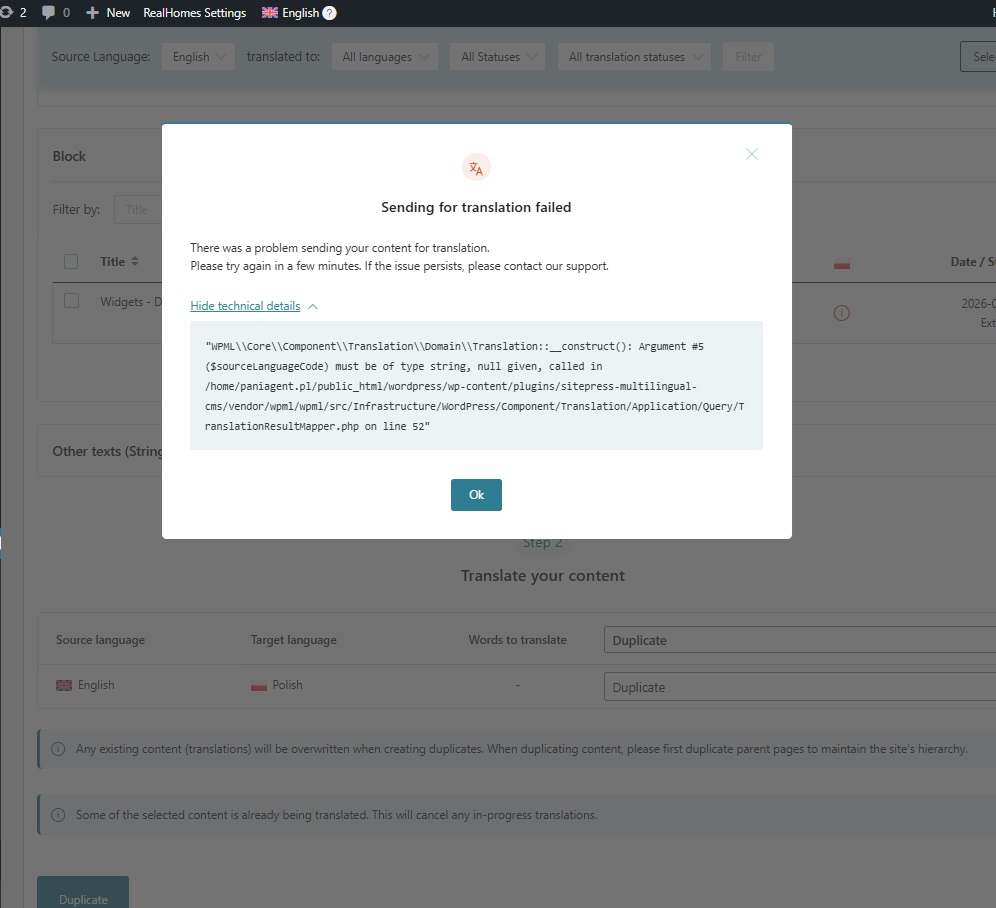 |
| March 18, 2026 at 2:56 pm #17908579 | |
|
Christopher Amirian WPML Supporter since 07/2020 Languages: English (English ) Timezone: Asia/Yerevan (GMT+04:00) |
Hi, Thanks, I'd appreciate it if you could give me the URL/User/Pass of your WordPress dashboard after you make sure that you have a backup of your website. Make sure you set the next reply as private. Also please tell me which item you want to duplicate and I will check. But I wonder why you did not choose the other method mentioned in the documentation? Seems to be easier without the need for duplication. The fallback method: Thanks. |
| March 18, 2026 at 4:28 pm #17908866 | |
|
wojciechB-15 |
Unfortunately, I’m unable to provide you with the login credentials for my website, as I’m currently working only on a developer version that’s available only on my local computer. I don't understand this other method of duplicating content. I don't see how “Fallback Untranslated Content to Default Language” would help me, since, as I mentioned in my previous ticket, my default language in WPML is Polish, and that is the language that hasn't been translated. My current theme version is only in English, and I want to copy it into Polish. But it is precisely Polish that I want to set as the default in WPML. |
| March 19, 2026 at 8:30 am #17909980 | |
|
Christopher Amirian WPML Supporter since 07/2020 Languages: English (English ) Timezone: Asia/Yerevan (GMT+04:00) |
Hi, Unfortunately, I can not help when I do not have access to the website. I would be able to give general information but I will not be able to do troubleshooting. For the error you have mentioned for duplication, please do as follows: - IMPORTANT STEP! Create a backup of your website. Or better approach will be to test this on a copy/staging version of the website to avoid any disruption of a live website. If the issue persists, you will need to upload your website in a place that we can have access to. Thanks |
| March 19, 2026 at 10:04 am #17910377 | |
|
wojciechB-15 |
I'm sorry, but I don't understand your answer. What issue are you referring to? Could you please take a look at the questions I asked in my first message? 1. Why is the ‘Copy all fields from original’ button only available when the ‘Classic Translation Editor’ option is selected, and not in the ‘Advanced Translation Editor’? 2. Even though I copied all fields using ‘Copy all fields from original’, the progress bar at the bottom of the page still shows ‘0% Complete’. How can I mark all fields as ‘Translation is complete’ after automatically copying all fields? |
| March 19, 2026 at 10:14 am #17910431 | |
|
Christopher Amirian WPML Supporter since 07/2020 Languages: English (English ) Timezone: Asia/Yerevan (GMT+04:00) |
Hi, I am not sure where you are talking about as I do not know which page you have those options. Are you talking about the Categories? or Pages? For the pages you can simply go to WordPress Dashboard> WPML > Translation Dashboard and select the pages and select the Duplicate option from there. For the categories, there is no duplciation option, and you need to go to WPML > Taxonomy translation and make sure that all the categories are translated. You can add the same content for the translated version to mimic the copying. Please provide screenshots of the pages that you have questions for and I will be happy to answer. |
| March 19, 2026 at 10:18 am #17910438 | |
|
Christopher Amirian WPML Supporter since 07/2020 Languages: English (English ) Timezone: Asia/Yerevan (GMT+04:00) |
The chat was disconnected that is why I moved it to this ticket. My latest answer: The sitemap generation is done by RankMath but I am not sure how you can force it to regenerate the sitemap. If you contact them, they will give a better idea of what to do. Please consider that the reply time for tickets is longer than chat. Thanks. |
| March 19, 2026 at 10:32 am #17910518 | |
|
wojciechB-15 |
I don't think your last message about the chat was meant for me, was it? I don't know what chat you're referring to. As for my issue with translating or duplicating pages, I’d first like to clarify the difference between these two operations. As I understand it, if I duplicate a page, from that point on it will be edited independently of the default language from which it was copied, is that correct? In that case, if I make changes to the original page, the copied page will still have the old layout and the two won’t sync, right? On the other hand, if I only set the page translation, the entire page layout will always remain the same and only the relevant fields will be translated, right? |
| March 19, 2026 at 11:49 am #17910884 | |
|
Christopher Amirian WPML Supporter since 07/2020 Languages: English (English ) Timezone: Asia/Yerevan (GMT+04:00) |
Yes, Sorry, the last message was not meant to be in here. I deleted that. Yes that is correct, the duplicate option will sync the changes and whatever you do it will also reflect on the duplicated page. That option is called overwrite if you go to the individual page edit screens, set the translation mode to Native WordPress and go to the second language. If you want to disconnect the synching you will need to go to the second language edit screen and click the Translate Independently option. But the COPY option will copy the content once to the second language but will not sync the changes afterwards. I recorded a video explaining: hidden link Thanks. |
| March 19, 2026 at 1:43 pm #17911234 | |
|
wojciechB-15 |
I'm sorry, but I still don't understand the difference between duplication and translation itself. In your video, you explain one of WPML's features, but it doesn't explain the difference between these two approaches. 1. I create a duplicate of the “Page -> Home” page via “WPML -> Translation Dashboard.” At this point, the ‘Home’ page is visible in the additional language under the “Pages -> All Pages” tab. This is the scenario you discussed in your video. 2. Another approach is to go to the “Pages -> All Pages” tab in the main language, and there, next to the “Home” page, simply click the “+” button (Add translation to Polish). At that point, an additional ‘Home’ entry is added under “WPML -> Translations,” and there I can click the “Actions -> Translate” button. What is the difference between these two paths? |
| March 19, 2026 at 2:20 pm #17911416 | |
|
Christopher Amirian WPML Supporter since 07/2020 Languages: English (English ) Timezone: Asia/Yerevan (GMT+04:00) |
Hi, The difference is that, for one, you will have the content of the original language copied. For the other one, you would have a chance to do the translation itself and have the content translated. Thanks. |
| March 19, 2026 at 2:34 pm #17911496 | |
|
wojciechB-15 |
But for the first one, I can also translate the copied page, just as you showed in your video. All I have to do is edit the copied page and click on “This document is a duplicate of Home and it is maintained by WPML. Translate independently.” So I still don’t see the difference between these two approaches. I don’t understand when I should use which approach. |
| March 20, 2026 at 7:27 am #17912755 | |
|
Christopher Amirian WPML Supporter since 07/2020 Languages: English (English ) Timezone: Asia/Yerevan (GMT+04:00) |
Hi, When you copy the page, you do not have access to the advanced translation editor anymore. You will have a page in the second language that you can edit, and yes, you can make changes that can act as a translation. But if you use the other method, if you did not force WPML to show the page, you will encounter the Advanced Translation Editor where instead of having access to the Native WordPress Editor you will have an editor that has the current language on the left and the translated language on the right. This editor will keep you from distraction and will cause you to focus on translation, and also gives the ability to be able to use the automatic translation service that WPML gives if you purchase credits. I'd appreciate it if you read this documentation first to make sure you understand what the Advanced Translation Editor is: https://wpml.org/documentation/translating-your-contents/advanced-translation-editor/ Also for more information about Automatic translation, you can click here: https://wpml.org/documentation/automatic-translation/ Thanks. |








