Skip to content Skip to sidebar

This thread is resolved. Here is a description of the problem and solution.

Problem:
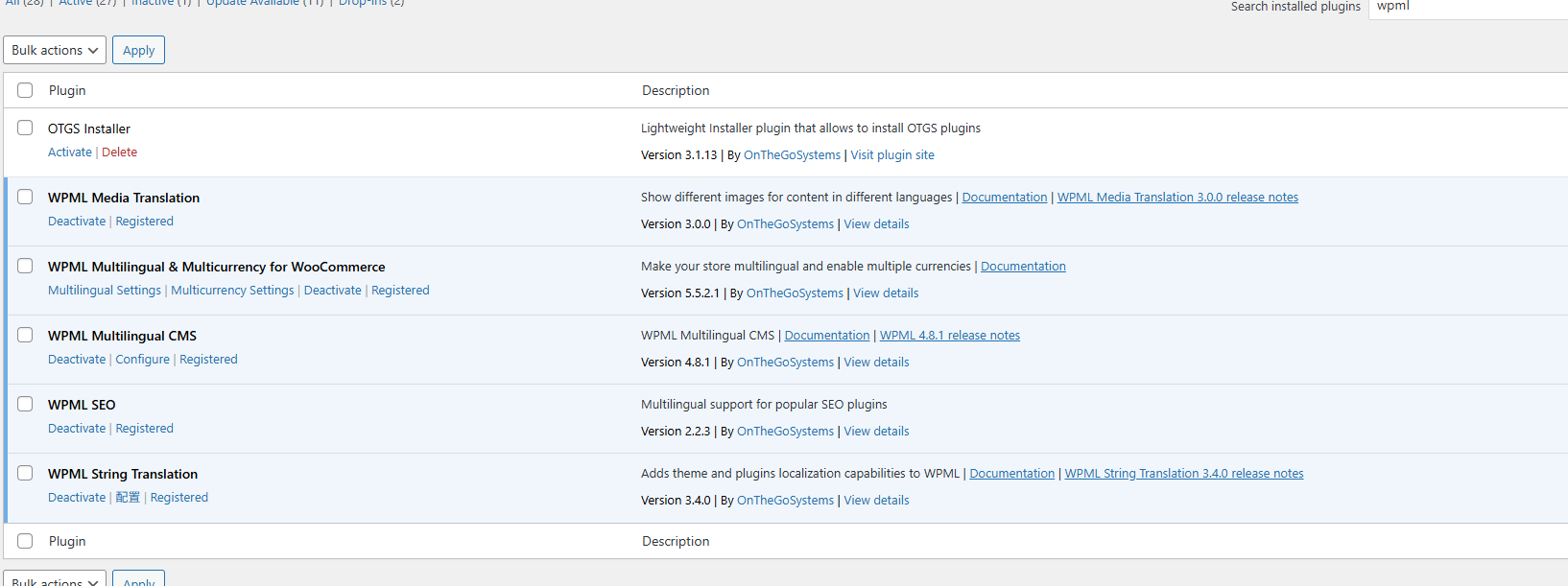
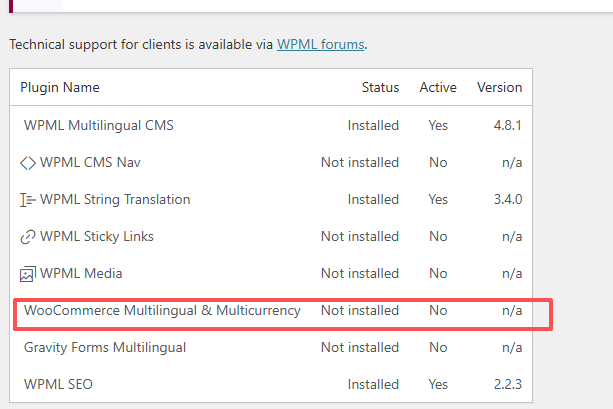
WPML Media Translation marked as 'Not Installed' on the Support page.
Solution:
We resolved this issue in the latest version of WPML (4.9.0). To address this, please follow these steps:
1. Go to your site’s admin area.
2. Navigate to Plugins → Add New Plugin and select the Commercial tab.
3. Click the 'Check for updates' button.
4. Find WPML 4.9 in the list and click 'Install'.
Before proceeding, ensure you make a full site backup (files and DB).
For more details on WPML 4.9.0, visit this link.

If this solution does not apply to your case, or if it seems outdated, we highly recommend checking related known issues at https://wpml.org/known-issues/, verifying the version of the permanent fix, and confirming that you have installed the latest versions of themes and plugins. If issues persist, please open a new support ticket.

This is the technical support forum for WPML - the multilingual WordPress plugin.

Everyone can read, but only WPML clients can post here. WPML team is replying on the forum 6 days per week, 22 hours per day.

This topic contains 2 replies, has 0 voices.

Last updated by Itamar 3 months ago.

Assisted by: Itamar.

Author Posts
September 29, 2025 at 6:52 am #17439507

riordanR

Background of the issue:
I installed WPML before and then uninstalled it, which caused the Status of WooCommerce Multilingual & Multicurrency to be Not installed. I want to install WooCommerce Multilingual & Multicurrency correctly. Link to a page where the issue can be seen: hidden link

Symptoms:
Plugin Name: WooCommerce Multilingual & Multicurrency Status: Not Installed Activated: No

Questions:
How can I solve the problem of WooCommerce Multilingual & Multicurrency showing as Not installed after uninstalling WPML?
What steps should I follow to correctly install WooCommerce Multilingual & Multicurrency?

September 29, 2025 at 8:06 am #17439835

Itamar
WPML Supporter since 02/2016

Languages: Hebrew (עברית )

Timezone: Asia/Jerusalem (GMT+03:00)

Hi,

I've replicated the issue with WPML Multilingual & Multicurrency for WooCommerce, which is listed as not installed in WPML -> Support, and escalated it to our developers. When the problem is fixed in future versions of WPML, we will update you here. For any other WPML questions or issues, please open a new ticket in our support forum.

Regards,
Itamar.

February 8, 2026 at 3:24 pm #17803139

Itamar
WPML Supporter since 02/2016

Languages: Hebrew (עברית )

Timezone: Asia/Jerusalem (GMT+03:00)

Hi,

I have an update.

This issue has been resolved in the latest version of WPML (4.9.0).
Please also note that we have new versions for Strings Translation (3.5.0), Media translation (3.1.0), and WCML (5.5.4). If you don't see the new versions on your site, please follow this:

1. In your site’s admin, go to Plugins → Add New Plugin and click the Commercial tab.

2. Click the Check for updates button.

3. Select WPML 4.9 from the list and click Install.

Before updating our plugins, please take a backup of your site.

**** Important! Please make a full site backup (files and DB) before you proceed with those steps****

More about WPML 4.9.0 in this post we published:
https://wpml.org/changelog/2026/02/wpml-4-9-better-automatic-translation-and-compatibility/?utm_source=at&utm_medium=emails&utm_campaign=wpml-4-9

I'm closing this ticket.
Please don't hesitate to contact us again with any WPML-related issues or questions.

Best Regards,
Itamar.