
This is the technical support forum for WPML - the multilingual WordPress plugin.
Everyone can read, but only WPML clients can post here. WPML team is replying on the forum 6 days per week, 22 hours per day.
| Sun | Mon | Tue | Wed | Thu | Fri | Sat |
|---|---|---|---|---|---|---|
| - | - | 9:00 – 18:00 | 9:00 – 18:00 | 9:00 – 18:00 | 9:00 – 18:00 | 9:00 – 18:00 |
| - | - | - | - | - | - | - |
Supporter timezone: America/Lima (GMT-05:00)
Tagged: Performance
This topic contains 57 replies, has 3 voices.
Last updated by Andreas W. 1 year, 5 months ago.
Assisted by: Andreas W..
| Author | Posts |
|---|---|
| September 16, 2024 at 4:29 am #16181180 | |
 coinQ |
Hello, Thank you for your patience. The staging URL is: hidden link. Please log in using the same admin credentials I provided recently. Please check and provide your feedback. Also, do not hesitate to ask if you need anything else. Thank you. |
| September 16, 2024 at 4:47 am #16181198 | |
 Shekhar Bhandari WPML Supporter since 03/2015 Languages: English (English ) Timezone: Asia/Kathmandu (GMT+05:45) |
Hello 🙂 Can you also provide us the sftp details for the new staging site? Thanks |
| September 16, 2024 at 10:35 am #16182949 | |
|
Shekhar Bhandari WPML Supporter since 03/2015 Languages: English (English ) Timezone: Asia/Kathmandu (GMT+05:45) |
Hello there, I have forwarded the details to our 2nd tier supporters. Thanks |
| September 17, 2024 at 4:15 am #16186005 | |
|
Shekhar Bhandari WPML Supporter since 03/2015 Languages: English (English ) Timezone: Asia/Kathmandu (GMT+05:45) |
Hello there, Our second tier supported checked the access, but sadly they do not have permission to access the theme folder on this installation. So can you provide provide unrestricted server access. Also our second tier mentioned that that those slow queries only occur if the custom theme is enabled. So can you use a default theme and check the issue and monitor the performance? Look forward to your reply. Thanks |
| September 17, 2024 at 11:00 am #16187730 | |
|
coinQ |
Hello, Thank you for your response and for the update. I apologize for the oversight regarding the access permissions. We also faced similar issues when accessing the folders and files inside the wp-content directory. However, we have now adjusted the permissions and access settings, and the issue should be resolved. However the file modification is not possible with that account. So, we have created another SFTP account with more privileges, if you enable the private/secure message option, i can share the details. Regarding your suggestion to test the default theme: the default theme does not display posts from other languages; it only shows English posts. Additionally, it lacks the separate sections on the homepage to display articles by category, which is a key feature of our custom theme. This is precisely why we built a custom theme and implemented WPML. Disabling WPML does indeed improve the website's performance and speed significantly. As you’ve likely noticed, the website loads perfectly when using our custom theme with WPML disabled. Currently, we have over 58,000 posts in total, with only about 19,000 in English. Disabling WPML and its related plugins allows the website to function properly, regardless of whether we use the default "Twenty Twenty-Four" theme or our custom theme. However, once WPML is activated, the site performance starts to decline. The slow queries you have observed are also related to WPML. I encourage you to deactivate WPML, test again, and note the performance difference when WPML is both activated and deactivated. As for using the default theme instead of the custom one, the default theme does not have pages and sections similar to what we currently use. If we were to switch, we would need to customize the default theme to match our requirements. Additionally, we have a specific design and layout for our website, which would also need to be integrated into the default theme, requiring further customization. Please review our custom theme code; it only uses the WP Query method to display posts, with no other complex or slow functions involved. If we were to use the default theme, we would have to implement similar functions and code, so the performance issue might persist if WPML is still active. We look forward to your further insights and recommendations on how to address the performance issues related to WPML. Best regards, |
| September 17, 2024 at 11:37 am #16187938 | |
|
Shekhar Bhandari WPML Supporter since 03/2015 Languages: English (English ) Timezone: Asia/Kathmandu (GMT+05:45) |
Hello there, I have enabled the private reply. Thanks |
| September 17, 2024 at 4:36 pm #16189931 | |
 Andreas W. WPML Supporter since 12/2018 Languages: English (English ) Spanish (Español ) German (Deutsch ) Timezone: America/Lima (GMT-05:00) |
Hello, Thank you for access to your staging site. The wp-config.php file was missing the nonce key: I have created those keys. You can create the keys here, if needed: I enabled WP DEBUG and did not catch any errors. At the moment, QUERY MONITOR was displaying any slow query on the hompage. The homepage loads in all languages in 0.8-0.9 seconds. We saw a slightly slow query on tag archives, like: The query filtered for the tag IDs: This comes from:
PostFetcher->fetch_posts()
wp-content/themes/coinedition/functions.php:361 where new WP_Query($args); is called.

	public function fetch_posts()
	{
		$args = array(
			'post_type' => 'post', //"post" post type
			'post_status' => 'publish', //only published articles
			'orderby' => 'date', // Order by date
			'order' => 'DESC', // Order in descending order (newest first)
			'suppress_filters' => false, // Let WPML apply its filters
			'fields' => 'ids', // Only retrieves post IDs
		);
`		if ($this->offset) {` `			$args['offset'] = $this->offset;` `		}`
		if ($this->posts_per_page) {
			$args['posts_per_page'] = $this->posts_per_page;
		}
`		if ($this->is_tag) {` `			$args['tag'] = $this->is_tag;` `		}`
		if ($this->category) {
			$args['category_name'] = $this->category;
		}
`		if ($this->category_id) {` `			$args['cat'] = array($this->category_id);` `		}`
		if ($this->paged) {
			$args['paged'] = $this->paged;
			$args['no_found_rows'] = false;
		} else {
			$args['no_found_rows'] = true;
		}
`		if ($this->author) {` `			$args['author'] = $this->author;` `		}`
		if ($this->exclude) {
			$args['post__not_in'] = array($this->exclude);
		}
`		$query = new WP_Query($args);`
		return $query;
	}
}
I replaced this query with a default query, then reverted my changes and I am not sure why, but at the moment the slow query is gone and the archive page load in German in 0.5 seconds: See: I can currently not see the issue anymore on the Staging Site. I have revised more than a dozen archive pages (post categories and tags) in German, and there is not any slow query occurring. All pages load in 0.6 seconds. Could you please have another look into that and let me know if you can still confirm the slow query on the staging site? Best regards |
| September 18, 2024 at 10:11 am #16192229 | |
|
coinQ |
Hello Andreas, Thank you for your detailed response and for informing us about the missing nonce key in the wp-config.php file. We appreciate your efforts in generating the necessary keys, and we will ensure that the appropriate changes are made as soon as possible. It's great to hear that the slow queries are no longer appearing on the website. However, it's quite peculiar that simply reverting your changes resolved the issue. As we are using Redis object caching, I’m wondering if the disappearance of the slow queries might be related to the object caching mechanism. Since object caching is designed to store and retrieve cached query results, it’s possible that the slow queries were cached and are not showing up now due to this. Could you please check the staging site performance again after disabling the object cache? You can easily disable object caching through the settings. I’ve attached a screenshot for your reference on how to disable it. Additionally, we have previously reported some issues with the Redis object cache, particularly when interacting with the WPML plugin. It seems that our Redis object cache fails to function properly due to the excessive number of requests made by WPML. You can find more details in the earlier messages of this ticket. If you need further information, such as Access Logs, Error Logs, Redis Logs, or anything else, please let us know, and we will be happy to provide them. We will also check the website from our side how it is working now. Thank you for your support, and we look forward to your findings. Best regards, |
| September 18, 2024 at 10:13 am #16192232 | |
|
coinQ |
PFA 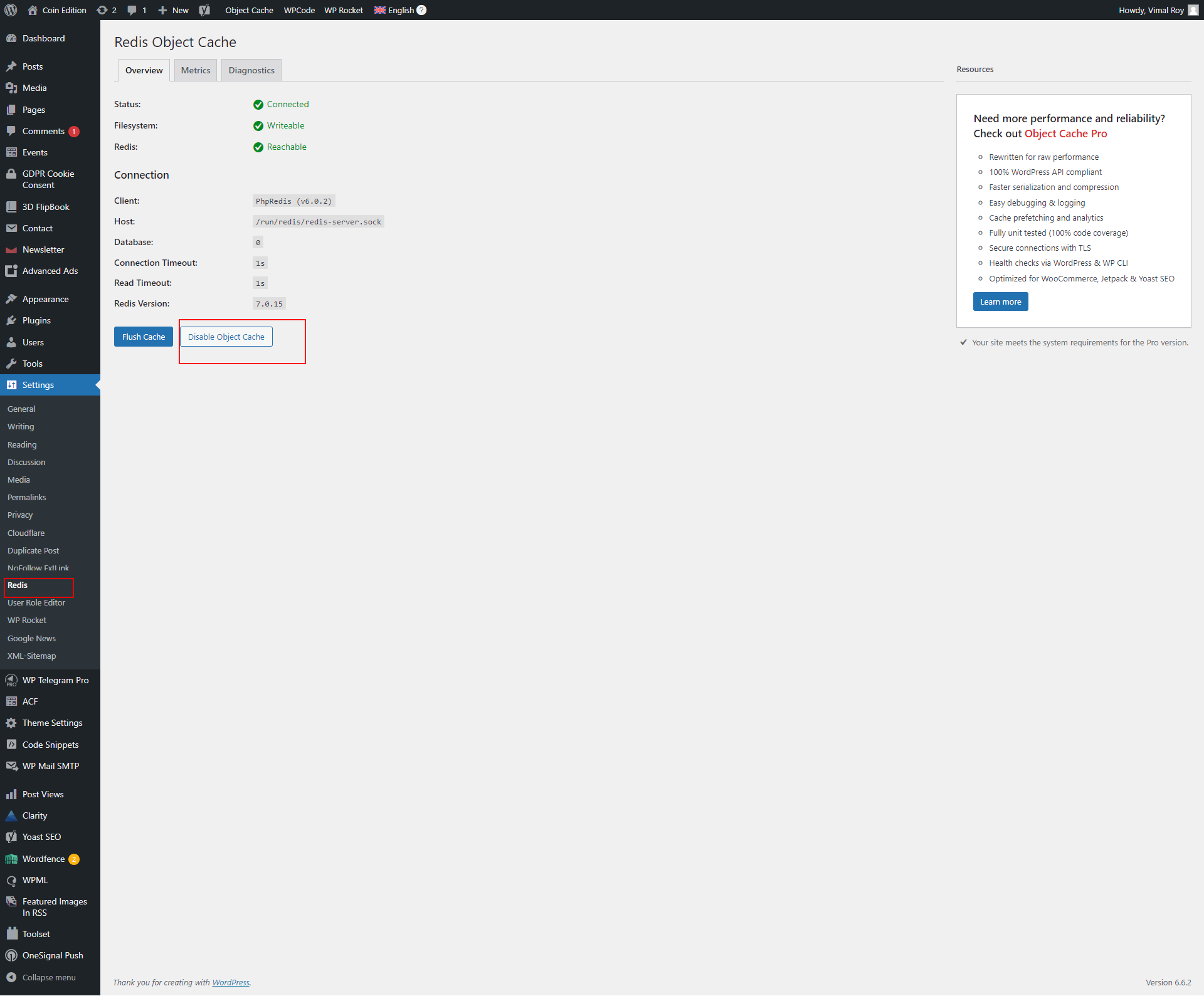 |
| September 18, 2024 at 5:53 pm #16194937 | |
|
Andreas W. WPML Supporter since 12/2018 Languages: English (English ) Spanish (Español ) German (Deutsch ) Timezone: America/Lima (GMT-05:00) |
Hello, I can see that the slow query is back on the staging, when visiting the German "Blockchain 101" archive. It takes 0.6-0.8 seconds or load time. This is the query:
SELECT wp_posts.ID
FROM wp_posts JOIN wp_icl_translations wpml_translations
ON wp_posts.ID = wpml_translations.element_id
AND wpml_translations.element_type = CONCAT('post_', wp_posts.post_type)
WHERE 1=1
AND ( wp_posts.ID NOT IN (
SELECT object_id
FROM wp_term_relationships
WHERE term_taxonomy_id IN (2278,2291,6406) ) )
AND wp_posts.post_type = 'post'
AND ((wp_posts.post_status = 'publish'))
AND ( ( ( wpml_translations.language_code = 'de'
OR ( wpml_translations.language_code = 'en'
AND wp_posts.post_type IN ( 'page' )
AND ( ( (
SELECT COUNT(element_id)
FROM wp_icl_translations
WHERE trid = wpml_translations.trid
AND language_code = 'de' ) = 0 )
OR ( (
SELECT COUNT(element_id)
FROM wp_icl_translations t2 JOIN wp_posts p
ON p.id = t2.element_id
WHERE t2.trid = wpml_translations.trid
AND t2.language_code = 'de'
AND ( p.post_status = 'publish'
OR p.post_status = 'private'
OR ( p.post_type='attachment'
AND p.post_status = 'inherit' ) ) ) = 0 ) ) ) )
AND wp_posts.post_type IN ('post','page','attachment','wp_block','wp_template','wp_template_part','wp_navigation','cookielawinfo' ) )
OR wp_posts.post_type NOT IN ('post','page','attachment','wp_block','wp_template','wp_template_part','wp_navigation','cookielawinfo' ) )
GROUP BY wp_posts.ID
ORDER BY wp_posts.post_date DESC
LIMIT 0, 6
The Call Stack is: Now, this query from your functions.php file has many conditions as it seems to be a general query solution for various use cases. --- Recommendation: Maybe it would be advisable to use a smaller query, simply designed to call nothing else but the posts assigned to such tag, direclty on the template file for such a tag-archive? Let's say you would have a template parts file called: tag-blockchain-101.php You could use WP_QUERY to call the posts specifically for this archive template: Example:
<?php
// Define the term ID
// Set up the WP_Query arguments
$args = array(
    'post_type'      => 'post', // Specify the post type
    'post_status'    => 'publish', // Only published posts
    'posts_per_page' => -1, // Retrieve all posts (you can set a specific number if desired)
    'tax_query'      => array(
        array(
            'taxonomy' => 'post_tag', // Specify the taxonomy
            'field'    => 'term_id',
        ),
    ),
    'supress_filters' = false,
);

// Create a new WP_Query instance
$query = new WP_Query($args);

// Check if there are posts
if ($query->have_posts()) {
    echo '<h1>Posts Tagged with Term ID ' . esc_html($term_id) . '</h1>';
    while ($query->have_posts()) {
        $query->the_post();
        // Output post title and link (customize as needed)
        echo '<h2><a href="' . get_permalink() . '">' . get_the_title() . '</a></h2>';
    }
    // Reset post data
    wp_reset_postdata();
} else {
    echo '<p>No posts found for this term ID.</p>';
}
?>
Like this the SQL query would just look like this and load way faster: Example: SELECT wp_posts.ID FROM wp_posts JOIN wp_term_relationships ON wp_posts.ID = wp_term_relationships.object_id WHERE wp_term_relationships.term_taxonomy_id IN (2278, 2291, 6406) AND wp_posts.post_type = 'post' AND wp_posts.post_status = 'publish' ORDER BY wp_posts.post_date DESC LIMIT 0, 6; More details about usage of term_id: Let me know what you think about my suggestion. Best regards |
| September 19, 2024 at 1:02 pm #16198899 | |
|
coinQ |
Hello Andreas, Thank you for your response and for the detailed recommendation. Currently, we are not using any specific templates for categories and tags. We use archive.php as a common template for all the taxonomies on the website. I would like to get your opinion on using a common tag template (tag.php) instead of a "tag-slug.php" template for a specific term. We chose a common archive template because the design is similar for all listing pages. If you think creating a common tag template (tag.php) for all tags would be beneficial, we are open to proceeding in that direction. However, creating separate tag-archive templates for each individual tag is not feasible since we have more than 500 tags in English alone. Could you please share your thoughts on this approach? In the meantime, we will look into implementing the tag.php template and observe the results. Looking forward to your feedback. Best regards, |
| September 19, 2024 at 11:37 pm #16200932 | |
|
Andreas W. WPML Supporter since 12/2018 Languages: English (English ) Spanish (Español ) German (Deutsch ) Timezone: America/Lima (GMT-05:00) |
Hello Vimal, Thank you for your answer! I believe a common tag template would be ideal for testing. If all templates are identical, then there should be no need to create specific templates for each tag. I really hope that this suggestion can solve the issue. Let us know if further assistance is needed. Best regards |
| September 20, 2024 at 8:48 am #16201679 | |
|
coinQ |
Hello Andreas, Thank you for your response and for confirming the approach. We will proceed with implementing a common tag template (`tag.php`) and will monitor the results. I appreciate your suggestions, and I hope this resolves the issue as well. In addition, I have noticed a 500 response in the access logs, and I investigated the issue further by checking both the Apache error log and Redis errors. Below are the relevant errors for your review: Access Log:- Apache Error Log:- Multiple similar warnings appear regarding undefined array keys in WPML Media Translation. Additionally, I’ve attached the Redis error logs for your reference. Could you please confirm if you've had a chance to check the Redis object cache issue that I mentioned earlier? It seems that we are facing problems due to too many requests from the WPML plugin, which is affecting the Redis object cache performance. If you need any further details or additional logs, feel free to let me know. ISSUES :- hidden link Best regards, |
| September 24, 2024 at 3:53 am #16212279 | |
|
Andreas W. WPML Supporter since 12/2018 Languages: English (English ) Spanish (Español ) German (Deutsch ) Timezone: America/Lima (GMT-05:00) |
Hello, The debug.log of the provided Staging Site does currently not display such error. The only significant error I see here is one pointing to Yoast Premium:
PHP Fatal error:  Uncaught TypeError: array_column(): Argument #1 ($array) must be of type array, string given in /var/www/html/wp-content/plugins/wordpress-seo-premium/src/integrations/third-party/wincher-keyphrases.php:83
Stack trace:
#0 /var/www/html/wp-content/plugins/wordpress-seo-premium/src/integrations/third-party/wincher-keyphrases.php(83): array_column()
#1 /var/www/html/wp-includes/class-wp-hook.php(324): Yoast\WP\SEO\Integrations\Third_Party\Wincher_Keyphrases->add_all_additional_keyphrases()
#2 /var/www/html/wp-includes/plugin.php(205): WP_Hook->apply_filters()
#3 /var/www/html/wp-content/plugins/wordpress-seo/src/actions/wincher/wincher-keyphrases-action.php(298): apply_filters()
#4 /var/www/html/wp-content/plugins/wordpress-seo/src/actions/wincher/wincher-keyphrases-action.php(192): Yoast\WP\SEO\Actions\Wincher\Wincher_Keyphrases_Action->collect_all_keyphrases()
#5 /var/www/html/wp-content/plugins/wordpress-seo/src/routes/wincher-route.php(262): Yoast\WP\SEO\Actions\Wincher\Wincher_Keyphrases_Action->get_tracked_keyphrases()
#6 /var/www/html/wp-includes/rest-api/class-wp-rest-server.php(1230): Yoast\WP\SEO\Routes\Wincher_Route->get_tracked_keyphrases()
#7 /var/www/html/wp-includes/rest-api/class-wp-rest-server.php(1063): WP_REST_Server->respond_to_request()
#8 /var/www/html/wp-includes/rest-api/class-wp-rest-server.php(439): WP_REST_Server->dispatch()
#9 /var/www/html/wp-includes/rest-api.php(420): WP_REST_Server->serve_request()
#10 /var/www/html/wp-includes/class-wp-hook.php(324): rest_api_loaded()
#11 /var/www/html/wp-includes/class-wp-hook.php(348): WP_Hook->apply_filters()
#12 /var/www/html/wp-includes/plugin.php(565): WP_Hook->do_action()
#13 /var/www/html/wp-includes/class-wp.php(418): do_action_ref_array()
#14 /var/www/html/wp-includes/class-wp.php(813): WP->parse_request()
#15 /var/www/html/wp-includes/functions.php(1336): WP->main()
#16 /var/www/html/wp-blog-header.php(16): wp()
#17 /var/www/html/index.php(17): require('...')
#18 {main}
Those errors were reported for the live site? If so, I would like to request access to the live site for investigating this further. The private reply form is enabled. Best regards |
| September 25, 2024 at 1:44 pm #16220835 | |
|
coinQ |
Hello Andreas, Thank you for your prompt response. Regarding the Yoast Premium issue, we had encountered the same problem on our live website, which was resolved by disabling the Wincher integration, following the recommendation from the Yoast plugin support team. I have applied the same fix to the staging site, and I believe this should address the error you highlighted. However, our primary concern relates to the Redis issues. We are experiencing challenges when using the WPML plugin in combination with the Redis Object Cache plugin. These issues have been affecting performance, and we've raised similar concerns in previous communications. If further investigation is required, we can provide the latest Apache, Error, and Redis logs from the live website to assist in troubleshooting. Please let us know how you'd like to proceed and if any additional information is needed. Best regards, |






The topic ‘[Closed] Very slow queries’ is closed to new replies.