aljazP-4
|
I have removed the link.
Thank you — I will also try to locate the problem, but so far I have been unsuccessful.
|

Andreas W.
WPML Supporter since 12/2018
Languages:
English (English )
German (Deutsch )
Timezone:
America/Lima (GMT-05:00)
|
I have analyzed the issue on your site, but it was not that easy, as it appears that some of the media is missing on my local copy after migration, and this leads to unexpected results in site performance:
At least one reason for a longer load time of at least 5-8 seconds is an AJAX request for WooCommerce Fragments (get_refreshed_fragments).
This call regenerates the mini‑cart HTML.
With WPML/WCML active, every fragment is passed through translation filters. That means:
- Each product name, price, and string is checked against WPML’s String Translation tables.
- For variable products, attribute labels are also translated.
WCML has a known bug: fragments are refreshed multiple times, even when the cart is empty, so you pay the translation overhead unnecessarily. This will be patched in WCML 5.6.
Workarounds:
- Disable cart fragments if you don’t need an auto‑updating mini‑cart:
add_action('wp_enqueue_scripts', function() {
wp_dequeue_script('wc-cart-fragments');
});
Would you agree if we give this a test on your live site?
|
aljazP-4
|
Of course we can temporarily disable it to check if this is a problem in production.
Is this a problem in woocommerce itself or just in the woodmart theme I'm using, cart fragments?
|
aljazP-4
|
I have change some of the setting on my site due to error:
/** Redis optimization for WooCommerce + WPML **/
define('WP_REDIS_MAXTTL', 3600); // Locks TTL to 1h instead of "forever"
define('WP_REDIS_SERIALIZER', 'igbinary'); // Faster and smaller serializator
define('WP_REDIS_SCHEME', 'tcp'); // stabile
define('WP_REDIS_DISABLED', false); // cache stays on
ModSecurity switched from Comodo (free) to OWASP (free).
Copilot says it has less false positives for wp + woocommerce. And should help with: WPML parameters, rest api, ajax requests, woocommerce endpoints, stripe/paypal hooks.
Php-fpm settings:
Increased: max_children=10, max_requests=300, memory_limit=1024M
|
Andreas W.
WPML Supporter since 12/2018
Languages:
English (English )
German (Deutsch )
Timezone:
America/Lima (GMT-05:00)
|
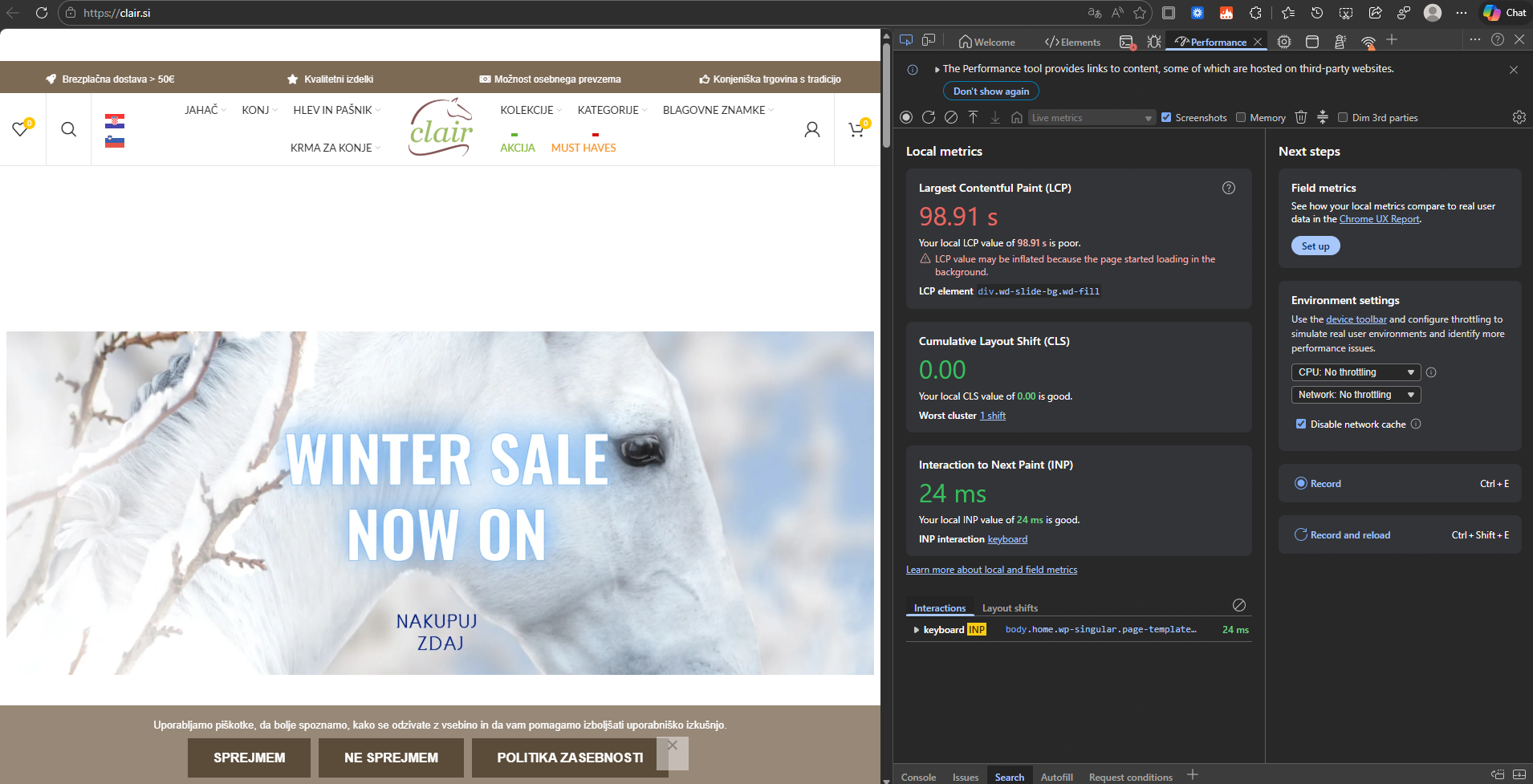
At the moment, WPML was not active, and the site was still very slow. See screenshot: it took more than 90 seconds for the homepage to load.
This indicates that the issue is not directly related to WPML, since the plugin is not running. After reloading the page another time, the cache begins working, and the load time drops to about 5 seconds.
Now, if I disable GTranslate and enable WPML, I again see this very long load time on the first page load. However, as mentioned, I can confirm the same behavior even without WPML active. On the second load, once the cache is working, the page load time is currently around 6–7 seconds with WPML, since I implemented the workaround in the Child Theme.
- Please check your caching setup. It looks like the first uncached request is extremely slow, regardless of WPML being active.
|
aljazP-4
|
Do you suggest goind to rocket cache?
Are you still working on production ?
|
Andreas W.
WPML Supporter since 12/2018
Languages:
English (English )
German (Deutsch )
Timezone:
America/Lima (GMT-05:00)
|
Indeed, I checked this today on the production site. When loading the page for the first time, it took 90 seconds to load, while running GTranslate (WPML not invovled).
After refreshing the page, it took about 5 seconds.
Then I saw the same pattern when disabling GTranslate and enabling WPML, but after all, the long load time seems to be there even without WPML.
I am not sure which would be the next step to take when it comes to cache. I would suggest consulting the respective support teams for each plugin.
Note that I included a workaround in the Child Theme, which might be the reason why the site now loads in about 6 seconds with WPML. This is a known issues and it will be handled in the upcoming WCML update.
If you still experience load times of more than 6 seconds while running the site with WPML, please let me know, and I will investigate further.
|
aljazP-4
|
I believe I’ve identified where the issue was coming from on my side. I’ve now activated WPML again and at the moment it’s working as expected. Page load times are in line with what you mentioned (around 5–6 seconds).
The main problem seems to have been caused by a very high number of incoming requests on my server, including traffic from some suspicious/unknown servers, which likely contributed to the extreme initial load times I was seeing.
Given that the site now behaves correctly with WPML enabled, I wanted to ask if you would suggest changing or adjusting anything further on your side, or if you think the current setup is fine for now.
|
Andreas W.
WPML Supporter since 12/2018
Languages:
English (English )
German (Deutsch )
Timezone:
America/Lima (GMT-05:00)
|
You should make sure to use our addon "WPML Multilingual & Multicurrency for WooCommerce" which is currently disabled.
I would also suggest updating WPML and its addons.
If you run into further issues, please let me know.
|