
This thread is resolved. Here is a description of the problem and solution.
Problem:
The client is experiencing an issue where the translation of the Flexible Shipping plugin does not update when switching languages unless debug mode is enabled. This problem arises due to unwanted strings being registered for translation, which conflicts and prevents the string from appearing translated.
Solution:
1. Change the Shipping Method Title in WooCommerce to the desired language.
2. Navigate to WPML > String Translation and delete all shipping method strings.
3. Clear the cart in the default language, add a product, and visit the cart page to register the correct string.
4. Add translations for these strings.
5. Switch to another language, update the cart by either increasing the product quantity or deleting an item to refresh the cache and see the translated string.
If the issue persists, it's important to note that WPML cannot force refresh WooCommerce caches directly. You can clear WPML caches via WPML > Support > Troubleshooting, but updating the cart is necessary to see the correct translation.
If this solution does not resolve your issue, or if it seems outdated or irrelevant to your case, we highly recommend checking related known issues at https://wpml.org/known-issues/, verifying the version of the permanent fix, and confirming that you have installed the latest versions of themes and plugins. Should you need further assistance, please feel free to open a new support ticket at WPML support forum.
This is the technical support forum for WPML - the multilingual WordPress plugin.
Everyone can read, but only WPML clients can post here. WPML team is replying on the forum 6 days per week, 22 hours per day.
Tagged: Documentation request, WCML
Related documentation:
This topic contains 12 replies, has 3 voices.
Last updated by Prosenjit Barman 1 year, 10 months ago.
Assisted by: Prosenjit Barman.
| Author | Posts |
|---|---|
| June 17, 2024 at 3:28 pm #15746239 | |
 Angelic Engel |
Background of the issue: Symptoms: Questions:  |
| June 17, 2024 at 6:56 pm #15746739 | |
 Lucas Vidal de Andrade WPML Supporter since 11/2023 Languages: English (English ) Spanish (Español ) German (Deutsch ) Portuguese (Brazil) (Português ) Timezone: Europe/Vienna (GMT+02:00) |
Thank you for contacting WPML support. While you are waiting for one of my colleagues to take this ticket and work on it, let me provide you with first debugging steps or if I can perhaps help with the issue quickly. Without enabling the debug mode, please try emptying all caches, after making the change to the Translations. It might be that there's some misconfigured cache that is preventing the translations from appearing in the Front End. If even after clearing the cache, please disable any performance or caching plugins you have active on your website to check again. If it has any impact, we can better understand what might be causing this behavior. Please make sure to have a full website backup before proceeding. If that does not help, one of my colleagues will soon come to continue support. |
| June 19, 2024 at 7:53 am #15753668 | |
|
Angelic Engel |
The caching plugins are disabled at the moment. I've tried emptying the caches before but that unfortunately didn't solve the problem. |
| June 20, 2024 at 11:32 am #15763309 | |
 Prosenjit Barman WPML Supporter since 03/2023 Languages: English (English ) Timezone: Asia/Dhaka (GMT+06:00) |
Hi There, I have taken over this ticket and will try my best to assist you in this matter. There might be another instance of the same string hidden or not registered for translation. Please follow the instructions outlined here and see if you can locate the string you're trying to translate. However, if the issue persists even after ensuring the correct string is translated, regenerating the translation files might help. - Please go to WPML > Support > Troubleshooting. I hope the information above will help. Feel free to let me know if you need further assistance in this matter. I will be happy to help. Best regards. |
| June 21, 2024 at 12:08 pm #15774812 | |
|
Angelic Engel |
I've tried both solutions but it unfortunately didn't solve the problem. |
| June 24, 2024 at 6:14 am #15802976 | |
|
Prosenjit Barman WPML Supporter since 03/2023 Languages: English (English ) Timezone: Asia/Dhaka (GMT+06:00) |
Hello There, Thank you for trying out the suggestions. Since the issue persists, we need to determine whether it is widespread or limited to your site only. I kindly request you to try replicating the issue in our sandbox environment. The autologin link to our sandbox is provided below. - hidden link The WPML plugin, its add-ons, and WooCommerce are pre-installed on the sandbox. Please complete any remaining setup steps. Then, install the Flexible shipping plugin and try to recreate the issue as it occurs on the main site. The primary goal of using the sandbox site is to isolate the issue in a minimal environment and in this way, we can also easily escalate the issue to our 2nd tier team if required. If you encounter the same issue on the sandbox site, let me know. I will review it and advise you on the next steps. Looking forward to your response and I appreciate your kind cooperation in this matter. Best regards, |
| June 24, 2024 at 12:39 pm #15807126 | |
|
Angelic Engel |
No problem, everybody needs a weekend 🙂 It works in the sandbox. Flexible shipping has 3 translations. Our staging had a lot more so i deleted a bunch. But when i translate "Thuisbezorgd", the yellow shaded item from the staging screenshot, "Delivered at home", is added. Do you know why this happens? I've also noticed the WooCommerce blocks are used to display the shopping cart. Our cart has been made with Elementor. Could this be the cause of the problem? 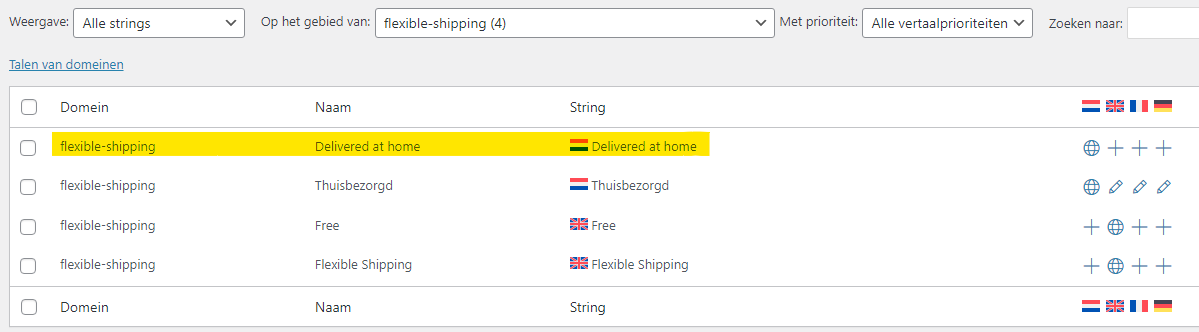 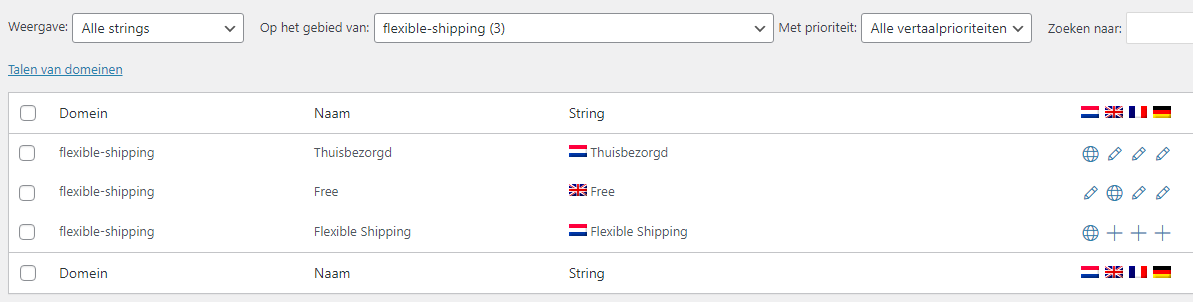 |
| June 25, 2024 at 3:31 am #15814670 | |
|
Prosenjit Barman WPML Supporter since 03/2023 Languages: English (English ) Timezone: Asia/Dhaka (GMT+06:00) |
Hi There, It seems that the page builder is not the source of the issue, since the shipping method is being loaded from WooCommerce. Upon further investigation, I found that the title of the shipping method is also registered as an Admin string in the Admin String section of String Translation. You may need to translate this string on your site to ensure it appears correctly translated on the frontend. Please follow these steps to see if they resolve the issue: - Navigate to "WPML > String Translation". I hope it will help. Feel free to let me know if you need further assistance in this matter. I will be happy to help. Best regards, |
| June 27, 2024 at 8:21 am #15841686 | |
|
Angelic Engel |
Hello, |
| June 28, 2024 at 2:53 am #15848123 | |
|
Prosenjit Barman WPML Supporter since 03/2023 Languages: English (English ) Timezone: Asia/Dhaka (GMT+06:00) |
Hi There, If the Title is translated correctly in String translation, then it should appear translated when you switch language. However, since this is not happening, other functionalities on your site may be interfering with the shipping method translation process. Since you're using an optimization plugin, please clear its caches. If possible, run a plugin conflict test on your site to determine if the issue is caused by plugin conflicts. To do this, take a backup of your site and database, then deactivate all plugins except for WPML, its addons, and the Flexible Shipping plugin. If this resolves the issue, start reactivating the plugins one by one and after activating each, continue to monitor the issue. In this way, you'll be able to detect causing the issue. But, if the issue persists, a closer inspection will be required to understand the root cause of the issue. I would like to request temporary access (wp-admin and FTP) to your site to take a better look at the issue. It would be better to have a testing site where the issue is replicated. You will find the needed fields below the comment area when you log in to leave your next reply. The information you will enter is private which means only you and I can see and have access to it. Maybe I'll need to replicate your site locally. For this, I’ll need to temporarily install a plugin called “Duplicator” or "All in One WP Migration" on your site. This will allow me to create a copy of your site and your content. Once the problem is resolved I will delete the local site. Let me know if this is ok with you. IMPORTANT Looking forward to your response. Best Regards, |
| July 3, 2024 at 5:38 am #15880228 | |
|
Prosenjit Barman WPML Supporter since 03/2023 Languages: English (English ) Timezone: Asia/Dhaka (GMT+06:00) |
Hi There, I have checked and am happy to inform you that the issue with the Shipping Method Title is now fixed. Please see this screenshot: hidden link The issue was caused by registering some unwanted strings related to the shipping method for translation, which conflicted and prevented the string from appearing translated. Here’s how I resolved it: 1. I went to the Shipping Method configuration in WooCommerce and changed the Shipping Method Title to "Thuisbezorgd" from "Delivered at home." Please note that if there is already a product in the cart and you still see the title in Dutch on the English cart page, update the cart by increasing the product quantity or deleting an item from the cart, and then check again. This is because the default string may be cached, and updating the cart will refresh the cache due to the AJAX call, which will then display the translated string properly. I hope this helps! If you need further assistance, please don't hesitate to reach out. I'm here to help. Best regards, |
| July 9, 2024 at 8:02 am #15918778 | |
|
Angelic Engel |
Hello, |
| July 9, 2024 at 11:28 am #15920292 | |
|
Prosenjit Barman WPML Supporter since 03/2023 Languages: English (English ) Timezone: Asia/Dhaka (GMT+06:00) |
Hi There, Since the information is stored in the WooCommerce cache, WPML cannot force refresh these caches. You can clear the WPML caches by navigating to "WPML > Support > Troubleshooting." However, you will still need to update or make changes to the cart to see the correct translation. It's best to remove the product from the cart and then check again. I hope you can understand. Feel free to let me know if you need further assistance or clarification. I will be happy to help. Best regards, |
| July 10, 2024 at 10:35 am #15927609 | |
|
Angelic Engel |
Thanks for your help! We'll try to resolve the cache issue in another way. |




