Home›Support›English Support›[Resolved] I have translated some information manually but its not showing in frontend
[Resolved] I have translated some information manually but its not showing in frontend
This thread is resolved. Here is a description of the problem and solution.
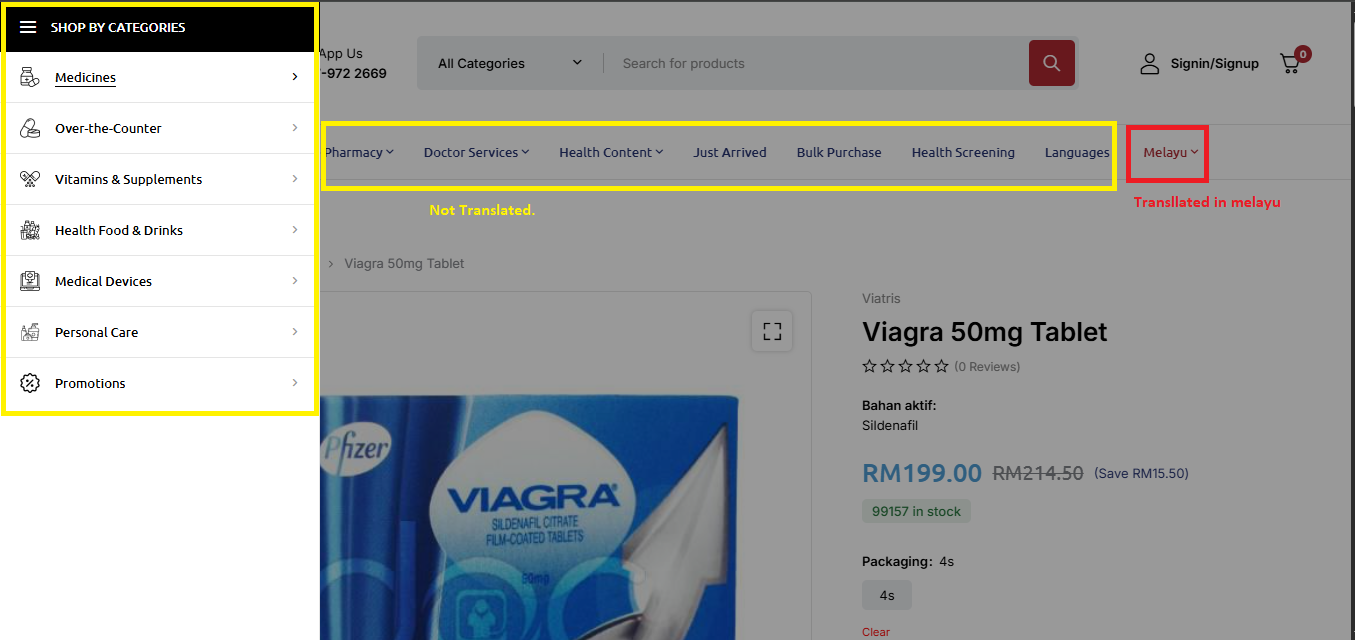
Problem: After switching from AISEO to Rank Math for website translations, the client noticed that headers and sidebar categories remained untranslated, despite the content being properly translated. The issue was inconsistent, with some elements translating correctly in some instances but not in others. Solution: We identified that the 'active ingredient' was not translating due to it not being handled in the Translation Editor. To resolve this, we recommend: 1. Make a slight change to the product description in the original language, update the product, and then revert the change. 2. Open the Advanced Translation Editor and manually translate the 'active ingredient'. 3. Complete the translation. If you're experiencing similar issues, we suggest following these steps. Additionally, it's important to ensure that all translations are properly managed in the Translation Editor.
Please note that this solution might be outdated or not applicable to your specific case. We highly recommend checking related known issues at https://wpml.org/known-issues/, verifying the version of the permanent fix, and confirming that you have installed the latest versions of themes and plugins. If the problem persists, please open a new support ticket.
This is the technical support forum for WPML - the multilingual WordPress plugin.
Everyone can read, but only WPML clients can post here. WPML team is replying on the forum 6 days per week, 22 hours per day.
Background of the issue:
I initially used AISEO for my website translations, and everything displayed correctly. However, after switching to Rank Math, I’ve noticed that my headers and sidebar categories are no longer translating. I’ve tried multiple troubleshooting steps, including clearing cache and rechecking translations, but the issue persists.
Symptoms:
The content is translated properly, but the header and sidebar remain untranslated on the frontend.
Questions:
Could you please advise on how to resolve the issue of untranslated headers and sidebar categories?
But first, please update your WPML plugin and add-ons to the latest version, 4.8.1, to benefit from the newest bug fixes and improvements. While this may not necessarily resolve your problem, it's important to work with the latest code available to troubleshoot effectively.
You can check the latest released versions under "My Account -> Downloads" on this site. Instructions to update can be found here: http://wpml.org/faq/install-wpml/
If you do not see the updates, you might need to click the 'Check for updates' button in Plugins → Add New Plugin → Commercial tab.
Please remember to back up your database before you proceed.
Sorry for the inconvenience. Please ignore the menus for now—my concern is with the meta translations. Some of my meta fields are being translated correctly, while others are not. For example, I’ve attached details of 2 products: one shows the translation properly, but the other does not, even though I’ve added translations for both.
When I created a support ticket, I was told I “need to give more space.” Could you please clarify what that means?
I have looked at it, but I am seeing the following:
That Page Can’t Be Found!
I need to request temporary access (wp-admin and FTP) to your site—preferably to a test site where the problem has been replicated if possible—in order to be of better help. When you log in to leave your next reply, you will find the needed fields below the comment area. The information you will enter is private, meaning only you and I can see and access it.
Please provide new links where the issue can be seen.
hidden link
as you can see in this product after translation the active ingredient is translated
hidden link
but not translated in this product.
As far as I understand, you are referring to a different issue than the one mentioned earlier.
Regarding your last comment, the “active ingredient” is not translated because it was not translated in the Translation Editor. To address this, I followed these steps:
1. Made a slight change to the product description in the original language, updated the product, and then reverted the change.
2. Opened the Advanced Translation Editor and translated “active ingredient”.
3. Completed the translation.
I’ve attached a screenshot for your review.
If you encounter a similar issue, you can follow the same steps to resolve it.