Skip to content Skip to sidebar

This thread is resolved. Here is a description of the problem and solution.

Problem:
The client was unable to add a language switcher to the menu because the option was missing in Appearance → Menus. Additionally, the 'Screen Options' tab was not present to adjust menu item visibility. The client also faced issues with translating the footer and Slider Revolution content.
Solution:
1. To address the root file/page setup, we recommended following the guide on setting the directory for the default language: https://wpml.org/documentation/getting-started-guide/language-setup/directory-default-language/
2. For adding a language switcher to the menu, the client needed to first create a menu in the original language, then add a translation or synchronize it as described here: https://wpml.org/documentation/getting-started-guide/translating-menus/. After this, the language switcher could be added in WPML -> Languages.
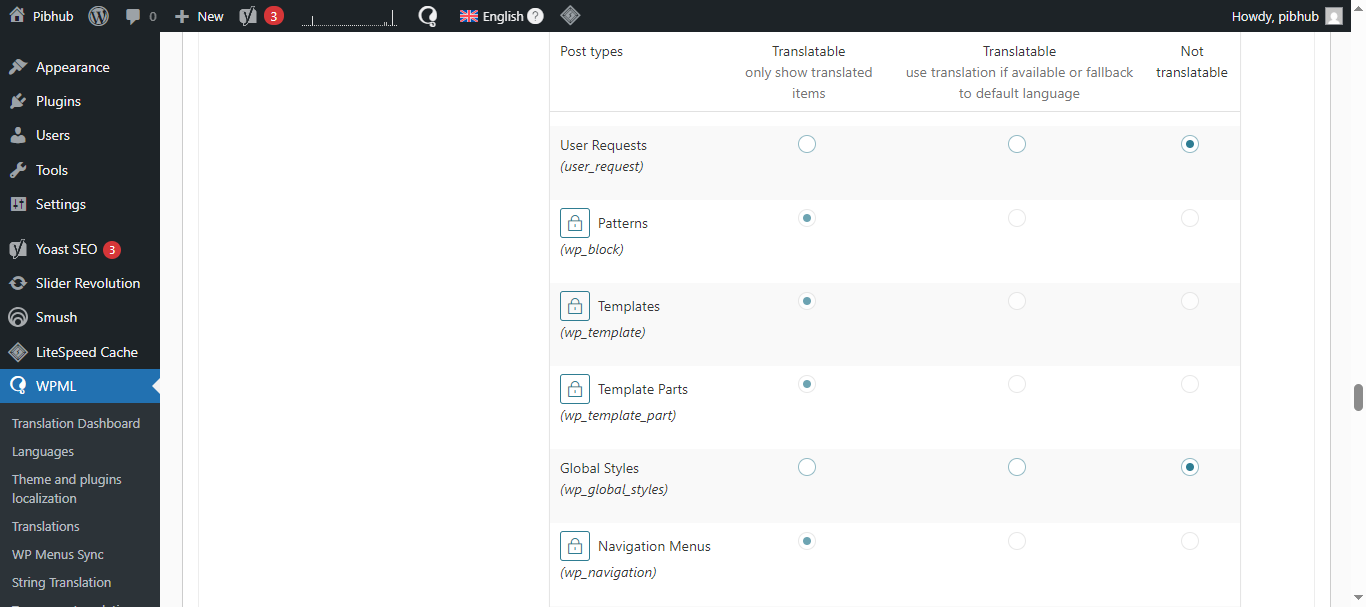
3. To translate the footer, the client was advised to set the templates as translatable in WPML -> Settings -> Post type translation, then use the WPML -> Translation Dashboard to translate the templates. Detailed steps can be found here: https://wpml.org/documentation/getting-started-guide/translating-custom-posts/
4. For translating Slider Revolution, the client needed to set the language for each slide following the steps here: https://wpml.org/documentation/plugins-compatibility/creating-multilingual-sliders-with-revolution-slider-and-wpml/

If this solution does not resolve your issue or seems outdated, we highly recommend checking related known issues at https://wpml.org/known-issues/, verifying the version of the permanent fix, and confirming that you have installed the latest versions of themes and plugins. If further assistance is needed, please open a new support ticket at WPML support forum.

This is the technical support forum for WPML - the multilingual WordPress plugin.

Everyone can read, but only WPML clients can post here. WPML team is replying on the forum 6 days per week, 22 hours per day.

This topic contains 10 replies, has 1 voice.

Last updated by Carlos Rojas 1 week, 1 day ago.

Assisted by: Carlos Rojas.

Author Posts
April 6, 2026 at 5:33 am #17950675

pibhubP

Hello,

In "Translation Dashbaord" section "Navigaton menu" is not available. Adding language switcher is not visible in the menu header. How can I add this?

And what can be in the root url?

April 6, 2026 at 6:05 am #17950700

pibhubP

Hello,

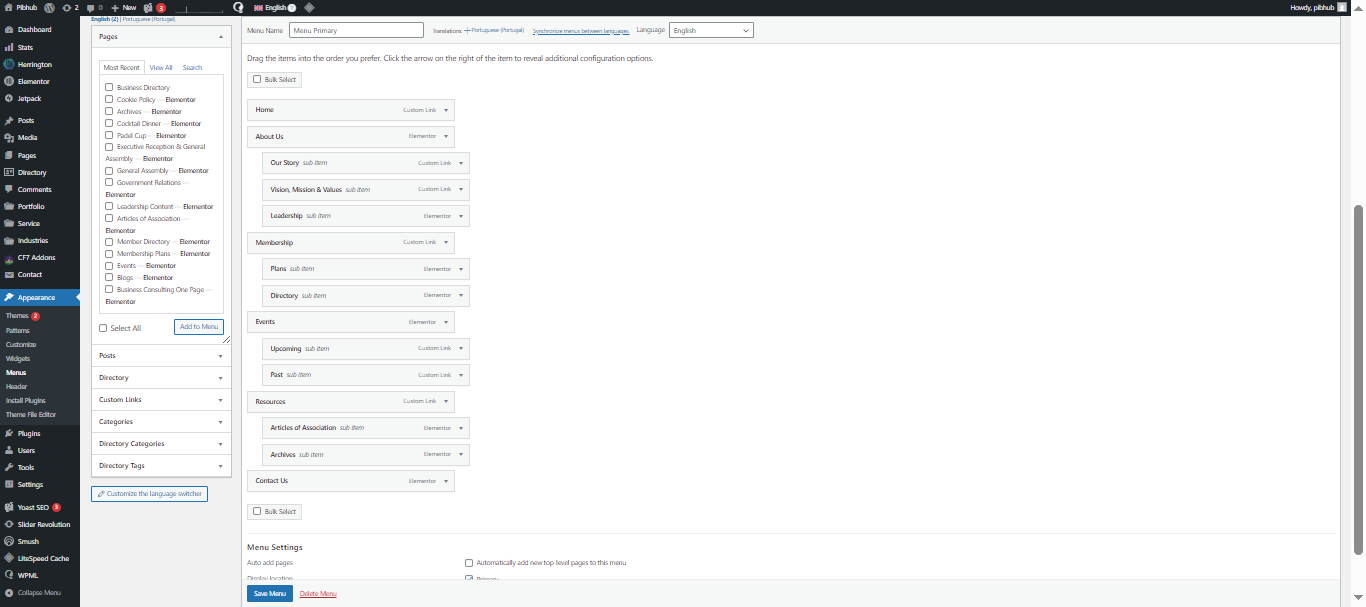
1. In Appearnce -> Menu Add Language switicher to menu option is not available. In WPML -> Languages -> Language switcher to NAvigation menu is already set but its not visible in the frontend header.

Plus, in my previous screnshot you can see in "Translation Dashboard" Navigation is not visible.

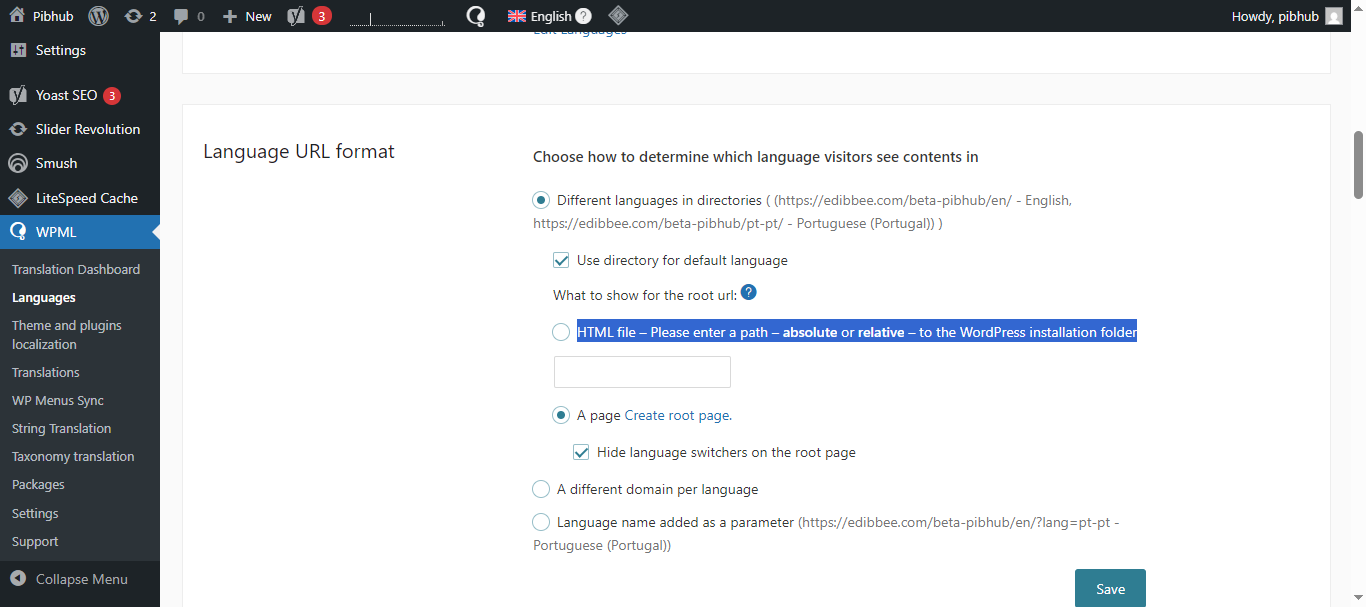
2. In Language URL format What should I add in What to show for the root url-> HTML file – Please enter a path – absolute or relative – to the WordPress installation folder....?

Languages-‹-Pibhub-—-WordPress-04-06-2026_11_34_AM.png
Menus-‹-Pibhub-—-WordPress-04-06-2026_11_29_AM.png
April 6, 2026 at 7:59 am #17950884

Carlos Rojas
WPML Supporter since 03/2017

Languages: English (English ) Spanish (Español )

Timezone: Europe/Madrid (GMT+02:00)

Hello,
Thank you for contacting us

1.- Please read this guide that explains what is the root file/page and how to set it correctly: https://wpml.org/documentation/getting-started-guide/language-setup/directory-default-language/

2.- Regarding the menu switcher: the first step is to create a menu in the original language (which you already did), then add a translation to that menu or synchronize it as described here: https://wpml.org/documentation/getting-started-guide/translating-menus/

Once the menu is translated or synced, you will be able to add the language switcher to that menu in WPML -> Languages.

Please let me know if you need further assistance.
Regards,
Carlos

April 6, 2026 at 8:46 am #17951018

pibhubP

Hello,

1. LAnguage URL format is sorted.

2. Navigation menu - This is only visible on the about us page - hidden link

Following as per the documentation - In the Translation Dashbaord - > Navigation Menu Tab is not visible and also the site or Theme tab

3. Translation -
En language - hidden link
PT language - hidden link

I have already edited the about us page in PT but its not visible on the page plus its not like the EN, the header & footer is different.

How can I sort 2nd & 3rd this out ?

April 6, 2026 at 9:01 am #17951029

Carlos Rojas
WPML Supporter since 03/2017

Languages: English (English ) Spanish (Español )

Timezone: Europe/Madrid (GMT+02:00)

Hi there,

1.- It is good to hear that this issue is already solved 🙂

2.- The menus don't appear in the Translation Dashboard. To translate the menus, you need to go to Appearance -> Menus -> Click on the plus (+) icon to add the translation to the secondary language.

3.- Please edit the About Us page in English -> Make a small change in the content -> Save the changes and update the translation. Then double-check if the translation appears correctly in pt-pt

April 6, 2026 at 10:31 am #17951167

pibhubP

Hello,

Thanks!

2nd and 3rd are resolved.

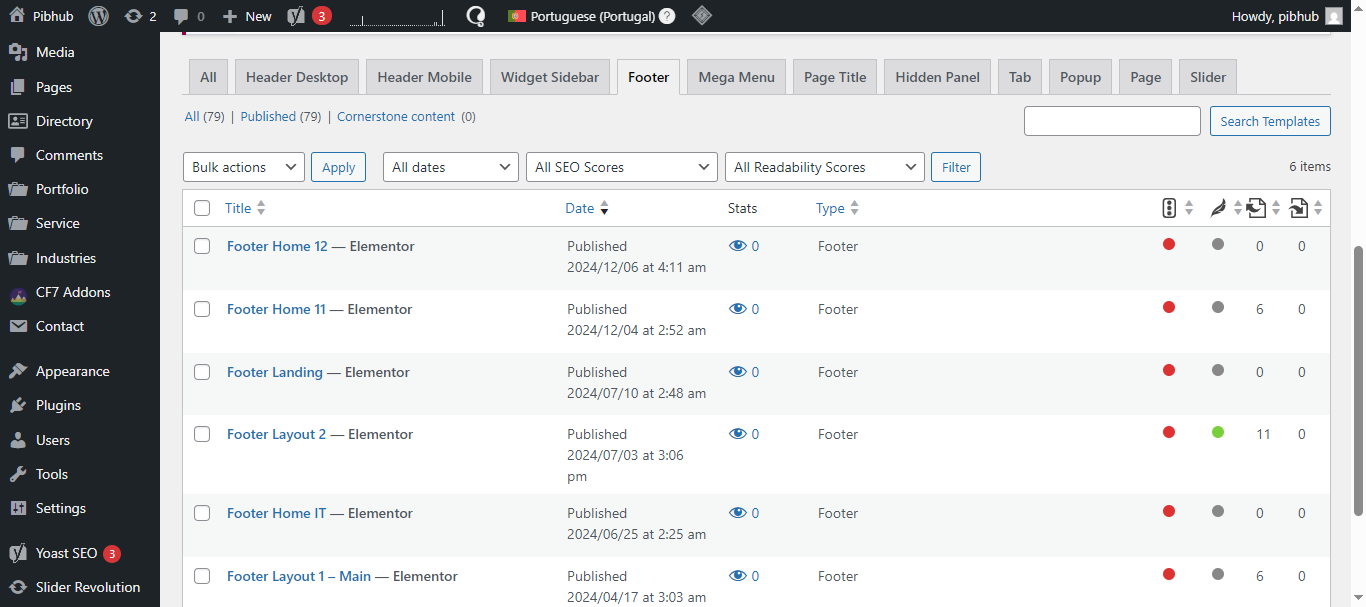
4th - Footer - This section is in Templates and this don't have option to translate in Portuguese.

Templates-‹-Pibhub-—-WordPress-04-06-2026_03_56_PM.png
April 6, 2026 at 10:39 am #17951199

Carlos Rojas
WPML Supporter since 03/2017

Languages: English (English ) Spanish (Español )

Timezone: Europe/Madrid (GMT+02:00)

Great!

To translate the footer, you need to go to WPML -> Settings -> Post type translation -> Search for the templates and set them as translatable -> Save the changes, and then go to WPML -> Translation Dashboard, where you will find a new section to translate the templates.

This guide provides the steps to follow to translate custom post types as the templates on your site: https://wpml.org/documentation/getting-started-guide/translating-custom-posts/

April 6, 2026 at 11:41 am #17951277

pibhubP

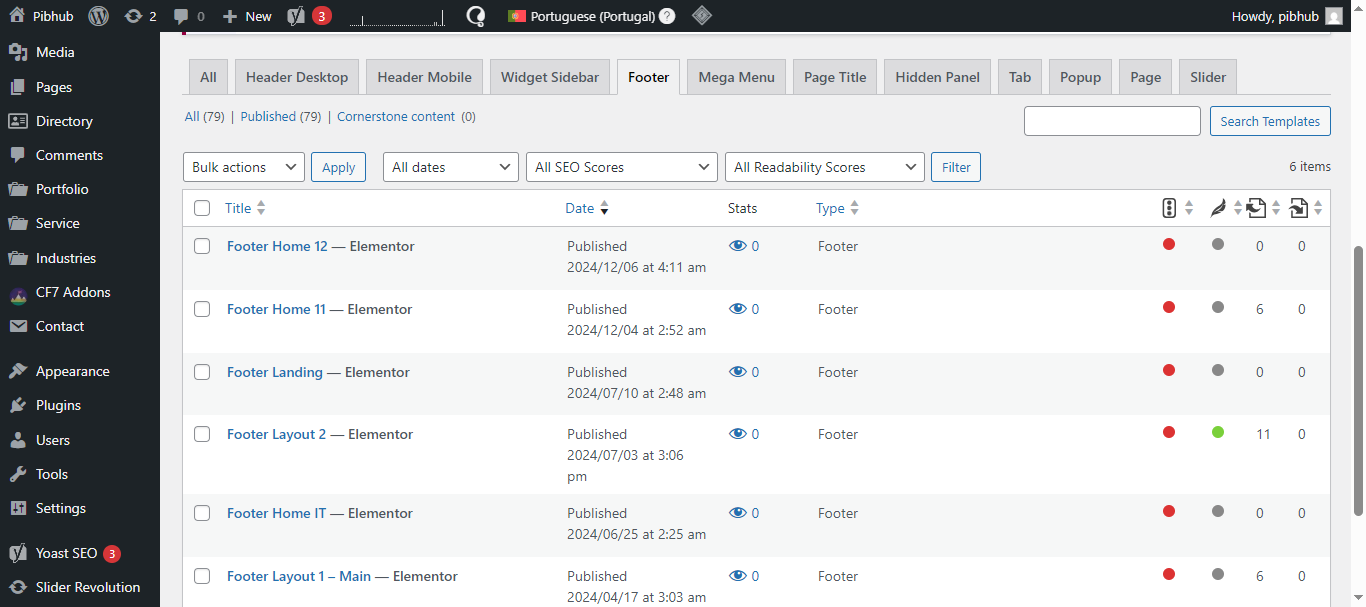
4th. PLease find the attached screenshot. Translate is selected, but then why does it not have option to translate.

5th. Also I want to translate the content in Slider Revolution. How can I do that?

Templates-‹-Pibhub-—-WordPress-04-06-2026_03_56_PM.png
Settings-‹-Pibhub-—-WordPress-04-06-2026_05_05_PM.png
April 6, 2026 at 11:54 am #17951319

Carlos Rojas
WPML Supporter since 03/2017

Languages: English (English ) Spanish (Español )

Timezone: Europe/Madrid (GMT+02:00)

Hi,

4.- These don't seem to be the Elementor templates in WPML -> Settings -> Post type translation. I think the Elementor templates are at the end of the table.

5.- To translate the Slider Revolution, you need to follow these steps: https://wpml.org/documentation/plugins-compatibility/creating-multilingual-sliders-with-revolution-slider-and-wpml/
Basically, you will need to set the language to each slide.

April 7, 2026 at 9:38 am #17953291
pibhubP

Hello,

Thanks!

4th and 5th are resolved.

6th - Header "Join Us" button not translated in portuguese. In backend its translated also translated in elementor (pt).

7th - Member Directory page EN - hidden link
PT - hidden link

Here the website link is not visible in PT translated page and when clicked on the logo it lands on 404 error page.

New threads created by Carlos Rojas and linked to this one are listed below:

https://wpml.org/forums/topic/split-navigation-menu/

April 7, 2026 at 9:58 am #17953367

Carlos Rojas
WPML Supporter since 03/2017

Languages: English (English ) Spanish (Español )

Timezone: Europe/Madrid (GMT+02:00)

Hi there,

As the original issues are solved, and the additional issues are solved, I'm splitting this ticket to address the 6th and 7th problems separately. I will also set this ticket as solved. This way we will be following our forum guideline of solving one issue at a time (although we already solved more than one 🙂 )

We will continue in this ticket: https://wpml.org/forums/topic/split-navigation-menu/