
This thread is resolved. Here is a description of the problem and solution.
Problem:
The client was experiencing issues with WPML on a new installation where the site immediately started loading 'EN' URLs without having English translations ready. Additionally, the site recognized the original Portuguese content as English, causing functionality issues when attempting to hide the 'EN' language.
Solution:
We recommended the following steps to resolve the issue:
1. Make a full backup of the site.
2. Navigate to WPML -> Languages -> Add / Remove languages, uncheck 'English' and save.
3. Go to WPML -> Support -> Troubleshooting and perform the following actions in order:
- Clear the cache in WPML
- Fix element_type collation
- Fix WPML tables collation
- Set language information
- Reset languages
4. Check the option 'I am about to reset all translation and language data.' and click on 'Reset and deactivate WPML'.
5. Reinstall WPML, setting Portuguese as the main language and English as the secondary language.
After these steps, the issues were no longer reproducible, and the site functioned correctly with the correct language assignments.
If this solution does not resolve your issue or seems outdated, we recommend checking related known issues at https://wpml.org/known-issues/, verifying the version of the permanent fix, and confirming that you have installed the latest versions of themes and plugins. If problems persist, please open a new support ticket at WPML support forum.
This is the technical support forum for WPML - the multilingual WordPress plugin.
Everyone can read, but only WPML clients can post here. WPML team is replying on the forum 6 days per week, 22 hours per day.
Tagged: Bug
This topic contains 24 replies, has 3 voices.
Last updated by Mateus Getulio 1 year, 8 months ago.
Assisted by: Mateus Getulio.
| Author | Posts |
|---|---|
| August 13, 2024 at 1:22 pm #16066603 | |
 alexandreR-4 |
Background of the issue: Symptoms: Questions: |
| August 13, 2024 at 3:08 pm #16067087 | |
 Bigul |
Hello, Welcome to the WPML support forum. Before assigning your ticket to one of my colleagues, please allow me to guide you through some initial debugging steps to help speed up the support process. To help you faster, I've enabled debug information for this support ticket. Please see this link for how to get this information from your site and give it to us: http://wpml.org/faq/provide-debug-information-faster-support/ When WPML is set up, it automatically configures your site to support multiple languages. But we can hide the languages from the site's front end. Please refer to the following documentation for more details. -- Bigul |
| August 13, 2024 at 4:34 pm #16067566 | |
|
alexandreR-4 |
Hello Bigul, here's Erik. There you go! |
| August 13, 2024 at 8:06 pm #16067978 | |
 Mateus Getulio Supporter Languages: English (English ) Portuguese (Brazil) (Português ) Timezone: America/Sao_Paulo (GMT-03:00) |
Hello Erik, I checked it and it looks like you have the fields 'home' and 'siteurl' configured like this: SiteURL hidden link Having different values for both fields can cause issues, is it possible for you to edit them in the wp-admin General settings screen and set them to be equal? Also, according to your Debug.info, the WP memory limit needs to be increased. PHP memory is fine, but WordPress uses 40Mb as default. The minimum requirements for WPML are 128 MB. (Kindly check this page https://wpml.org/home/minimum-requirements/) You can increase it by adding the following code in your wp-config.php file right before the /* That's all, stop editing! Happy publishing. */ line:
/* Memory Limit */
define('WP_MEMORY_LIMIT', '256M');
define( 'WP_MAX_MEMORY_LIMIT', '256M');
If even after that the issue persists, I would like to request temporary access (wp-admin and FTP) to your site to take better look at the issue. You will find the needed fields for this below the comment area when you log in to leave your next reply. The information you will enter is private which means only you and I can see and have access to it. Our Debugging Procedures I will be checking various settings in the backend to see if the issue can be resolved. Although I won't be making changes that affect the live site, it is still good practice to backup the site before providing us access. In the event that we do need to debug the site further, I will duplicate the site and work in a separate, local development environment to avoid affecting the live site. Privacy and Security Policy We have strict policies regarding privacy and access to your information. Please see: **IMPORTANT** - Please make a backup of site files and database before providing us access. Please, let me know if you need any additional details. Have a nice day. |
| August 14, 2024 at 5:27 pm #16072042 | |
|
Mateus Getulio Supporter Languages: English (English ) Portuguese (Brazil) (Português ) Timezone: America/Sao_Paulo (GMT-03:00) |
Hello there, Thank you for providing me with the staging site. Is WPML installed and configured in there, the issue you reported is happening in the staging site as well? I tried accessing it, but it looks like there's a basic HTTP authentication in place, I tried using the user and password you provided but it doesn't seem to be working for the HTTP auth. Can you please review it? I enabled the private fields for your next reply in case you need to share the basic auth credentials. Best, |
| August 14, 2024 at 8:42 pm #16072507 | |
|
Mateus Getulio Supporter Languages: English (English ) Portuguese (Brazil) (Português ) Timezone: America/Sao_Paulo (GMT-03:00) |
Thank you for providing the basic auth credentials. In order for me to troubleshoot the issue effectively, I would need you to install WPML on the staging site and run through the setup wizard. During this process, please select the languages, set your translation preferences, and configure any other necessary settings as you did in the live environment. This will allow the issue to manifest on the staging site, enabling me to investigate and identify the root cause. Once you've completed the setup, please give me a heads-up, and I'll proceed with the troubleshooting. Thank you for your cooperation. Best regards, |
| August 19, 2024 at 11:07 am #16083126 | |
|
alexandreR-4 |
Hello Mateus, hope you're doing fine. The plugin is now installed and activated. Could you take a look? Thank you   |
| August 19, 2024 at 11:19 am #16083187 | |
|
alexandreR-4 |
Just so you can understand, one of the problems has already started. When I type the URL, the site now redirects me to hidden link. |
| August 19, 2024 at 5:17 pm #16084768 | |
|
Mateus Getulio Supporter Languages: English (English ) Portuguese (Brazil) (Português ) Timezone: America/Sao_Paulo (GMT-03:00) |
Hi Erik, Thank you very much for replicating the issue. Upon further review, when I checked the posts and pages I noticed that they were wrongly assigned to English even though the site's main language is Portuguese. I believe this was causing the issues you were experiencing. This is a strange bug, it is possible that at some point of time this site had WPML installed? Some leftover data could have caused it. I followed a few steps and when I check now it looks like the existent content has been properly assigned to Portuguese and that there's no /en in the URL bar when we're browsing the site: - Make a full backup of the site After that, I ran the wizard again, installed WPML with Portuguese as the main language and English as the secondary language and I'm no longer able to reproduce those issues. Can you please test it again to make sure it is working properly now? Thank you, |
| August 19, 2024 at 6:47 pm #16085015 | |
|
alexandreR-4 |
Hi Mateus, thank you for your assistance. I can't assure you that WPML was previously installed, but I can't deny it either. But I'm consulting now that the problem I was facing is still bothering me. See, my homepage is now exhibiting a random "archives" page (that I can customize and set to the correct "Home"), but this is weird. The original "Home" page has been renamed to home-2 and we lost all the categories (the home is now missing "Notícias e eventos", which shows posts based on categories). We are now restoring the backup from the staging website to start from scratch. Best |
| August 19, 2024 at 8:32 pm #16085211 | |
|
Mateus Getulio Supporter Languages: English (English ) Portuguese (Brazil) (Português ) Timezone: America/Sao_Paulo (GMT-03:00) |
Hello Erik, I believe we can try to reset WPML before even running the wizard for the 1st time. This should get the issue fixed, can you give me a heads up once the staging has been restored? Thank you for your help! |
| August 20, 2024 at 10:58 am #16086705 | |
|
alexandreR-4 |
Hi Mateus, I'll let you know as soon as the backup has been restored. |
| August 20, 2024 at 7:59 pm #16088195 | |
|
alexandreR-4 |
Hi Mateus, the backup has been restored and WPML is activated, but not yet configured: hidden link. So far, the site is normal and all the categories are as expected. Our IT office said they deleted everything related to WPML, including any database tracks. Can you help me with this issue? |
| August 20, 2024 at 9:28 pm #16088381 | |
|
Mateus Getulio Supporter Languages: English (English ) Portuguese (Brazil) (Português ) Timezone: America/Sao_Paulo (GMT-03:00) |
Hello Erik, Thank you for restoring the site from the backup and deleting that old WPML data. Before running the wizard again I went to WPML -> Support -> Troubleshooting and ran the following options: - Clear language information and repopulate languages After that, I re-enabled WPML and upon running the wizard there was no issue that I could identify. The content is now correctly assigned to the Portuguese language from the start, the home page is unchanged and there's no new version for the home, the categories seem to be correct as well. Can you please review it to confirm that all looks good now? Thanks a lot! 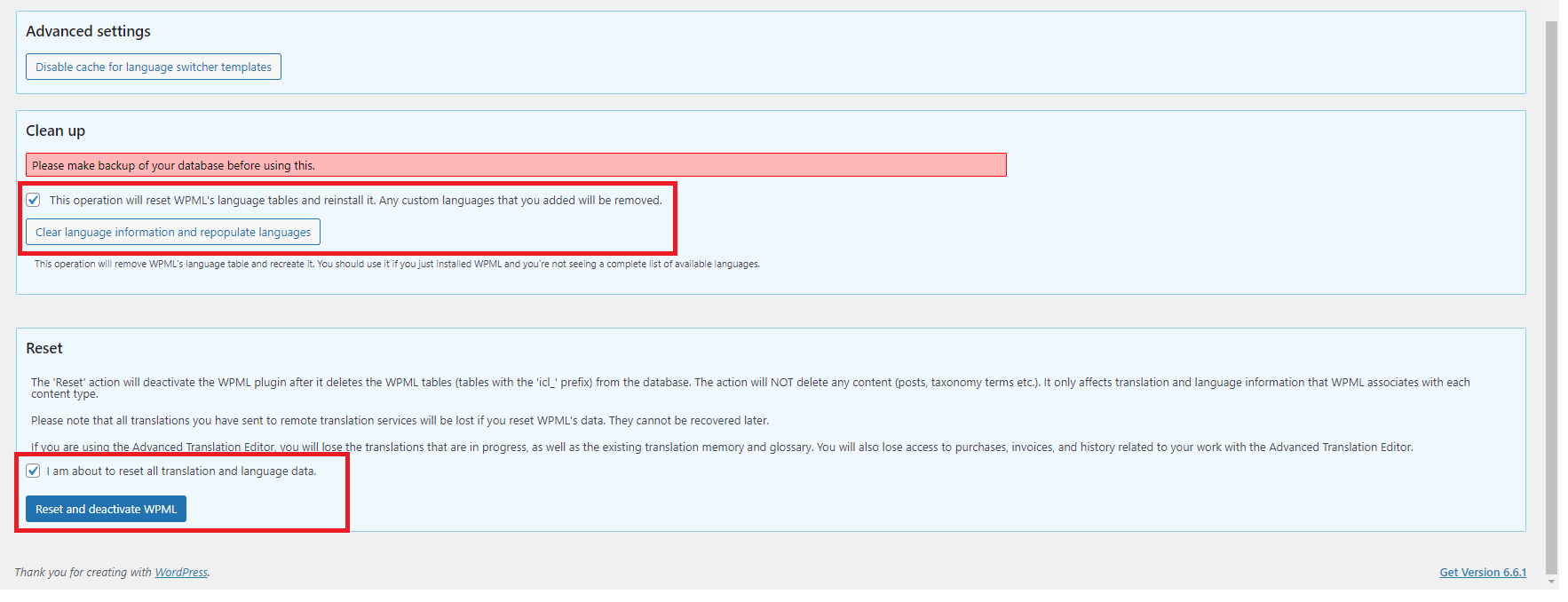 |
| August 21, 2024 at 11:17 am #16090150 | |
|
alexandreR-4 |
Hi Mateus, Thank you for your assistance. I just checked and everything seems fine! The "noticias" category was lost and renamed as "não categorizado", but after comparing the original number of posts (noticias) to the newly uncategorized posts, I realized that the amount of publications was the same. Long story short, I renamed the "não categorizado" category back to "noticias" and called it a day. Time to push to production and start translating I think. I would kindly ask you to keep this ticket open until August 27 so I can guarantee that the problem is solved. Is that ok for you? Thank you once again! |






