Skip to content Skip to sidebar

This is the technical support forum for WPML - the multilingual WordPress plugin.

Everyone can read, but only WPML clients can post here. WPML team is replying on the forum 6 days per week, 22 hours per day.

Sun Mon Tue Wed Thu Fri Sat
- 9:00 – 13:00 9:00 – 13:00 9:00 – 13:00 9:00 – 13:00 9:00 – 13:00 -
- 14:00 – 18:00 14:00 – 18:00 14:00 – 18:00 14:00 – 18:00 14:00 – 18:00 -

Supporter timezone: Europe/Kyiv (GMT+03:00)

This topic contains 6 replies, has 0 voices.

Last updated by raulI-3 2 days, 20 hours ago.

Assisted by: Andrey.

Author Posts
April 29, 2026 at 3:56 pm #18003498

raulI-3

I can't see the option to activate WPML

April 29, 2026 at 8:29 pm #18004083

Andrey
WPML Supporter since 06/2013

Languages: English (English ) Russian (Русский )

Timezone: Europe/Kyiv (GMT+03:00)

Thank you for contacting WPML support.

Can you please elaborate a little more so I can better understand? Sometimes screenshots illustrating what you mean may go a long way to clarify what words fail to transmit, so if you like, make use of "upload an image" below the comment area.

Creating Multilingual Sliders with Slider Revolution and WPML:
https://wpml.org/documentation/plugins-compatibility/creating-multilingual-sliders-with-revolution-slider-and-wpml/

Please keep in mind that this plugin needs to be translated manually (https://wpml.org/plugin/slider-revolution/):
https://wpml.org/documentation/translating-your-contents/using-different-translation-editors-for-different-pages/
hidden link

I've enabled debug information for this support ticket. Please refer to this link for instructions on how to retrieve this information from your site and provide it to us: http://wpml.org/faq/provide-debug-information-faster-support/

April 29, 2026 at 9:24 pm #18004112

raulI-3

Hi Andrey ,

Thanks for the guide , the situation is the plug-in Slider Revolution update the interface and now I can not see where to activate the WPML .

April 30, 2026 at 7:02 am #18004495

Itamar
WPML Supporter since 02/2016

Languages: Hebrew (עברית )

Timezone: Asia/Jerusalem (GMT+03:00)

Hi,

I'm Itamar from the support team, and I'm joining this thread to let you know about the following. The Slider Revolution developers are working on a new WPML integration for version 7. This is why you can't see the WPML settings you used to. As a workaround until the integration is complete, we suggest downgrading to the Slider Revolution rendering engine to version 6.

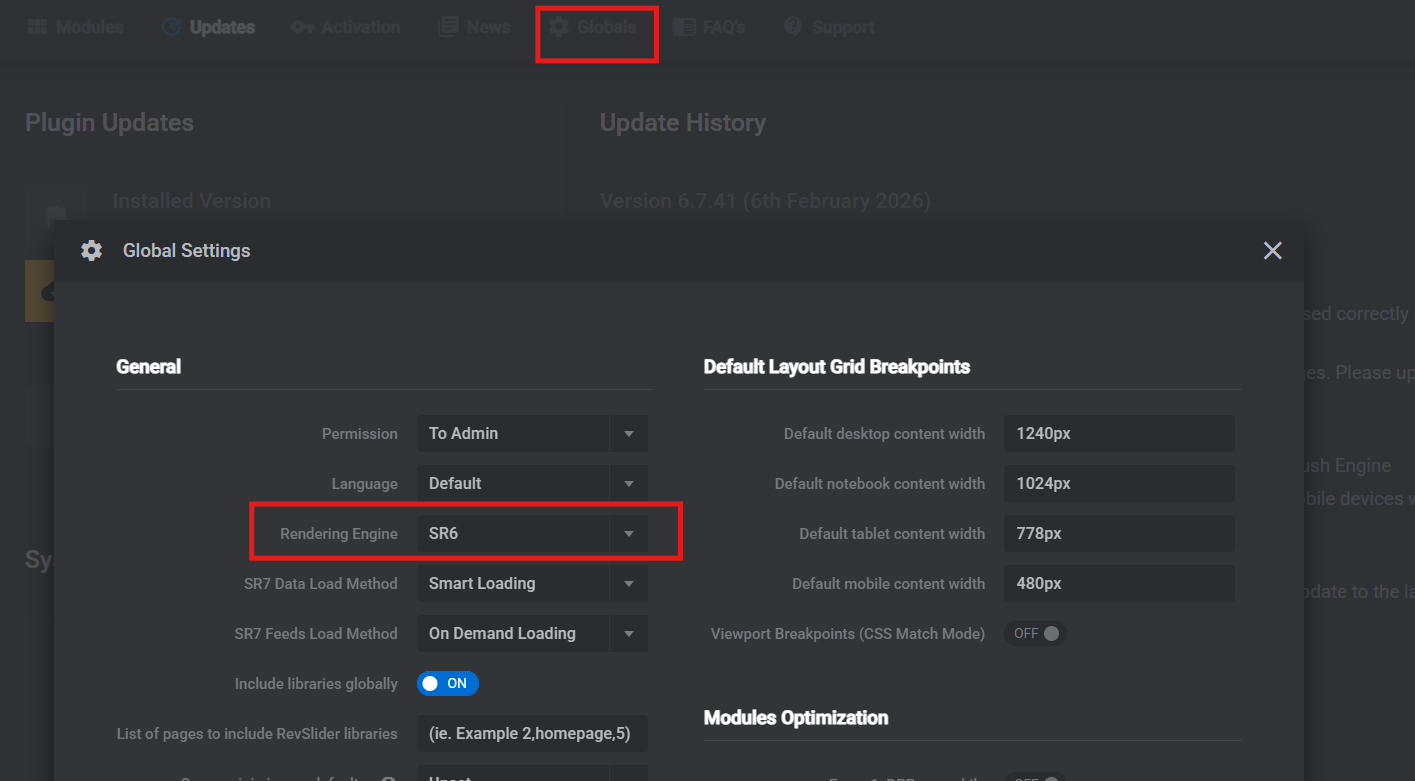
1. In the WordPress dashboard, go to Slider Revolution > Globals > Global Settings.
2. Locate the Rendering Engine setting.
3. Select the SR6 engine.
4. Save the changes.

For your information, we also published an errata about it.
https://wpml.org/errata/slider-revolution-sr7-engine-not-compatible-yet-with-wpml/

Regards,
Itamar.

April 30, 2026 at 7:17 am #18004582

raulI-3

Hi Itamar ,

I don't see the option to select SR6

Screenshot 2026-04-30 at 09.17.33.png
April 30, 2026 at 8:19 am #18004755

Andrey
WPML Supporter since 06/2013

Languages: English (English ) Russian (Русский )

Timezone: Europe/Kyiv (GMT+03:00)

Thank you for your feedback.

The screenshot I shared earlier was from a previous version.

If the issue still persists, I’ve created a fresh installation for testing. Could you please install the latest version of Slider Revolution there and check if you see the same?

The link to the Sandbox site in the following private reply.

image1.png
April 30, 2026 at 2:47 pm #18006324

raulI-3

Hi Andrey ,

Done , the last version of SR7 is install in the Sandbox.