
This is the technical support forum for WPML - the multilingual WordPress plugin.
Everyone can read, but only WPML clients can post here. WPML team is replying on the forum 6 days per week, 22 hours per day.
| Sun | Mon | Tue | Wed | Thu | Fri | Sat |
|---|---|---|---|---|---|---|
| - | - | 9:00 – 18:00 | 9:00 – 18:00 | 9:00 – 18:00 | 9:00 – 18:00 | 9:00 – 18:00 |
| - | - | - | - | - | - | - |
Supporter timezone: America/Lima (GMT-05:00)
Related documentation:
This topic contains 31 replies, has 0 voices.
Last updated by Andreas W. 2 days, 4 hours ago.
Assisted by: Andreas W..
| Author | Posts |
|---|---|
| March 18, 2026 at 3:41 am #17906179 | |
 adrienL-15 |
Hello, I’m experiencing an issue after updating WPML to the latest version. On my WooCommerce site, the “Translate content” button is always disabled (greyed out) when editing products. The problem affects all products. What I already tried: - Ran WPML troubleshooting tools (cleanup, sync, etc.) The issue appeared right after updating WPML. It seems that WPML cannot initialize the translation process properly. Could you please help identify what is causing this? Thanks in advance. 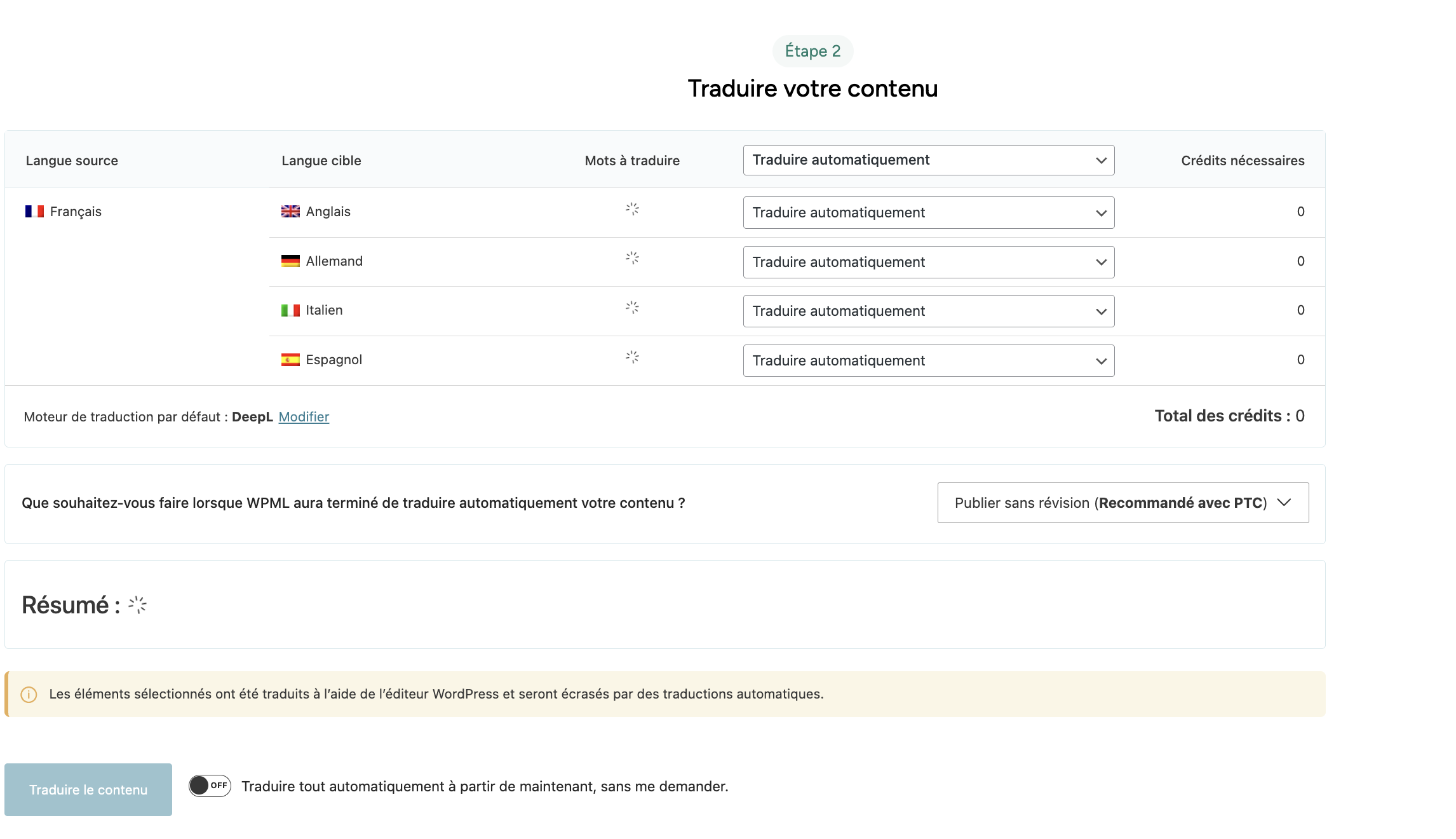 |
| March 19, 2026 at 2:49 am #17909644 | |
 Andreas W. WPML Supporter since 12/2018 Languages: English (English ) Spanish (Español ) German (Deutsch ) Timezone: America/Lima (GMT-05:00) |
Hello, It seems the minimum server requirements are not met: Could you please increase the WordPress memory limit (WP Memory Limit) to at least 256 MB? WPML requires at least 128 MB. Your current values are: To do this, you need to connect to your website's server and open the wp-config.php file in a text editor. The file is located in the WordPress root directory. Add this code to the wp-config.php file to increase WordPress's memory:
define ('WP_MEMORY_LIMIT', '256M');
Add this just before this comment: // That's all, stop editing! Happy blogging. The current values can be viewed under WPML > Support > WordPress. These settings can be restricted directly by your hosting provider. Therefore, I recommend contacting them and asking them to change them directly if the changes are not applied automatically. After adjusting the limit, try again to send the content to translation. If this does not solve the issue, please let me know. Best regards |
| March 19, 2026 at 4:28 am #17909653 | |
|
adrienL-15 |
Hello, I increased the WP Memory Limit to 256M as requested, but the issue is still present. The "Translate content" button is still disabled, and clicking the "+" icon creates a new product instead of a translation. This issue appeared right after updating WPML. I am attaching the debug information below. Thanks.  |
| March 19, 2026 at 2:31 pm #17911481 | |
|
Andreas W. WPML Supporter since 12/2018 Languages: English (English ) Spanish (Español ) German (Deutsch ) Timezone: America/Lima (GMT-05:00) |
Do you see any issues at WPML > Support > Installer Support or at WPML > Support> ATE Error Log? I'd like to request temporary access (wp-admin and FTP) to the website to investigate the issue further. You'll find the necessary fields below the comment section if you log in to leave the next reply. The information you provide will be private, meaning only you and I will be able to see and access it. IMPORTANT If you don't see the "wp-admin / FTP" fields, your login credentials for the post and website will be set to "PUBLIC." Do NOT publish the information unless you see the required wp-admin / FTP fields. The private reply form looks like this: When replying again, click "I still need assistance". Video: Please note that we are required to request this information individually on each ticket. We are not permitted to access any login information that was not specifically provided in the private reply form for this ticket. |
| March 19, 2026 at 3:09 pm #17911570 | |
|
adrienL-15 |
Hi, I checked the ATE error log and found repeated errors: “Api error missing resource: No sitekey found for this website” It looks like the site is no longer properly connected to the Advanced Translation Editor. Would you confirm if the correct approach is to reset and reconnect ATE from WPML troubleshooting? If yes, I will proceed with that. For now, I would prefer not to provide wp-admin / FTP access unless strictly necessary. Best regards 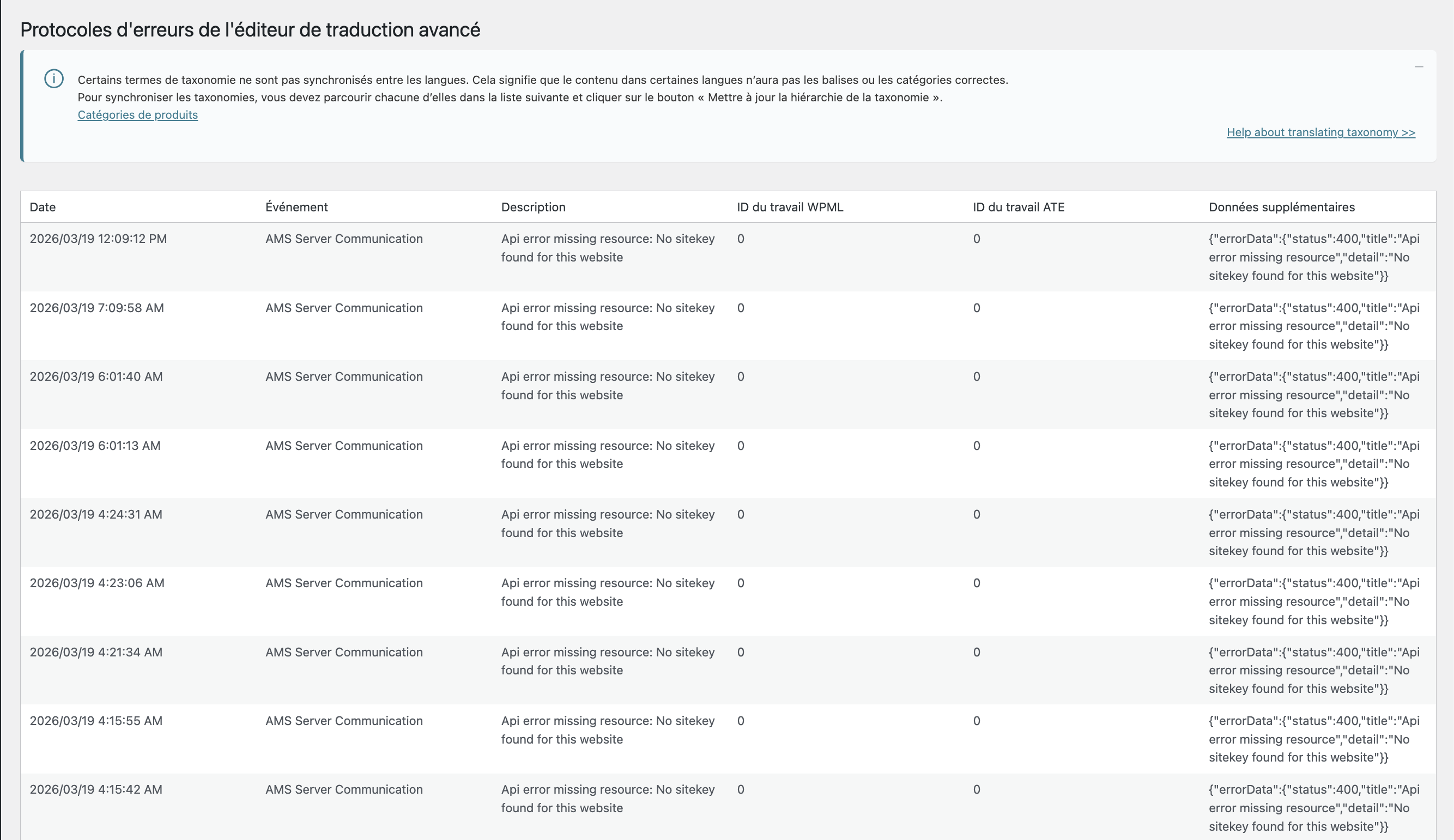 |
| March 19, 2026 at 5:33 pm #17912133 | |
|
Andreas W. WPML Supporter since 12/2018 Languages: English (English ) Spanish (Español ) German (Deutsch ) Timezone: America/Lima (GMT-05:00) |
Please send me screenshots from: 1) WPML > Support > Installer Support after having clicked "Check now". 2) WPML > Support > Troubleshooting > Your Automatic Translation account id is. |
| March 20, 2026 at 12:22 am #17912536 | |
|
adrienL-15 |
Hi, Please find attached the requested screenshots. Let me know if you need anything else. Best regards   |
| March 20, 2026 at 3:09 pm #17914715 | |
|
Andreas W. WPML Supporter since 12/2018 Languages: English (English ) Spanish (Español ) German (Deutsch ) Timezone: America/Lima (GMT-05:00) |
The only odd thing I can see on the system is that the wpml.org site key of your site seems to be used for more than one site. WPML must be re-registered after every website migration or after changing the domain or domain provider. 1) Go to https://wpml.org/de/account/websites/ 2) If the site URL is already registered, delete it from the list. 3) Now enter the site URL again. This will create a new site key. 4) Click on "Show key" and copy it. 5) Enter the key under Plugins > Add New > Commercial (tab) to re-register WPML. If WPML is still registered here, unregister it first. If the problem persists, please let me know. |
| March 21, 2026 at 4:06 am #17915478 | |
|
adrienL-15 |
Hi, Thanks for your message. I followed your instructions step by step: However, the issue is still the same: the Translation Dashboard buttons remain greyed out and I cannot launch translations in bulk. I also tested whether this could be caused by server protection (Cloudflare Managed Challenge), so I temporarily disabled it, but it did not change anything. On the other hand, I noticed that I can still translate content manually by opening each product/page individually and using the WPML Translation Editor (ATE), which works correctly. So currently: At this point, I feel like I’ve followed all the suggested steps and the issue remains unchanged. Do you see anything else that could be causing this, or any other direction I should investigate? Thanks in advance for your help. |
| March 21, 2026 at 5:01 pm #17915893 | |
|
Andreas W. WPML Supporter since 12/2018 Languages: English (English ) Spanish (Español ) German (Deutsch ) Timezone: America/Lima (GMT-05:00) |
If you still get the sitekey/ATE registration mismatch issue on WPML > Support > ATE Error log, then there might be an issue with your account. The next step would be to escalate this issue to the second-tier support team for further review, but it would be really advisable that you first provide access to the site. I would not take any changes on your site, but only create a local copy to investigate if the site is suffering from PHP or database errors that could be causing this issue. The private reply form is enabled again. |
| March 22, 2026 at 8:57 am #17916189 | |
|
adrienL-15 |
Hi, I understand that further investigation would require access to the site, which I prefer not to provide. Since the bulk translation workflow is currently not working on my side, I’ve had to move away from the ATE system and set up an alternative workflow to handle translations independently. I’ll continue working this way moving forward. Thanks again for your help. Best regards, |
| March 24, 2026 at 3:39 pm #17923054 | |
|
Andreas W. WPML Supporter since 12/2018 Languages: English (English ) Spanish (Español ) German (Deutsch ) Timezone: America/Lima (GMT-05:00) |
Hello Adrien, Without access to the site, it is sadly impossible for me to determine what is causing the issue with your Translation Dashboard. Note that the Advanced Translation Editor's translation jobs pass through an external server, which runs our own system to handle credits, translation memory, and other site-related data. I am escalating the issue to the second-tier support team to have them review your account. Best regards |
| March 25, 2026 at 1:08 am #17924252 | |
|
Andreas W. WPML Supporter since 12/2018 Languages: English (English ) Spanish (Español ) German (Deutsch ) Timezone: America/Lima (GMT-05:00) |
Could you please confirm if this issue occurred after updating to WCML 5.5.4? If not, does downgrading WCML to version 5.5.3 or updating to version 5.5.5 solve the issue? Changelog: |
| March 27, 2026 at 2:47 am #17930804 | |
|
adrienL-15 |
Hi, Yes, the issue appeared right after the latest WCML update. I did look into rolling back the plugin, but the rollback tool I use requires a premium version, and I prefer to avoid downgrading plugins on a live production site. The problem is still the same: the Translation Dashboard button remains greyed out, while translations can still be done manually from the product edit page. Best regards, |
| March 27, 2026 at 6:08 am #17930840 | |
|
Andreas W. WPML Supporter since 12/2018 Languages: English (English ) Spanish (Español ) German (Deutsch ) Timezone: America/Lima (GMT-05:00) |
Could you please provide us: 1) A screenshot from the Browser Debug Console while being on the Translation Dashboard 2) Any errors from the WordPress debug.log |






