
This thread is resolved. Here is a description of the problem and solution.
Problem:
The client reported extreme performance issues with their WooCommerce site when WPML Multilingual CMS and WPML String Translation were enabled, causing page load times to exceed 2 minutes. The slowdown was suspected to be due to heavy database queries or translation-related overhead.
Solution:
We identified that the AJAX request for WooCommerce Fragments (get_refreshed_fragments) was causing longer load times, as every fragment passed through translation filters. A known bug in WCML caused fragments to refresh multiple times unnecessarily. We suggested a workaround to disable cart fragments if an auto-updating mini-cart was not needed, using the following code:
add_action('wp_enqueue_scripts', function() {
wp_dequeue_script('wc-cart-fragments');
});
Additionally, we found that the first uncached page load was extremely slow regardless of WPML being active, indicating a potential issue with the caching setup. We implemented the above workaround in the Child Theme, which improved the load time to about 6 seconds with WPML enabled.
We also recommended ensuring that the WPML Multilingual & Multicurrency for WooCommerce addon was enabled and that WPML and its addons were updated.
If you're experiencing similar issues, we recommend trying the provided workaround and checking your caching setup. It's also important to ensure that all WPML components are up to date. If these steps do not resolve the issue or if the solution seems outdated or irrelevant to your case, please visit our support forum at WPML Support Forum and open a new support ticket. We also highly recommend checking related known issues at https://wpml.org/known-issues/, verifying the version of the permanent fix, and confirming that you have installed the latest versions of themes and plugins.
This is the technical support forum for WPML - the multilingual WordPress plugin.
Everyone can read, but only WPML clients can post here. WPML team is replying on the forum 6 days per week, 22 hours per day.
Tagged: Bug, Performance, WCML
Related documentation:
This topic contains 23 replies, has 0 voices.
Last updated by Andreas W. 3 months ago.
Assisted by: Andreas W..
| Author | Posts |
|---|---|
| January 15, 2026 at 5:08 pm | |
 aljazP-4 |
SUPPORT UPDATE: The page load time issue was fixed on chat and now takes 2-4 seconds. Some warnings need to be fixed in Woodmart, and a few other plugins. Hello WPML Support Team, Problem description: Things we did for speed: Server specifications: Store size: Additional notes: Questions: We can provide: Thank you for your assistance. |
| January 15, 2026 at 7:10 pm #17735188 | |
 Andreas W. WPML Supporter since 12/2018 Languages: English (English ) German (Deutsch ) Timezone: America/Lima (GMT-05:00) |
Hi there, We had a chat today regarding performance issues on your site. On chat, we were able to bring the load time down to between 2-4 seconds, but there was still a warning regarding the theme showing up permanently. I hope the Woodmart Team can patch your site with a workaround until they have fixed the issue on their end. Drop me a comment once you have heard back from them, and we will take it up from there. This ticket will remain open for 14 days. I will be awaiting your reply. Best regards |
| January 23, 2026 at 6:15 am #17755855 | |
|
aljazP-4 |
Hello Andreas, I have resolved the issue with the theme, and the error is no longer appearing. I have also received an official response from Discount Rules confirming that they will fix the issue on their side in a future update. The test site is now working stably. Would it be possible to apply all the changes that are currently on the test environment to the production site on Monday, 26 January 2026? |
| January 23, 2026 at 4:57 pm #17757934 | |
|
Andreas W. WPML Supporter since 12/2018 Languages: English (English ) German (Deutsch ) Timezone: America/Lima (GMT-05:00) |
Hello, Have you also reported this error to Woodmart? function wp_add_inline_script was called incorrectly. Ne pošiljajte oznak v wp_add_inline_script(). (This message was added in version 4.5.0.)
wp_add_inline_script()
wp-includes/functions.wp-scripts.php:134
woodmart_enqueue_base_scripts()
wp-content/themes/woodmart/inc/enqueue.php:215
do_action('wp_enqueue_scripts')
wp-includes/plugin.php:522
wp_enqueue_scripts()
wp-includes/script-loader.php:2311
do_action('wp_head')
wp-includes/plugin.php:522
wp_head()
wp-includes/general-template.php:3197
load_template('wp-content/themes/woodmart/header.php')
wp-includes/template.php:814
locate_template()
wp-includes/template.php:749
get_header()
wp-includes/general-template.php:48
I'd like to offer to take a closer look at the production site and request temporary access (wp-admin and FTP) to the website to investigate the issue further. You'll find the necessary fields below the comment section if you log in to leave the next reply. The information you provide will be private, meaning only you and I will be able to see and access it. IMPORTANT If you don't see the "wp-admin / FTP" fields, your login credentials for the post and website will be set to "PUBLIC." Do NOT publish the information unless you see the required wp-admin / FTP fields. I may need to install a plugin called "All In One WP Migration" to create a copy of the website on which I can investigate the problem more thoroughly. The private reply form looks like this: When replying again, click "I still need assistance". Video: Please note that we are required to request this information individually on each ticket. We are not permitted to access any login information that was not specifically provided in the private reply form for this ticket. Best regards, |
| January 27, 2026 at 8:06 am #17765477 | |
|
Andreas W. WPML Supporter since 12/2018 Languages: English (English ) German (Deutsch ) Timezone: America/Lima (GMT-05:00) |
Hello, My apologies for the delay in answering, as I do not work on Sundays and Mondays. Handling this request on chat would be possible, but I do not have any influence on the supporter who will be assigned to your chat. What you could do is tell the supporters that you would like to talk to Andreas W., and I will be able to step in. Best regards |
| January 27, 2026 at 10:37 am #17766253 | |
|
Andreas W. WPML Supporter since 12/2018 Languages: English (English ) German (Deutsch ) Timezone: America/Lima (GMT-05:00) |
Take kindly note that on your production site, WPML is currently not active, and I see a higher load time even in this state: hidden link hidden link Please let me know how you would like me to proceed. I would need to activate WPML to take further steps. I also might need to enable WP_DEBUG to check for errors and install "Query Monitor" to check for slow queries. |
| January 27, 2026 at 5:55 pm #17768606 | |
|
aljazP-4 |
No problem, we can communicate like this. |
| January 27, 2026 at 6:50 pm #17768717 | |
|
Andreas W. WPML Supporter since 12/2018 Languages: English (English ) German (Deutsch ) Timezone: America/Lima (GMT-05:00) |
No, I have not yet made any changes to the site, but WPML is currently not active there. May I activate it? Without running WPML, I see the following issues: There are still two errors on the site that are not caused by WPML, but may impact WPML String Translation: Function _load_textdomain_just_in_time was called incorrectly. Translation loading for the woo-discount-rules domain was triggered too early. This is usually an indicator for some code in the plugin or theme running too early. Translations should be loaded at the init action or later. (This message was added in version 6.7.0.) Function _load_textdomain_just_in_time was called incorrectly. Translation loading for the woo-discount-rules-pro domain was triggered too early. This is usually an indicator for some code in the plugin or theme running too early. Translations should be loaded at the init action or later. (This message was added in version 6.7.0.) This should get reported to Flycart. --- Also, there are two slow queries with a load time impact of about 2.5 seconds, which come from: This should get reported to WooCommerce. --- I would suggest handling those issues first or testing with WPML, but without the mentioned plugins above. --- Furthermore, there seems to be a duplicate entry on the wp-config.php file which should be handled properly: |
| January 27, 2026 at 7:22 pm #17768799 | |
|
aljazP-4 |
Regarding the first two, the answer from discount rules is in the attachment. 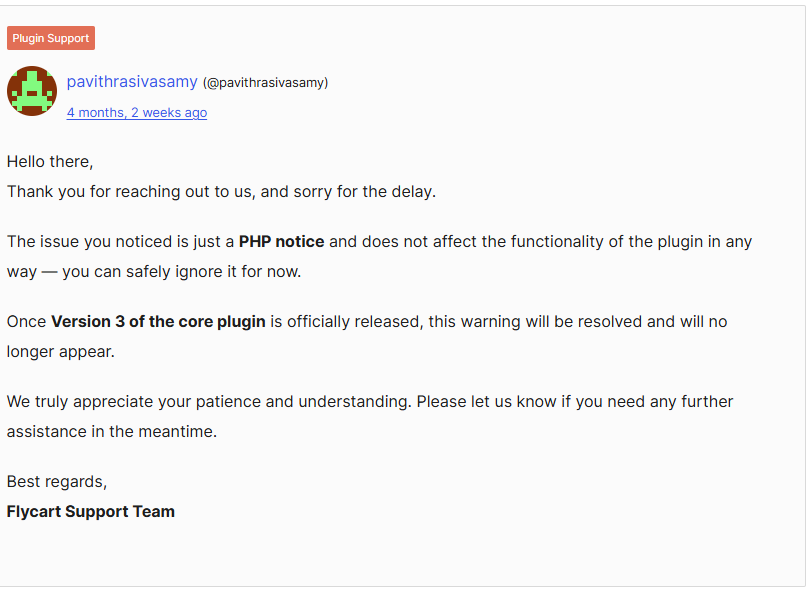 |
| January 28, 2026 at 3:11 am #17769294 | |
|
Andreas W. WPML Supporter since 12/2018 Languages: English (English ) German (Deutsch ) Timezone: America/Lima (GMT-05:00) |
The issue with loading textdomains was reported by us in the following errata about it: The author of the plugin should solve this issue. It might not break the site, but it definitely should get solved. --- The issue with the wp-config.php file is that there are two similar declarations, and only one is accepted: define( 'WP_CACHE_KEY_SALT', 'clair.si:' ); This line should only exist once in the file. I have commented out the second entry, which solves the current error. --- I would also suggest we wait for now for WooCommerce, as, according to Query Monitor, there are still two queries from WC Price History causing a load time of about 2.5 seconds, but those slow queries seem only to occur on the backend. There was a WC Price History database update available, which is in progress now. --- Once I enable WPML, the site becomes slow, and I can see the following error, which can lead to a load time between 20 and 40 seconds: wpml: cURL error 28: Operation timed out after 45009 milliseconds with 0 bytes received This error occurs because the site has issues connecting to wpml.org, and usually, such errors are temporary. The cause for this error is currently unclear to me. I further receive random 502 and 404 errors when navigating the backend. I then installed the latest beta versions of our plugins, as they come with some bugfixes and performance enhancements. Anhow, the issue persists. --- At this point, I would need to begin disabling plugins to isolate the cause of the issue, which might not be possible as this is a live site. If there are any installed plugins that are actually not in use, please delete them. I will try to check the site for errors now and might need to take a local copy of the site for investigating further. |
| January 28, 2026 at 3:17 am #17769295 | |
|
Andreas W. WPML Supporter since 12/2018 Languages: English (English ) German (Deutsch ) Timezone: America/Lima (GMT-05:00) |
Could you please verify the earlier-provided FTP access credentials? It keeps telling me that the password is incorrect. The private reply form is enabled again. |
| January 28, 2026 at 9:52 am #17769955 | |
|
Andreas W. WPML Supporter since 12/2018 Languages: English (English ) German (Deutsch ) Timezone: America/Lima (GMT-05:00) |
I have tried to create a copy of the website with "All in One WP Migration", but the export fails, which seems to be related to missing permissions. I am also still experiencing random 502 errors while navigating the backend, even while WPML is disabled. Furthermore, the issues that I saw today on the live site were not occurring on the staging, which I revised on our chat. I could offer to try to migrate the site to our test server on Cloudways for testing. Could you please provide me with more details about the size of your website, including the uploads folder? |
| January 29, 2026 at 1:03 pm #17773677 | |
|
aljazP-4 |
My test was also on 8.3 PHP, but production is on 8.4 PHP. Now i have downgrade production. Are these setting ok : hidden link |
| January 29, 2026 at 11:54 pm #17775380 | |
|
Andreas W. WPML Supporter since 12/2018 Languages: English (English ) German (Deutsch ) Timezone: America/Lima (GMT-05:00) |
Inside FVM those settings, you are removing scripts from Frontend at "Remove JavaScript Scripts": If I understand the settings of FVM correctly, this will lead to important scripts for WPML not being loaded. I would suggest removing our URLs from this setting if you plan to use the Advanced Translation Editor. I will now try again to take a local copy of the site for testing and then get back to you. Take kindly note that due to the size of the site, the migration might take longer than expected. |
| January 30, 2026 at 9:02 am #17776205 | |
|
Andreas W. WPML Supporter since 12/2018 Languages: English (English ) German (Deutsch ) Timezone: America/Lima (GMT-05:00) |
I wanted to let you know that I took a local copy of your site, and I can confirm a performance issue while running the site only with Woodmart, WooCommerce, and WPML. So far, I have not been able to figure out what is causing this issue, and I need to ask you for some more patience. |






