Can you please elaborate a little more so I can better understand? Sometimes screenshots illustrating what you mean may go a long way to clarify what words fail to transmit, so if you like, make use of "upload an image" below the comment area.
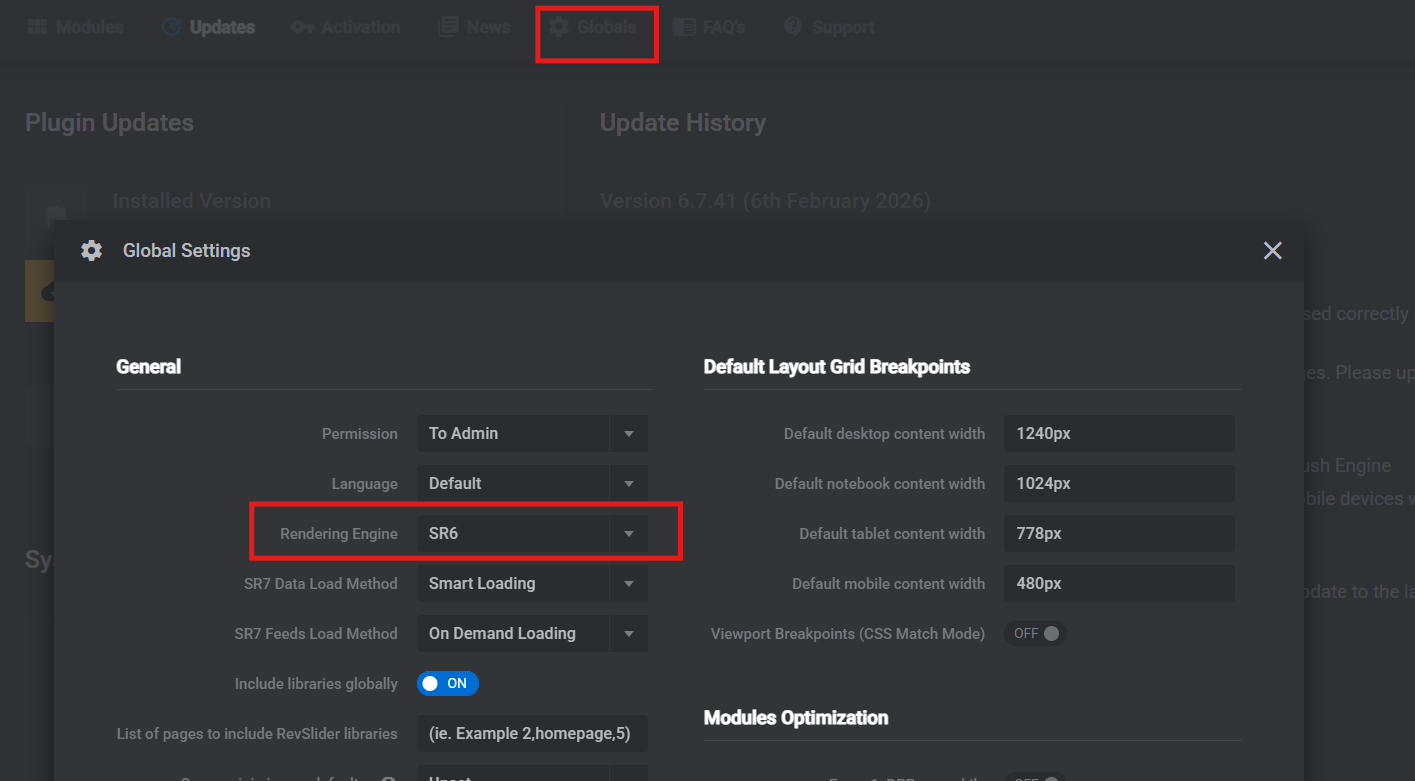
I'm Itamar from the support team, and I'm joining this thread to let you know about the following. The Slider Revolution developers are working on a new WPML integration for version 7. This is why you can't see the WPML settings you used to. As a workaround until the integration is complete, we suggest downgrading to the Slider Revolution rendering engine to version 6.
1. In the WordPress dashboard, go to Slider Revolution > Globals > Global Settings.
2. Locate the Rendering Engine setting.
3. Select the SR6 engine.
4. Save the changes.
The screenshot I shared earlier was from a previous version.
If the issue still persists, I’ve created a fresh installation for testing. Could you please install the latest version of Slider Revolution there and check if you see the same?
The link to the Sandbox site in the following private reply.
We have contacted the plugin author regarding the latest version of Slider Revolution and are awaiting their response.
In the meantime, if you need to continue using Slider Revolution, please install the previous version of the plugin and apply the workaround described in the errata linked above.