[Resolved] Split: Translation queue shows jobs not found
This thread is resolved. Here is a description of the problem and solution.
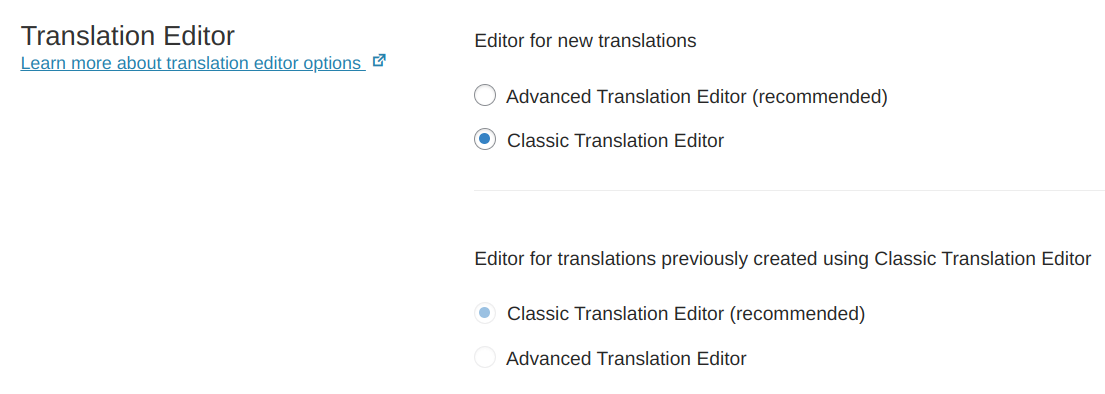
Problem: The client is experiencing issues with WPML Translation Management where 'Jobs could not be loaded' due to wp-json being disabled for security reasons. Additionally, they encounter a message stating 'You can only edit translations assigned to you' and are considering downgrading WPML due to these issues. Solution: We recommend setting the Classic Translation Editor (CTE) as the default method for creating translations, which does not require the REST API and thus bypasses the issue with wp-json being disabled. Here are the steps: 1. Set CTE as the default translation method: https://wpml.org/documentation/translating-your-contents/translation-editor-options/ 2. Alternatively, use the WordPress Editor for creating translations and avoid using WPML > Translation Management and WPML > Translations for these contents. 3. To hide WPML's menu options 'Translation Management' and 'Translations', use the Admin Menu Editor plugin: https://wordpress.org/plugins/admin-menu-editor/ 4. If using the WordPress Editor, ensure that translators have the admin user role to create translations. If these solutions do not resolve your issue or seem outdated, we highly recommend checking related known issues at https://wpml.org/known-issues/, verifying the version of the permanent fix, and confirming that you have installed the latest versions of themes and plugins. If the problem persists, please open a new support ticket at WPML support forum.
This is the technical support forum for WPML - the multilingual WordPress plugin.
Everyone can read, but only WPML clients can post here. WPML team is replying on the forum 6 days per week, 22 hours per day.
Thank Andreas, WPML > Translation Management > Jobs is empty and at the right side, there is a message "Jobs could not be loaded" . I uploaded a screenshoot.
Languages: English (English )Spanish (Español )German (Deutsch )
Timezone: America/Lima (GMT-05:00)
Hello,
I would like to offer to have a closer look at the problem and request temporary access (wp-admin and FTP) to the website to investigate this issue further.
You can find the required fields below the comment section when you log in to leave the next reply. The information you provide is private, which means only you and I can see and access it.
IMPORTANT
Please be sure to make a backup copy of the website and database before allowing us access.
If you can't see the wp-admin / FTP fields, your post and website credentials are set as PUBLIC. DO NOT publish the data unless you see the required wp-admin / FTP fields.
I may have to install a plugin called "All In One WP Migration" to make a copy of the website where I can investigate the issue further.
However, I would also be very grateful if you could provide a staging site or copy of the website from your server yourself for this purpose.
If you have any questions about creating such a staging site, you can consult your hosting provider. Just take note that WPML should be registered on this site again.
If you are unable to provide such a copy of the site for testing, please let me know on this ticket.
The private response form looks like this: hidden link
Next time you reply, click "I still need assistance."
Video: hidden link
Please note that we are obliged to request this information individually on each ticket. We may not access any access information not specifically submitted on this ticket in the private response form.
Andreas, thank you. We can not give you access to the production or test enviroment. What we can do is create a enviroment for you as copy of code and database for you. It will take 2 days. Is it ok for you to access to cloned enviroment ?
Andreas, I kown why we can not see WPML > Translation Management > Jobs. It is because we have wp-json disabled. We have wp-json disabled for security reasons, and we don't want to enabled it. We tried to WPML > Translation Management > Jobs because for some of the existing translations the button is disabled and we get the message "You can only edit translations assigned to you." So. due to we are not going to use WPML translations jobs, can we delete all from database, to remove the message "You can only edit translations assigned to you." ?
Languages: English (English )Spanish (Español )German (Deutsch )
Timezone: America/Lima (GMT-05:00)
Hello,
My apologies for the delay in answering, as Sundays and Mondays are my non-working days.
The Translation Management is a core feature of WPML and it is no longer able to be disabled (in earlier years it was an additional plugin).
This means, that there is no way to completely remove the module from WPML, as it tracks the translations on your site and is necessary for the communication between your site, and the Advanced Translation Editor, which runs on an external server.
This editor does not support translation memory, glossary, or automatic translation. If you switch from ATE to CTE you will still be able to use your translations, but if you later on switch back to Advanced Translation Editor, the translation will need to be redone completely.
Thanks Andreas. We are a bit disapointed with WPML. It should always maintain functionalities when upgrade, because if not, you can create a lot of troubles. We are thinking to downgrade to our old version and search for alternatives to WPML, if there is no solution, because we can no work like this. Any sugestion ?
Languages: English (English )Spanish (Español )German (Deutsch )
Timezone: America/Lima (GMT-05:00)
Hello,
The jobs likely can not be loaded, as the REST API is not enabled and our plugin WPML String Translation is not active on the site. The website also seems not to be registered on wpml.org with its proper site key.
IMPORTANT:
If you use the WordPress Editor for creating the translation I need to recommend not using WPML > Translation Management and WPML > Translations for those contents.
WPML Translation Management is designed for the usage of the WPML Translation Editor and I can even currently experience an unexpected behavior:
1) Open a Post on the WordPress Editor
2) In the right sidebar change the translation method to "WordPress Editor"
3) Now, go to WPML > Translation Management and create a job for this post
4) Access the translation on WPML > Translations
Result: The WPML Translation Editor will open. I get the same results if the post was already translated or not.
Issue: If a translator completes the translation on the WPML Translation Editor, any translations that priorly were made on the WordPress Editor will be overwritten.
I have escalated this issue internally now for further discussion.
Languages: English (English )Spanish (Español )German (Deutsch )
Timezone: America/Lima (GMT-05:00)
About the registration:
WPML must be re-registered after each website migration or after changing the domain or domain provider. This means, that if you create a staging or dev site, then each site needs its own site key.
Languages: English (English )Spanish (Español )German (Deutsch )
Timezone: America/Lima (GMT-05:00)
I am asking because if I go to WPML > Support > Installer Support and click "Check now" it says that the site key is not correct.
Now, this could be an old message, but usually, once we click "Check now" again it should say that the site is registered correctly.
Anyhow, this is not really that important in this case, as you are not using the Advanced Translation Editor and the only issue you might experience is that you will not be able to download our plugins by going to Plugins > Add new > Commercial.
Important is, that if you use the WordPress Editor for the translations, you should not use WPML > Translation Management and WPML > Translations after all.
Those translations will be created by using the WPML translation status icon on the pages or post lists or directly by using the Language setting inside the the right sidebar of the WordPress Editor.
The role "Translator" might further not be suitable for this purpose. Your translators might need the admin user role to be able to create translations using the WordPress Editor.
Please make sure to inform any involved translators about this workflow and let me know if you run into issues with the translations.
Andreas, when you say "Those translations will be created by using the WPML translation status icon on the pages or post lists or directly by using the Language setting inside the the right sidebar of the WordPress Editor."
When you say "Those translations", do you mean "manually created translations" ? So, creating translations through status icon in pages or post lists, or directly by using the Language setting is what we normally do.