
This is the technical support forum for WPML - the multilingual WordPress plugin.
Everyone can read, but only WPML clients can post here. WPML team is replying on the forum 6 days per week, 22 hours per day.
Tagged: Performance
This topic contains 34 replies, has 0 voices.
Last updated by Itamar 1 month, 2 weeks ago.
Assisted by: Itamar.
| Author | Posts |
|---|---|
| November 25, 2025 at 3:13 pm #17608693 | |
 erinS-5 |
Background of the issue: Symptoms: Questions: |
| November 25, 2025 at 3:57 pm #17608951 | |
 Itamar WPML Supporter since 02/2016 Languages: Hebrew (עברית ) Timezone: Asia/Jerusalem (GMT+02:00) |
Hi, This ticket has been inactive for quite a while. I didn't get a reply from you. So, I've transformed this chat into a support ticket because you may still need our help. After your last comment in the chat, I suggested the following. If the problem persists, please share the WordPress debug log (not WPML debug information). https://wpml.org/documentation/support/debugging-wpml/ To enable it, open your wp-config.php file and look for
define('WP_DEBUG', false);
Change it to:
define('WP_DEBUG', true);
// Enable Debug logging to the /wp-content/debug.log file
define('WP_DEBUG_LOG', true);
// Disable display of errors and warnings
define('WP_DEBUG_DISPLAY', false);
@ini_set('display_errors', 0);
After this, repeat the action that causes the problem on your site - visit the admin pages that get frozen. In this case, the errors will be saved to a debug.log log file inside the /wp-content/ directory. Then please share the errors with us. If the debug.log was already active, please only share the error you encountered during your test to keep the log concise and avoid unrelated errors. You might also find errors in the browser's console that indicate the problem. If you find any, please also share them with us. Regards, |
| December 2, 2025 at 8:48 am #17624944 | |
|
erinS-5 |
Hello, We’ve increased the WP_MEMORY_LIMIT on the production site to 512M and tested multiple WPML versions to rule out any environment-related issues. We tried 4.8.0, 4.8.1, 4.8.2, 4.8.3, 4.8.4, 4.8.5, and the latest 4.8.6 — all of them show the same latency problem in the WordPress admin panel. However, once we downgraded to version 4.7.6, the issue disappeared completely. It looks like the problem is introduced somewhere in the 4.8.* release line. Could you please investigate this on your side? Also, in all 4.8.* versions this new badge looks odd hidden link, and it doesn’t seem to provide any clear or useful information to the user hidden link Thanks! |
| December 2, 2025 at 12:19 pm #17626237 | |
|
Itamar WPML Supporter since 02/2016 Languages: Hebrew (עברית ) Timezone: Asia/Jerusalem (GMT+02:00) |
Hi, This icon informs the user about progress with automatic translation. 1. Have you tried my suggestions to enable WordPress debug.log and found any errors that you can share? 2. Is your site now on the latest WPML version, or have you downgraded to 4.7.6? Please answer my question, and if you need further help, please share the access details for your site with me. Also, please allow me to take a copy of your site. For this, I must install a plugin like Duplicator or All-in-One Migration. Please let me know if you agree. I'm enabling a private message for the following reply. |
| December 3, 2025 at 1:10 pm #17630923 | |
|
erinS-5 |
1. The debug.log shows only warnings and notices, there are no errors. We’re unable to share site credentials or make a copy of the site. What if we don’t want to use automatic translation and want to keep things as they were before? How can we turn off this functionality? Also, the 4.8.* versions are still causing significant admin latency on our site. Do you have any solution for this? |
| December 4, 2025 at 3:49 pm #17635232 | |
|
Itamar WPML Supporter since 02/2016 Languages: Hebrew (עברית ) Timezone: Asia/Jerusalem (GMT+02:00) |
Hi, You asked: "What if we don’t want to use automatic translation and want to keep things as they were before? How can we turn off this functionality?" I don't know how things were on your site before. But if you mean going back to using the Classic Translation Editor, you can do so in WPML -> Settings -> Translation Editor. Please see the attached screenshot cte.jpg. Automatic translation is optional. You don't have to use it. You can still use the Advanced Translation Editor without automatically translating the content. The full settings for automatic translation are in WPML -> Settings -> automatic translation. But before going there, you should check in WPML -> Translation Dashboard, and if Translate Everything Automatically is active, turn it off. Please see the attached screenshot trans-everything-auto.jpg. You also asked: "Also, the 4.8.* versions are still causing significant admin latency on our site. Do you have any solution for this?" Given that you can't share access to or a copy of your site, I can only suggest that you debug the performance issue using the Query Monitor plugin, as we explain in the following guide: https://wpml.org/faq/how-to-debug-performance-problems/. Then please share slow or repetitive queries related to WPML, Strings Translation, or any of our other plugins. Regards, 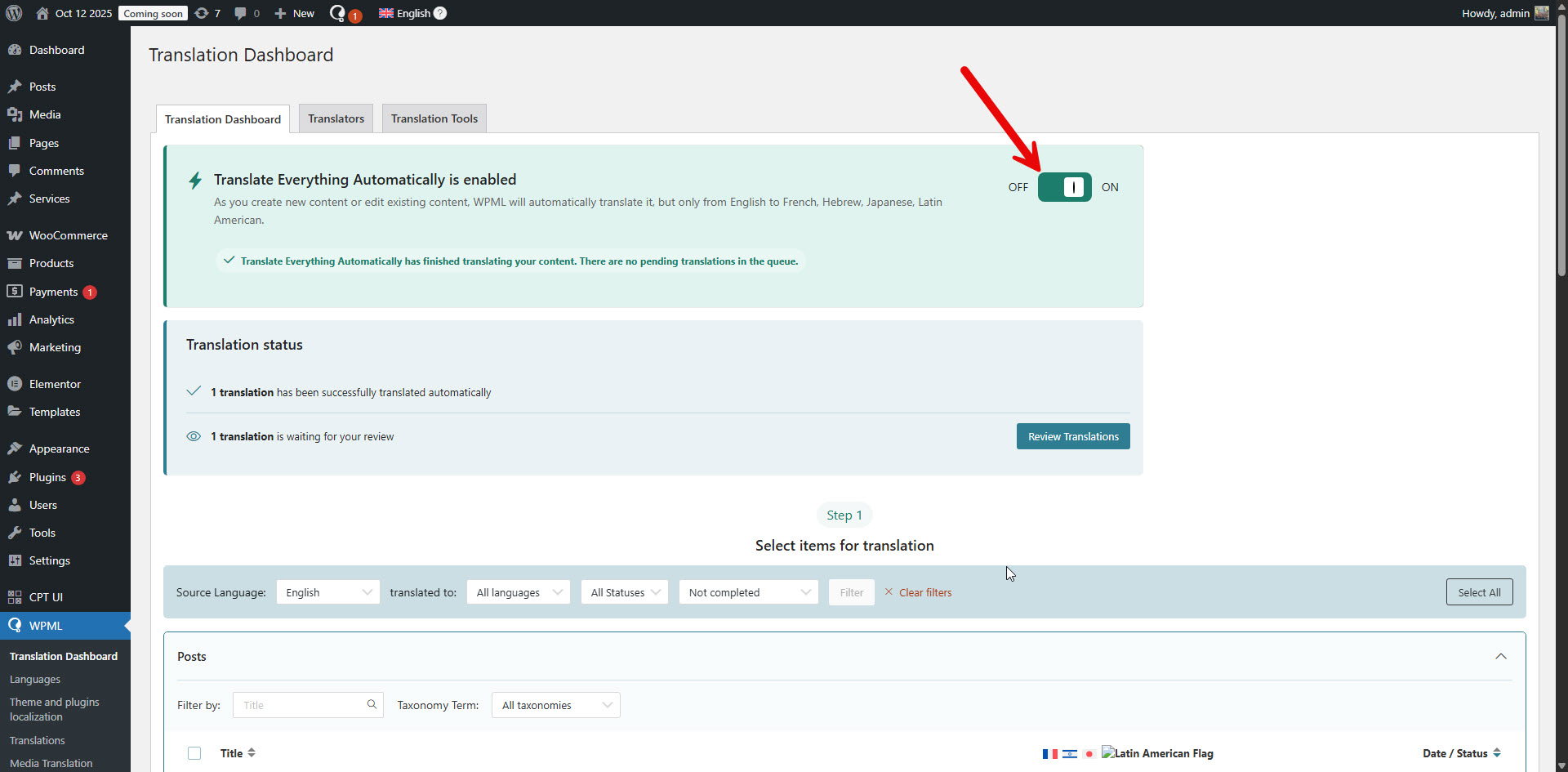 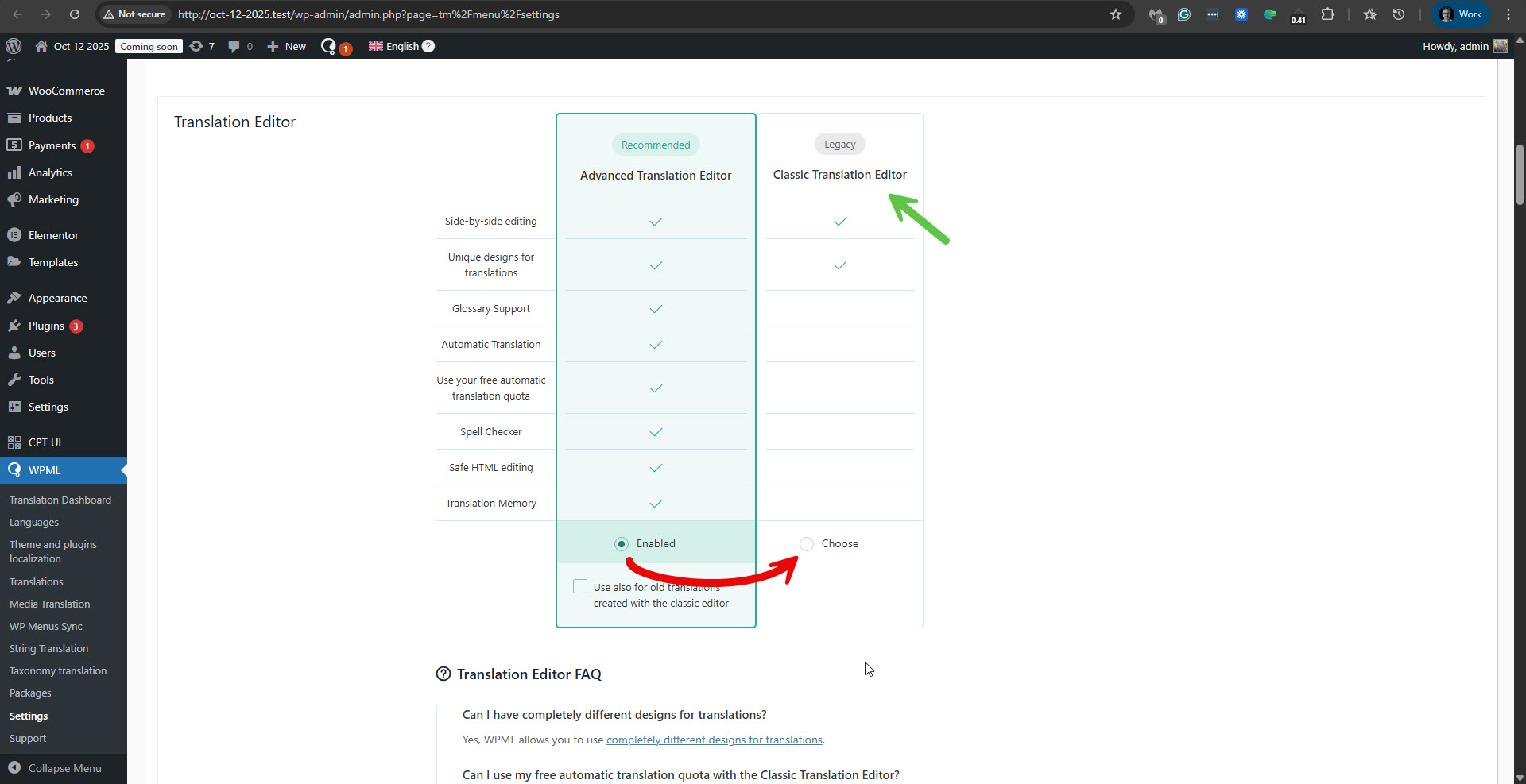 |
| December 4, 2025 at 7:13 pm #17636023 | |
|
erinS-5 |
we didn't switched to the Advanced Translation Editor, and still using the Classic one, but why then this badge hidden link has appeared in the 4.8.* versions? |
| December 7, 2025 at 9:15 am #17641318 | |
|
Itamar WPML Supporter since 02/2016 Languages: Hebrew (עברית ) Timezone: Asia/Jerusalem (GMT+02:00) |
Hi, Please try the following to remove this automatic translation icon/badge. 1. Go to WPML -> Translation Dashboard -> Translation Jobs. 2. In the 'Translated by' column, filter to show translated by 'Automatic translation'. Please see the attached screenshot. 3. Select all jobs and cancel them. Please see the attached screenshot. 4. Try the following troubleshooting options. A. Take a backup of the DB of your site. B. Go to WPML -> Support -> Troubleshooting (link) C. Once on the troubleshooting screen, press the following buttons. - 'Synchronize local job ids with ATE jobs' - 'Synchronize translators and translation managers with ATE' *** Please make a backup of your site before proceeding with the above suggestion.*** Regards, 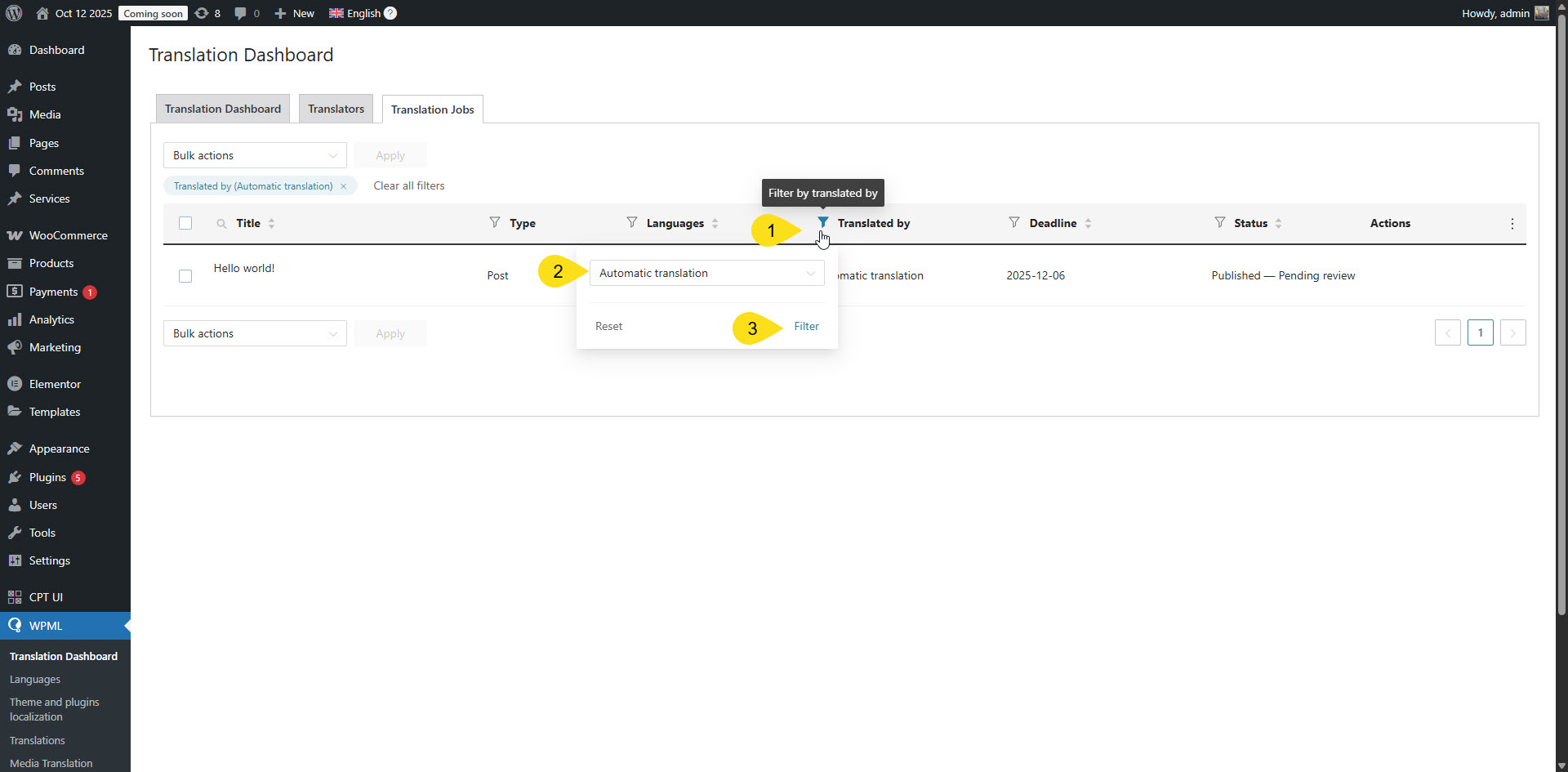 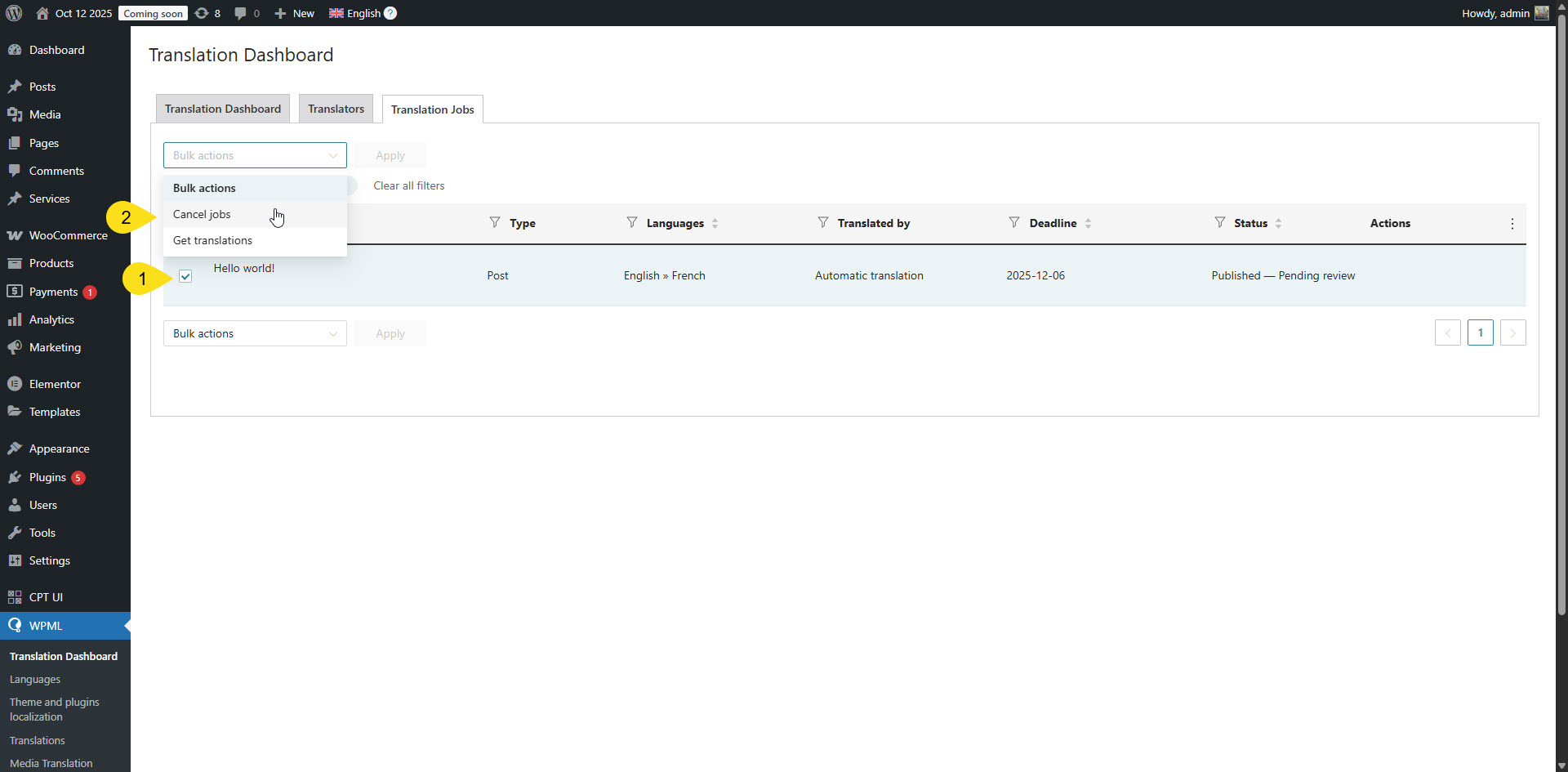 |
| December 11, 2025 at 12:22 pm #17655870 | |
|
erinS-5 |
We did filtering, and in our case the list of automatic translations is empty, so nothing to cancel. Also we clicked 'Synchronize local job ids with ATE jobs' and 'Synchronize translators and translation managers with ATE' in the troubleshooting page, but this badge hidden link is still visible on the site. How to remove it from the admin panel? we don't need it and it doesn't provide any useful information. |
| December 11, 2025 at 7:11 pm #17657367 | |
|
Itamar WPML Supporter since 02/2016 Languages: Hebrew (עברית ) Timezone: Asia/Jerusalem (GMT+02:00) |
Hi, Please go to WPML -> Support -> Advanced Translation Editor - Error Logs. Please note that my weekends are Friday to Saturday. If you need further assistance, I'll be available to continue checking this issue and helping you next week. Thanks, |
| December 15, 2025 at 8:32 am #17662941 | |
|
erinS-5 |
For now on the on prod we downgraded to WPML 4.7.6, and everything works smoothly, but on dev site we're using the latest 4.8.6 version and we still have latency with the admin panel. We recorded the latency behaviour and it's impossible to upload a video here. on the prod site we in Advanced Translation Editor - Error Logs we don't have any recent logs, but on the dev we have some of them: 2025/12/11 12:12:19 PM ATE Server Communication WPML has detected a change in your site's URL. To continue translating your site, go to your WordPress Dashboard and tell WPML if your site has been moved or copied. 0 0 {"url":"https:\/\/ams.wpml.org\/api\/wpml\/website_contexts","requestArgs":[],"status":426} Do you have the solution with the latency issue? 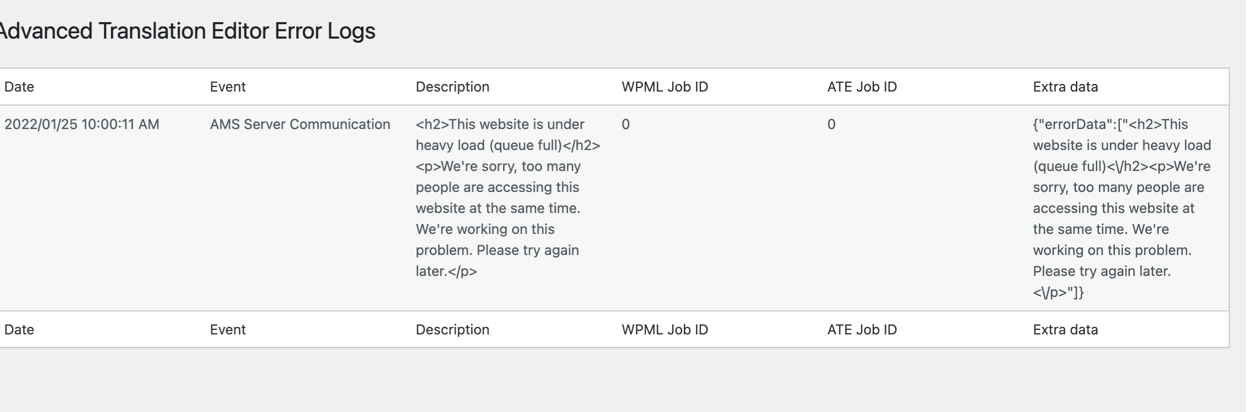 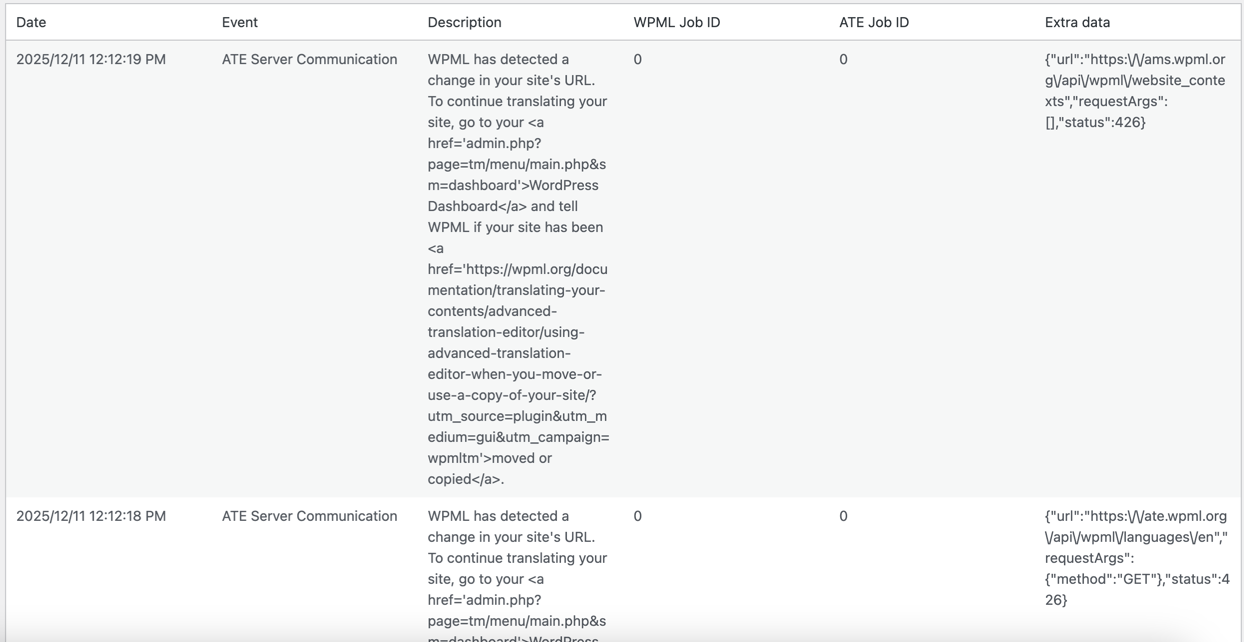 |
| December 16, 2025 at 12:49 pm #17667534 | |
|
Itamar WPML Supporter since 02/2016 Languages: Hebrew (עברית ) Timezone: Asia/Jerusalem (GMT+02:00) |
Hi, The recent messages you show in hidden link">this screenshot are related to this guide. Regarding the video you recorded. You can upload a video to a service like Google Drive or Dropbox and share the link with me. Could you please share the URL of your dev site? If you are unable to share with me access to the dev site, please try my following suggestion from December 4.
Regards, |
| December 17, 2025 at 10:51 am #17670563 | |
|
erinS-5 |
I don’t think we’ll be able to provide access to the dev site either. In Query Monitor, I noticed one related warning: WARNING: /bitnami/wordpress/wp-content/plugins/sitepress-multilingual-cms/classes/translations/TranslationElements/FieldCompression.php:150 - gzuncompress(): data error Also, I noticed that this badge hidden link links to the videos: |
| December 18, 2025 at 7:31 pm #17676164 | |
|
Itamar WPML Supporter since 02/2016 Languages: Hebrew (עברית ) Timezone: Asia/Jerusalem (GMT+02:00) |
Hi, Thanks for sharing the error from the Query Monitor plugin with me. I appreciate your patience. |
| December 23, 2025 at 7:55 am #17683972 | |
|
erinS-5 |
thanks, waiting for your reply |






