How can I update WPML CMS Multilingual and String Translation
Solution:
If you're experiencing this issue, we recommend you try the following steps:
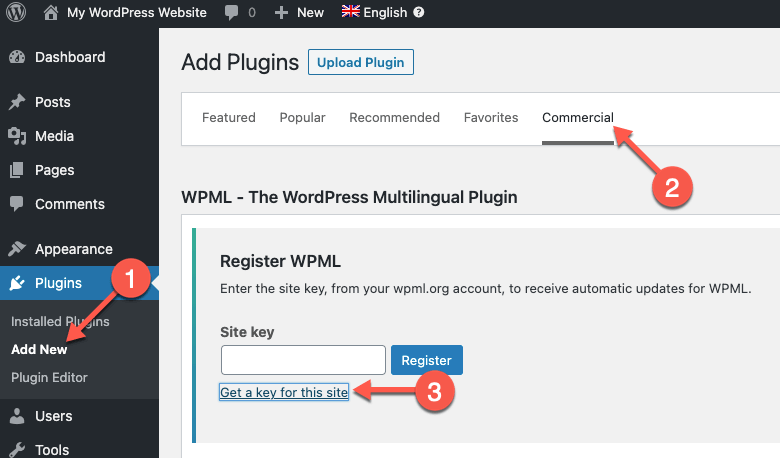
1. Navigate to Plugins → Add New and select the Commercial tab. Then, click 'Unregister WPML from this site'. 2. After the page loads, click on 'Register WPML'. You will see a prompt to enter the site key. Select 'Get a key for this site'. 3. In your WPML account, complete the site key wizard and set it to 'Production site'. 4. Copy your new key and paste it in the Commercial tab. Afterwards, you can delete your old site key in your WPML account. 5. Update your WPML plugins.
This solution might be irrelevant if it's outdated or not applicable to your case. We highly recommend checking related known issues at https://wpml.org/known-issues/, verifying the version of the permanent fix, and confirming that you have installed the latest versions of themes and plugins. If the issue persists, please open a new support ticket at WPML support forum.
Problem: You are an agency and have set up an account for using a plugin. You want one of your clients, NLCS Kobe, to take over ownership of their account as they are struggling to translate the site. Solution: If you're experiencing this issue, we recommend transferring the renewal of the WPML account to your client. This allows them to take ownership and handle future payments. You can find detailed instructions on how to proceed with this transfer here: Transferring Account Renewals to Your Clients.
Please note that this solution might be irrelevant if it's outdated or not applicable to your specific case. We highly recommend checking related known issues at https://wpml.org/known-issues/, verifying the version of the permanent fix, and confirming that you have installed the latest versions of themes and plugins. If the issue persists, please open a new support ticket.
Problem: Sie versuchen, Pay as you go für eine Multisite-Umgebung zu aktivieren, die aus mehreren Websites besteht. Es hat bisher funktioniert, aber seit 1-2 Monaten erhalten Sie eine Fehlermeldung beim Versuch, diese Funktion zu aktivieren. Solution: Das Problem scheint darin zu liegen, dass das Sicherheitslimit von 195.000 Credits erreicht wurde, weil bisher keine Zahlung eingegangen ist. Es gibt eine offene Rechnung, die bezahlt werden muss. Wir empfehlen Ihnen, bei offenen Fragen zu Rechnungen das Formular auf der folgenden Seite zu verwenden: https://wpml.org/home/contact-us/contact-form/.
Falls diese Lösung veraltet ist oder nicht auf Ihr Problem zutrifft, empfehlen wir Ihnen, ein neues Support-Ticket zu eröffnen. Überprüfen Sie auch die bekannten Probleme, bestätigen Sie die Version der dauerhaften Lösung und stellen Sie sicher, dass Sie die neuesten Versionen von Themes und Plugins installiert haben. Für weitere Unterstützung besuchen Sie bitte unser Support-Forum.
Problem: You were charged for an auto-renewal that you did not authorize and need to cancel this payment. Solution: To stop WPML renewals, go to your WPML account, click the "Modify" link, scroll down to "Payment method", and click "Cancel automatic renewal". If you need to ask for a refund, please visit https://wpml.org/purchase/refunds/, but note that refunds are only possible within 30 days after purchase.
For issues not related to technical support, such as account and billing inquiries, please use the following form to contact the account and billing team: https://wpml.org/home/contact-us/contact-form/.
If this solution does not apply to your case, or if it seems outdated, we highly recommend checking related known issues at https://wpml.org/known-issues/, verifying the version of the permanent fix, and confirming that you have installed the latest versions of themes and plugins. If you still need assistance, please open a new support ticket at WPML support forum.
Problem: You are developing a WordPress site and have launched it with two languages, planning to add 22 more. After updating the production key post-launch, the translation jobs for these languages disappeared. Solution: If you're experiencing this issue, it's likely due to using the same site key for both the pre-launch and the production domains. We recommend creating a new site key for the production domain and registering the site again. This should help in restoring the visibility of the translation jobs. Additionally, ensure that both sites share the same translation memory to facilitate auto-completion of previously translated segments.
Please note that this solution might be outdated or not applicable to your specific case. We highly recommend checking related known issues at https://wpml.org/known-issues/, verifying the version of the permanent fix, and confirming that you have installed the latest versions of themes and plugins. If the issue persists, please open a new support ticket at WPML support forum for further assistance.
Problem: You are trying to (re)register WPML to your site but encounter an error because it was previously registered under a different account. Solution: To resolve this issue, please follow these steps after ensuring you have a full site backup: 1) Log in to your old WPML account where the site was initially registered. 2) Delete the key for the site from https://wpml.org/account/sites/ 3) Log out and then log in to your new WPML account. 4) Access your site dashboard. 5) Navigate to Plugins>>Add New>>Commercial tab. 6) Click on the "Register WPML" link. 7) Click on the "Get a key for this site" link. 8) Copy the newly generated code. 9) Return to Plugins>>Add New>>Commercial tab. 10) Register the site with the new key. For more detailed instructions, please refer to our documentation:
If this solution does not apply to your case, or if it seems outdated, we highly recommend checking related known issues at https://wpml.org/known-issues/, verifying the version of the permanent fix, and confirming that you have installed the latest versions of themes and plugins. Should you need further assistance, please do not hesitate to open a new support ticket at WPML support forum.
Problem: You are trying to create a new account on wpml.org for your client but can only log in and cannot find the sign-up form. Solution: If your client needs to purchase a WPML subscription, they can do so at https://wpml.org/purchase/. Alternatively, you can transfer the subscription renewal to their specific site, which also benefits you. Please read more about this process at https://wpml.org/purchase/transferring-account-renewals-to-your-clients/. If you need further assistance or if this does not resolve your issue, we recommend checking related known issues at https://wpml.org/known-issues/, verifying the version of the permanent fix, and confirming that you have installed the latest versions of themes and plugins. If the problem persists, please open a new support ticket at WPML support forum.
Проблема: Клиент подписался на пакет 'Оплата по мере использования' для автоматического перевода в WPML и заметил неожиданное списание средств. Решение: Мы рекомендуем проверить инвойсы, которые могут содержать информацию о причинах списания средств. Инвойсы доступны здесь: https://wpml.org/documentation/automatic-translation/automatic-translation-invoices/ Также стоит проверить настройки в WPML → Translation Management, перейти на вкладку Tools и ознакомиться с репортами и инвойсами. Возможно, настройки были установлены на автоматический перевод всего публикуемого контента, что могло привести к списанию средств.
Если предложенные решения не помогут или кажутся неактуальными, рекомендуем открыть новый тикет в службе поддержки. Также полезно проверить известные проблемы по ссылке https://wpml.org/known-issues/, убедиться в актуальности версии исправления и в том, что установлены последние версии тем и плагинов.
Problem: The client was unable to add a site key to their website and suspected that their IP might be blocked by the WPML API server, as indicated by an 'X' next to it in the Installer Support. Solution: We escalated the issue to our system team, who then unblocked the client's site. We advised the client to delete the existing site key and create a new one by following these steps: 1. Log in to your WPML.org account and go to the Sites page. 2. Delete the existing site key. 3. Log in to your site, navigate to the Dashboard >> Plugins >> Add new > Commercial tab and click the Unregister WPML from this site link. 4. Click the Register WPML link. 5. Click the Get a key for this site link. 6. Generate the key for your site. 7. Copy the key, paste it back into the input box, and press the Register button to see if this resolves your issue.
If this solution does not apply to your case, or if it seems outdated, we highly recommend checking related known issues at https://wpml.org/known-issues/, verifying the version of the permanent fix, and confirming that you have installed the latest versions of themes and plugins. If issues persist, please open a new support ticket.