[Resolved] Need automatioc translation for my Wordpress Site.
This thread is resolved. Here is a description of the problem and solution.
Problem: The client is experiencing issues with both automatic and manual translations not working on their WordPress site after installing the WPML plugin. They have completed translations on a staging site and are now looking to apply these to the live site without purchasing additional credits. Solution: First, ensure that the WPML plugin is properly installed and activated on your live site. You can follow the installation guide here: WPML Installation Guide. Next, to transfer completed translations from the staging to the live site, use the WPML's Translation Management tools. Detailed steps can be found here: Translating Your Content. Regarding the WPML license for the live site, you do not need to purchase additional credits if you have already done so for the staging site. Simply log in to your WPML account and follow the instructions to activate the license on your live site.
If these steps do not resolve your issues or if the information provided becomes outdated, we highly recommend checking related known issues at https://wpml.org/known-issues/, verifying the version of the permanent fix, and confirming that you have installed the latest versions of themes and plugins. If you still face problems, please open a new support ticket.
This is the technical support forum for WPML - the multilingual WordPress plugin.
Everyone can read, but only WPML clients can post here. WPML team is replying on the forum 6 days per week, 22 hours per day.
Background of the issue:
I have installed WPML plugin and run automatic translation to translate my existing page content from English to different languages, but the translation is not working. Manual translation for pages is also not working. I attended a WPML Coaching Session, but the representative couldn't solve my issue. He advised me to generate a new ticket and contact a higher technical support person. My site, hidden link, is VPN protected, so it cannot be accessed directly.
Symptoms:
Automatic and manual translations are not working on my WordPress site.
Questions:
Why is the automatic translation not working on my WordPress site?
Why is the manual translation not working on my WordPress site?
I would need temporary access to your website to investigate and understand this issue better.
Please fully back up your site (files and database) and confirm it in your next reply.
* Note: I might need to enable/disable plugins, switch themes, and access your website database.
I would need to access your site's WP-admin.
Your next reply is set to private so you can provide the username and password details.
Our client's compliance policy will not allow us to share access credentials to the staging site.
We can however shadow you and enter the credentials for you to investigate further.
I am not sure I understand what you mean by shadowing me and how that can work out ( I am assuming that would require you/me to connect remotely, which would be out of the scope of this support forum). I would need access to just check if the WPML plugin/s is set up properly
and check if there is any error showing on the logs, I suggest checking our support policy, maybe it helps to clarify about the access we need.
The alternative would be to create a testing site on our servers and try to reproduce the issue on that site (which in your case might not be the best option given that the issue seems to be related to your server).
Sure, thank you. We can provide access to the stagging server with credentials. For that you may have to install and use our company VPN (our team is ready support on the same.)
Also, it will be helpful if you can share an email ID to create the VPN in your name.
Apparently, the authenticator code needs to be used on the app as well, not only on the portal. I managed to connect and check the website, thank you.
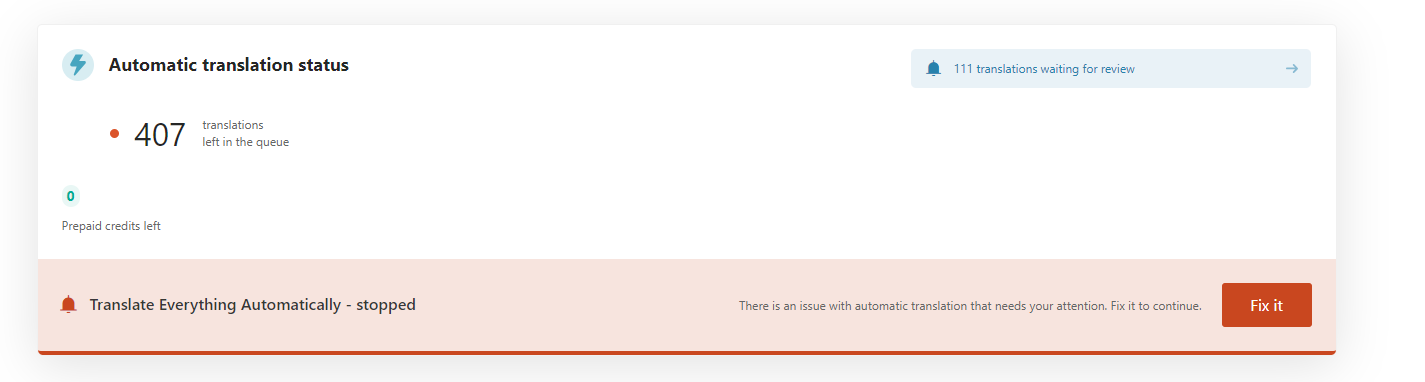
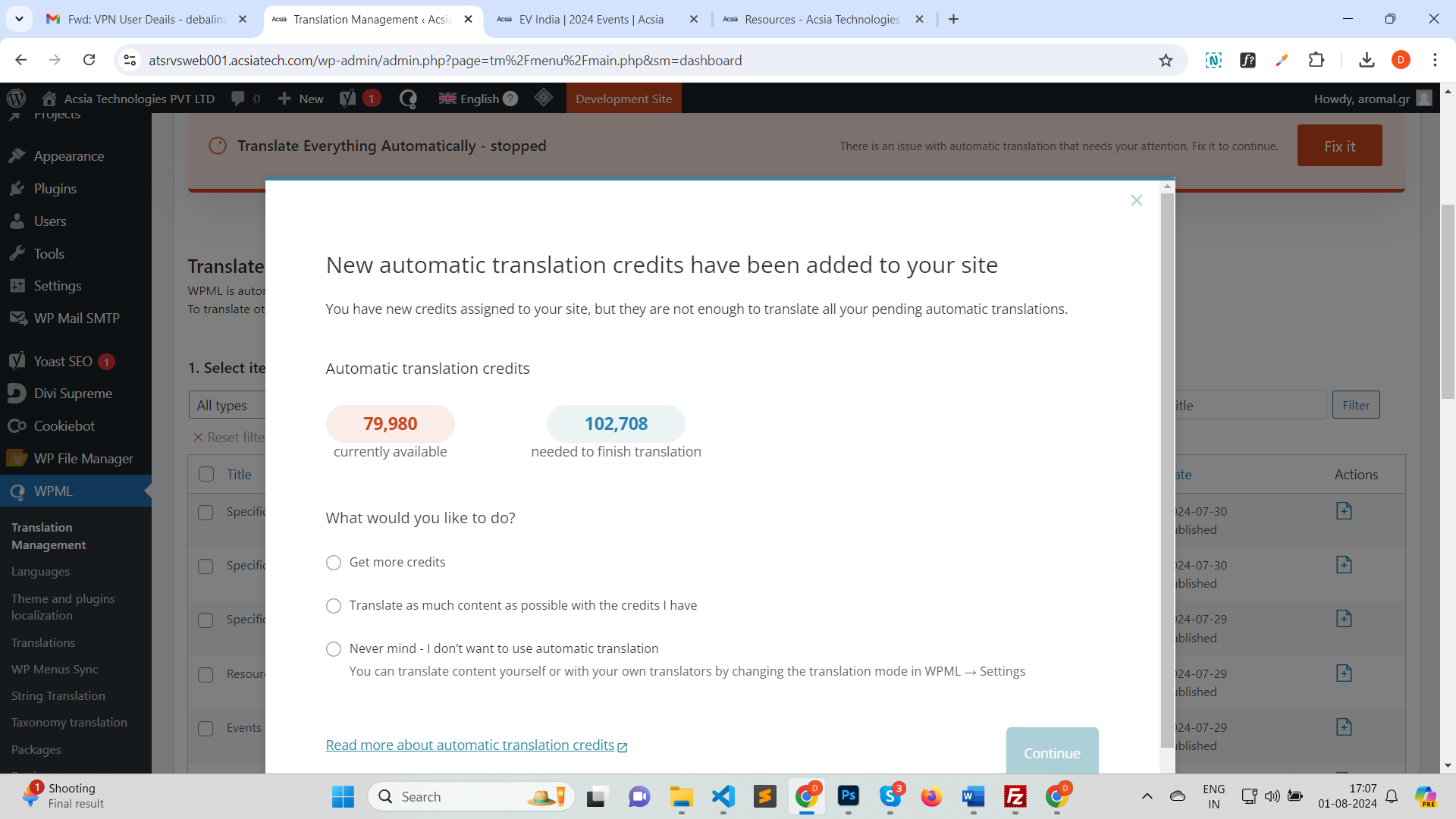
From what I was able to check you are using prepaid credits for the automatic translations, and you need to add credits(please check the attached image) from your wpml.org account for the automatic translations to be completed. You can check this link for more details related to the credits packages.
After you assign the credits to the website, please go to WP-Admin -> WPML -> Settings and enable the automatic translations by clicking the button "Resume". You would also need to review the translations once they are completed to approve them.
Let me know if you have further questions or need further assistance.
I will buy the credits. But, as per my plan I am supposed to get 90000 credits while It's showing 79980 credits. Can you please let me know why is that?
The credits missing from the 90k should have been used to translate the 111 translations waiting for review. Do you recall how many credits you initially assigned to the website?
* You need to assign the credits to the website from your wpml.org account.
From the image you shared seems that you would need to get a few more credits than you have left, anyway, you could try translating as much as possible with the credits left and check if the issue persists. If it doesn't then you can continue with purchasing the rest of the credits needed.
I have assigned all the credits to my staging website. However, it still says need to buy more. Can you check the website and confirm how many credits I need to buy more?
Also, to confirm, there will be only German and English language.
=============
One other thing. We are doing this in staging for now. If we do the same in Live, do we need to buy the connects again? Since it's staging can we use the same credits?
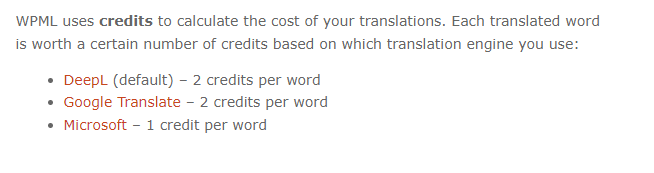
You should be able to get the word count as mentioned here, then multiply by the number of credits per word as shown in this link, then check the pricing table.
As for your question related to the production site, normally when you move the site from staging to production you don't need to redo the translations from the start, you would need to create a new key for the production key. Please check the information on this link for more details.
I have purchased the credits. The translations are done I guess. But, in front-end I am not seeing the German language. Could you please check once asap?