Home » Documentation » Getting Started Guide » Site Navigation » Custom HTML for Menu Items

Custom HTML for Menu Items

WPML allows you to create fancy navigation menus with your own HTML for menu items.

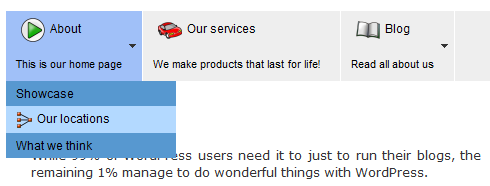
Let’s start with an example. Supposing you want to a add icons and a short description to the top navigation menus like in this example:

Items in drop down menus have icons and description

Items in drop down menus have icons and description

What we will do is add custom fields to each of the pages, which will hold the icons and the description text. Then, we’ll hook to the menu function and tell it to use these fields in the menu items.

Step 1) Add the Custom Fields to the pages

In order for each page to get its own unique icon and description, we’ll use custom fields.
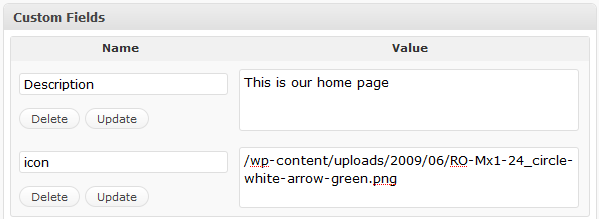
Icon and Description custom fields added to a page

Icon and Description custom fields added to a page

Step 2) Build the theme function that will produce the menu items

We need to create a function that will generate the HTML for the menu items. By default, each item in the menu gets the page title. This function will allow us to place arbitrary HTML inside menu items.

WPML will still build the entire menu, including the drop-down effect, sections and everything else. This function lets us control the contents of each item.

Here is my function:

function text_for_menu($page_id, $menu_level){
  $ret = '';
  $icon = get_post_meta($page_id,'icon',true);
  $description = get_post_meta($page_id,'Description',true);
  if($menu_level==0){
    if ($icon) $ret .= '<img width="24" height="24" style="vertical-align: middle; margin:0 5px 0 5px;" src="'.$icon.'" alt="icon" />';
    $ret .= get_the_title($page_id);
    $ret .= '<br /><span>'.$description.'</span>';
  } else {
    if ($icon) $ret .= '<img width="16" height="16" style="vertical-align: middle; margin:0 5px 0 0;" src="'.$icon.'" alt="icon" />';
    $ret .= get_the_title($page_id);
  }
  return $ret;
}

What it does:

  1. Get the contents of the custom fields called ‘icon’ and ‘Description’: get_post_meta($page_id,’icon’,true);
  2. Check which menu level the item belongs to. Top menu items are ’0′ and the drop down items are ’1′.
  3. For the top menu items, it adds a 24×24 icon, then the page title and then the description.
  4. For drop down menu items, it adds a 16×16 icon and then the page title.

Step 3) Hook that function to WPML

Last, we tell WPML to use this function in order to create the menu items. We do this by adding this line to functions.php:

add_filter('icl_nav_page_html', 'text_for_menu', 1, 2);

What this does is instruct WordPress to add a function called text_for_menu to WPML’s icl_nav_page_html. It’s a standard WP filter, so you can call it several times and add more and more fields.

11 Responses to “Custom HTML for Menu Items”

  1. Laura S. says:

    Hello,

    I’m not sure this matches up exactly with what I want to do. My main navigation is a set of 8 images (HOME, ABOUT US, etc.). Each image has a rollover state. There is no text for these, they are only images. The images are not necessarily the same width, although perhaps I could force them to be if necessary.

    When you mouse over one of the nav images, it should turn into the rollover state and reveal a dropdown menu.

    It’s not clear from the directions above whether I have the option of using images (and no text) for the main part of the nav. And, if I am allowed to use images, do they need to be the same width. It looks like the dropdown menu is a little more flexible.

    Can you please help clear this up for me? Thanks :)

    Laura S.

  2. Laura S. says:

    I am trying this again with some help. I am confused about “Step 2: Build the theme function” — where do I put this code? Does it go in the functions.php file?

    Thank you,
    Laura S.

  3. Laura S. says:

    Same question for Step 3 — where does this code go?

  4. Aldo says:

    Is there a way to add an id to the LI tag in the menu using the page slug?

    • amir says:

      Right now, no. There’s no way to do it.

      You can create an element with a span and assign an ID to it and then create CSS for that span. It’s a little more complicated but you’ll get the exact same visual result.

  5. maraa says:

    I tried to use this function (I didnt change anything, added exactly the same code to functions.php and the custom fields to a page). But nothing happens.

    Actually I don’t need images in my navigation, I just want to add a different link title (a shorter version than the page title).

    Could you please help me out here?
    Thanks a lot!

  6. dinis says:

    Hi. I posted these messages in other thread but mabe now this is the right one:

    Congrats for your well fantastic plug-in.

    I am quite new to WP and not a php developer. My theme has a Menu Manager and a also a Menu Manager for categories – (I am using newscast theme from Kriesi.at). WPML does not interact with this admin menu. So, I cannot localise the Menu neither the Categories menu. I guess this data goes into the database. I am quite lost. Can I do something in the theme admin pages so that WPML adds language fileds to the menu managers?

    Do you think The solution you post in the current thread is the way for me to solve my problem?

    BR
    Dinis

  7. leonor says:

    Hi Amir! My theme supports 1 menu. How do I make it support 2 menus so I can get my main menu (About, Services, contact US…) in English and Spanish?

    Thanks!!

  8. leonor says:

    Admir I desperately need your help, I have looked all over your website for solutions but I can not find a way to change the language in my main menu and without being able to do that the whole language change is pointless.

    I can’t do the “wordpress theme localization” to fix it because I can’t locate the Main menu code with words such as “About, Contact us, etc”. So there is no text to gettext.
    My main menu file reads like this:

    ‘ul’,
    ‘menu_class’ => ‘sf-menu sf-navbar’,
    ‘menu_id’ => ‘topnav’,
    ‘depth’ => 0,
    ‘theme_location’ => ‘header_menu’
    ));
    ?>
    What do you suggest? I have already contacted the template company but they ask me for money in order to help me, I cannot make money If I can’t start running my business and I need my web page for that!! Please help me!

Leave a Reply

Please leave here comments about this page only.
For technical support and feature suggestions, head to our forum. We are waiting there!

You can use these tags:
<a href="" title=""> <abbr title=""> <acronym title=""> <b> <blockquote cite=""> <cite> <code> <del datetime=""> <em> <i> <q cite=""> <strike> <strong>