If this solution does not resolve your issue or seems irrelevant due to being outdated or not applicable to your case, we highly recommend checking related known issues at https://wpml.org/known-issues/, verifying the version of the permanent fix, and confirming that you have installed the latest versions of themes and plugins. If needed, please open a new support ticket at WPML support forum for further assistance.
Problem: After updating WPML String Translation to version 3.2.16, changes made on the original page, such as updating a picture, do not reflect on translated pages. Additionally, a 'basedir restriction in effect' error occurs, preventing file access within allowed paths. Solution: If you're experiencing similar issues after updating WPML String Translation, we recommend checking the temporary workaround available at https://wpml.org/errata/php-warning-file_exists-open_basedir-restriction-in-effect-warning-possible-with-current-string-translation/.
This solution might be outdated or not applicable to your specific case. We highly recommend checking related known issues at https://wpml.org/known-issues/, verifying the version of the permanent fix, and confirming that you have installed the latest versions of themes and plugins. If the problem persists, please open a new support ticket at WPML support forum for further assistance.
Problem: The client is trying to insert a language switcher in the header using the 'menu language switcher' option in WPML but faces issues with the dropdown menu only showing options from a previous theme, not the current theme. Additionally, inserting a WPML block in the header breaks the header into multiple lines. Solution: We recommend going to WPML-> Languages-> Menu Language Switcher and deleting the old switcher. Then, edit your header/navigation template and add a new switcher block. If this does not resolve the issue, placing the language switcher in a column within the header might prevent it from breaking into multiple lines.
Please note that this solution might be outdated or not applicable to your specific case. We highly recommend checking related known issues at https://wpml.org/known-issues/, verifying the version of the permanent fix, and confirming that you have installed the latest versions of themes and plugins. If the problem persists, please open a new support ticket at WPML support forum for further assistance.
Problem: You are experiencing an issue where after updating WPML String Translation to version 3.2.17, the file paths have been incorrectly altered from /usr/home/mobilemarkup/ to /usr/home/l10n.phpbilemarkup/, replacing 'mo' with 'l10n.php'. This has resulted in numerous warning messages exposing server paths publicly. Solution: We recommend following the temporary workaround provided in the WPML errata. You can find detailed steps and more information here: WPML Errata on open_basedir restriction issue.
Please note that this solution might be outdated or not applicable to your specific case. We highly recommend checking related known issues at https://wpml.org/known-issues/, verifying the version of the permanent fix, and confirming that you have installed the latest versions of themes and plugins. If the issue persists, please open a new support ticket at WPML Support Forum for further assistance.
Problem: You are using WPML with the Kadence theme on your website and experiencing issues with translations not appearing on the live page, despite being translated in the backend. Specific problems include untranslated elements in the header, footer, and other areas.
Solution:
1) For the untranslated button in the header, we found the string "[kadence_conditional_header_3996]header_button_label" in Admin Strings. It was not included in String Translation, so we included it, corrected the language of the string, and translated it. It should now display correctly.
2) For the footer widgets using blocks, refer to this guide on translating widgets. We demonstrated this process in a video, showing how to display the same widget in multiple languages and how to duplicate and set language/translate the rest of the widgets.
3) The form requires further investigation and possibly a custom XML config. We recommend opening a separate ticket for this issue.
4) The 'Case Studies' posts have not been translated yet. Please translate these posts for them to appear correctly.
5) For SEO work on the Swedish page, ensure that media (images and videos) are translated or different for each language to display correctly. If issues persist, consider opening a separate ticket with detailed steps or a video recording of the problem.
If this solution does not resolve your issue or seems outdated, we highly recommend checking related known issues at https://wpml.org/known-issues/, verifying the version of the permanent fix, and confirming that you have installed the latest versions of themes and plugins. If necessary, please open a new support ticket at WPML support forum for further assistance.
Problem: If you're experiencing significantly increased page loading times when the WooCommerce Multilingual & Multicurrency plugin is activated, it might be due to outdated versions of WPML and other plugins. Solution: We recommend updating WPML to version 4.6.15 and Strings Translation to 3.2.17 as described here: WPML Errata. Ensure all other themes and third-party plugins are also updated to their latest versions. If you use Elementor, update WPML before updating Elementor to version 3.26, as detailed here: WPML Changelog. If problems persist, try testing in a minimal environment: deactivate all plugins except for WPML and its add-ons, WooCommerce, and Elementor + Pro. Reactivate plugins one by one to identify the problematic plugin. Ensure to back up your site before making these changes.
If this solution does not resolve your issue or seems outdated, please check for related known issues at WPML Known Issues and confirm you have the latest versions of themes and plugins. If necessary, do not hesitate to open a new support ticket at WPML Support Forum for further assistance.
Problem: If you're experiencing an issue where credits transferred between WPML accounts are missing, as was the case when 54100 credits intended for translations were not visible on the target site after being assigned. Solution: We recommend checking the original site to confirm if the credits are still there. In this specific instance, we found that the credits were still on the original site. We then manually removed these credits from the original site and reassigned them to the intended site. You can verify the credits under WPML >> Translation Management > Tools tab.
If this solution does not resolve your issue or seems outdated, or if it does not apply to your specific case, please visit our support forum at WPML Support Forum for further assistance. We also highly recommend checking related known issues at https://wpml.org/known-issues/, verifying the version of the permanent fix, and confirming that you have installed the latest versions of themes and plugins.
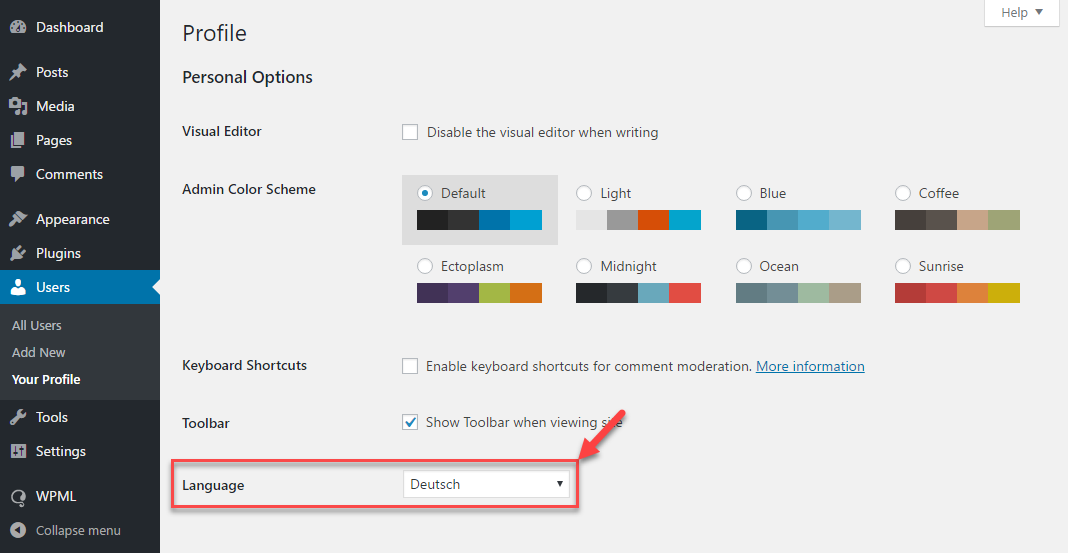
The client wants all notifications displayed by the WPML plugin to be in English, despite the admin interface already being set to English.
Solution:
We recommend setting your profile language to English under Users >> Profile on your WordPress site. After updating this setting, please clear all types of caches to ensure the changes take effect. For detailed guidance, refer to our documentation on setting the WordPress administration language:
If this solution does not resolve your issue or seems irrelevant due to being outdated or not applicable to your case, we highly recommend checking related known issues at https://wpml.org/known-issues/, verifying the version of the permanent fix, and confirming that you have installed the latest versions of themes and plugins. Additionally, you can open a new support ticket for further assistance at WPML support forum.
Problem: You are experiencing issues updating WPML Multilingual CMS and other related WPML plugins from the WordPress dashboard, encountering an error that prevents automatic updates. Solution: We recommend following these steps: 1. Navigate to Plugins → Add New, then click on the Commercial tab. Select "Unregister WPML from this site." 2. After the page loads, click on "Register WPML." You will see a prompt to enter the site key. Click on "Get a key for this site." 3. In your WPML account, complete the site key wizard and select it as a Production site. 4. Copy your new site key and paste it into the Commercial tab. Then, delete your old site key from your WPML account. 5. Try updating the WPML plugins again. If you still face issues, temporarily deactivate all plugins except WPML and attempt the update again. Ensure to back up your database before making any changes.
If these steps do not resolve your issue, or if the solution becomes outdated, we highly recommend checking related known issues at https://wpml.org/known-issues/, verifying the version of the permanent fix, and confirming that you have installed the latest versions of themes and plugins. If the problem persists, please open a new support ticket at WPML support forum for further assistance.
Problem: You are experiencing translation issues with the BuddyBoss App while using WPML. Specific words or phrases remain untranslated in the app, despite being correctly added in the String Translation module. Solution: 1. Update your WPML String Translation to the latest version, 3.2.17, to ensure you have the most recent bug fixes and improvements. You can update by visiting WPML installation guide. 2. Install the BuddyPress Multilingual glue plugin, which is necessary for translating BuddyBoss texts. This plugin can be found under your WPML account or through the Plugins section in your WordPress dashboard. For more details, visit BuddyPress Multilingual documentation. 3. Ensure that both the BuddyBoss Platform Pro and BuddyBoss Platform plugins are updated to their latest versions. Check for updates at BuddyBoss release notes. 4. If issues persist, consider contacting the author of BuddyBoss, as the app may not be retrieving the correct content.
Please note that this solution might be outdated or not applicable to your specific case. We highly recommend checking related known issues at WPML known issues, verifying the version of the permanent fix, and confirming that you have installed the latest versions of themes and plugins. If the problem persists, please open a new support ticket.
Problem: The client is experiencing an issue where WPML replaces German strings with English strings in custom fields when a translator updates an existing post. This problem occurs across multiple post types and is suspected to be related to the Advanced Translation Editor.
Solution: We recommend setting the affected custom fields to "copy" so they are not editable in the translation editor and are always copied directly to the translation. This should prevent the fields from being overwritten. Here is a guide on managing custom field translations: Translating Custom Fields.
If the issue persists, consider disabling the WPML editor and continue using the manual method for translations. Alternatively, if using the Advanced Translation Editor, ensure that numerical values are correctly configured for translation by adding a specific code snippet to the functions.php file of your theme. More details can be found here: Translating Numbers.
If these solutions do not resolve the issue or if they seem outdated or irrelevant to your specific case, please check related known issues at https://wpml.org/known-issues/, verify the version of the permanent fix, and confirm that you have installed the latest versions of themes and plugins. We highly recommend opening a new support ticket for further assistance at WPML Support Forum.
Problem: You are experiencing issues with your WPML setup, specifically a missing gear icon which is typically visible when a site is registered as a development site. Solution: First, ensure that your site is registered as a development site to display the gear icon. If your site is a production site, the gear icon will not be displayed. Additionally, check if you are viewing a cached version of your site by visiting it in an incognito window. For the second issue regarding site connection, select "ναι" and proceed without connecting the site. After this, update us, and we will assist in connecting the two sites under the same account to share credits and translation memory.
If this solution does not resolve your issue or seems irrelevant due to being outdated or not applicable to your case, we recommend opening a new support ticket. We also highly recommend checking related known issues at https://wpml.org/known-issues/, verifying the version of the permanent fix, and confirming that you have installed the latest versions of themes and plugins. For further assistance, please visit our support forum at WPML Support Forum.
Problem: You are trying to delete a website that is not online but has 2000 WPML credits associated with it. Solution: 1. Log into your WPML.org account. 2. Navigate to your registered sites. 3. Click the trash icon next to the site you wish to delete. The credits should then return to your main WPML.org account page. For more details on managing credits, visit How to Assign Automatic Translation Credits to Your Sites.
If this solution does not apply to your situation because it might be outdated or not relevant to your specific case, we recommend opening a new support ticket. We also highly recommend checking related known issues at https://wpml.org/known-issues/, verifying the version of the permanent fix, and confirming that you have installed the latest versions of themes and plugins. For further assistance, please contact us through the WPML support forum.
Problem: If you're trying to assign 90,000 credits from your WPML account to your registered website but the site URL is not displaying on your account profile page in the 'sites using prepaid credits section', preventing you from assigning the credits. Solution: We recommend you delete the existing site key and create a new one by following these steps: 1. Login to your WPML.org account and go to the Sites page. 2. Delete the existing site key. 3. Login to your site and navigate to the Dashboard >> Plugins >> Add new > Commercial tab and click the Unregister WPML from this site link if it exists. 4. Then click the Register WPML link. 5. Click the Get a key for this site link. 6. This will generate the Key for your site and you can also assign the credits using that popup. 7. Copy the key, paste it back into the input box, and press the Register button. 8. Now, try to update the WPML plugins after taking a backup of your site.
If this solution does not resolve your issue or seems irrelevant due to being outdated or not applicable to your case, we highly recommend checking related known issues at https://wpml.org/known-issues/, verifying the version of the permanent fix, and confirming that you have installed the latest versions of themes and plugins. If further assistance is needed, please open a new support ticket at WPML support forum.
Problem: You are experiencing issues with the WPML plugin not connecting to wpml.org on your staging site, which prevents the plugin from checking for new releases and security updates. This might be due to using an old license key that is connected to the production site. Solution: 1. Log in to your WPML account and navigate to the Sites page. 2. Delete the existing site key if there is one for this website. 3. Go to your Site Dashboard, then to Plugins >> Add New >> Commercial tab. 4. Click on the 'Unregister WPML from this site' button, then click on the link that says 'Register WPML', and register with a new key.
If this solution does not resolve your issue or seems irrelevant due to being outdated or not applicable to your case, we highly recommend checking related known issues at https://wpml.org/known-issues/, verifying the version of the permanent fix, and confirming that you have installed the latest versions of themes and plugins. If the problem persists, please open a new support ticket.
This page includes support tickets that are resolved and documented. Looking for tickets that are “in progress”? Visit the complete support tickets archive